
Do LinkedIn hashtags still work? Short answer: yes, but they no longer do what they did five years ago.
LinkedIn removed the ability to follow a hashtag, and hashtag follower counts stopped being a usable benchmark. What is left is a context marker that tells the platform what your post is about. Useful, still worth adding, and no longer a reach lever on its own. 💡
Here is what this guide covers.
What changed, and what you can no longer do.
How many hashtags to use, with the numbers behind it.
Where to place them, in the post or in the first comment.
Which ones to pick, by industry.
How to find them, and what a hashtag generator is worth.
How all of this fits into B2B prospecting.
Do LinkedIn hashtags still work?
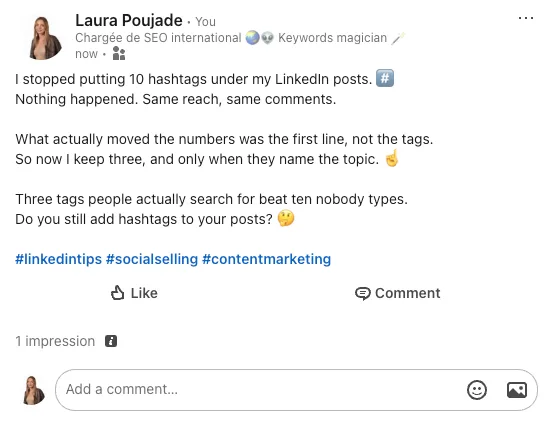
They work as labels, not as amplifiers. The platform now decides who sees your post mainly from the text itself, the first line, and the conversations it starts. A LinkedIn hashtag helps it classify the topic, which is a real but modest contribution.
The change is easy to summarise if you compare what the feature used to offer with what remains today.
What it used to do | What it does today |
|---|---|
Follow a hashtag and get a dedicated feed | Removed, you follow people and pages instead |
Judge a topic by its follower count | Counters are no longer a usable benchmark |
Add ten hashtags for extra reach | Past a handful, reach drops and spam signals rise |
Act as a discovery channel of its own | Acts as a topic label inside full-text search |
So the strategy that still holds is the boring one. Write something worth reading, put your in-text keywords where they belong, then add a few hashtags that genuinely describe the subject. Anything else is decoration.
What you can no longer do
Four habits from the era before that change stopped working, and they are still everywhere in old guides.
Following a tag to build a topic feed. The option is gone.
Basing your choice on follower counts. That number is no longer exposed or reliable.
Relying on the editor autocomplete to pick a tag. The composer stopped proposing them.
Piling on ten hashtags hoping for a lift. It dilutes the topic and looks like spam.
What replaced them is closer to classic SEO than to social media tricks: in-text keywords, a strong first line, readable formatting, targeted mentions, and replies to every comment. The full method sits in our guide to writing a post on LinkedIn.
How many hashtags should you use on LinkedIn?
Between one and five, and closer to three than to five in most cases. That is the single most asked question about LinkedIn hashtags, so here is the reasoning rather than just the number. 🎯
Number of hashtags | What happens | When it fits |
|---|---|---|
0 | The platform reads your topic from the text alone | Personal stories, opinion posts |
1 to 3 | Clear topic signal, clean reading | The default for almost every post |
4 to 5 | Still fine if every tag is precise | Multi-topic posts, events |
6 to 9 | Diminishing returns, the topic blurs | Rarely worth it |
10 and above | Spam signals, reach falls | Never |
The mistake is not the count, it is the precision. One tag that names your exact subject does more than ten generic hashtags like #business or #marketing, which describe millions of unrelated posts and tell the algorithm nothing useful.

After publishing, check what actually moved. If a post with hashtags performs like one without, cut them and put the effort into the text. Our guide to measuring your LinkedIn engagement rate explains which numbers are worth tracking.
And if the count is the only thing you were unsure about, the rest of your post matters more. Timing included: our data on the best time to post on LinkedIn moves impressions far more than any tag ever will.
How to add hashtags to a LinkedIn post
Typing one takes two seconds. Placing it well takes a little more thought, and there are three spots worth knowing. ✍️
In the body of your post
Type # followed by your keyword, with no spaces and no punctuation, for example #contentmarketing. The editor no longer suggests anything as you type, so check your spelling yourself before publishing.
Put them at the end of the post rather than scattered through your sentences. A hashtag in the middle of a paragraph breaks the reading rhythm and turns a normal phrase into a clickable link nobody asked for.

In the first comment
If your post is long or visually dense, you can move the hashtags into your own first comment. The topic signal still registers and the post stays clean.
It is a matter of taste more than performance. Both placements work, so pick one and keep it consistent across your posts.
Criterion | At the end of the post | In the first comment |
|---|---|---|
Topic signal | Registered | Registered |
Reading comfort | Fine with 1 to 3 tags | Better when you have 4 or 5 |
Last thing readers see | A row of tags | Your closing line or question |
Editing later | Requires editing the post | Edit the comment, post untouched |
One detail that catches people out: the character limit applies to the post body, so a long row of tags eats into the space before the see more cut. Our guide to LinkedIn post character limits shows exactly where that line falls.
Creating your own hashtag
There is nothing to register. Type a tag nobody uses and it exists from that moment, which is how branded hashtags are born.
Keep it short and unmistakable, then check the search bar to confirm it is not already taken by another topic. Use it the same way everywhere, in posts, visuals and your bio, and get colleagues to pick it up. A branded tag only pays off once a handful of people use it consistently.
Which LinkedIn hashtags should you choose?
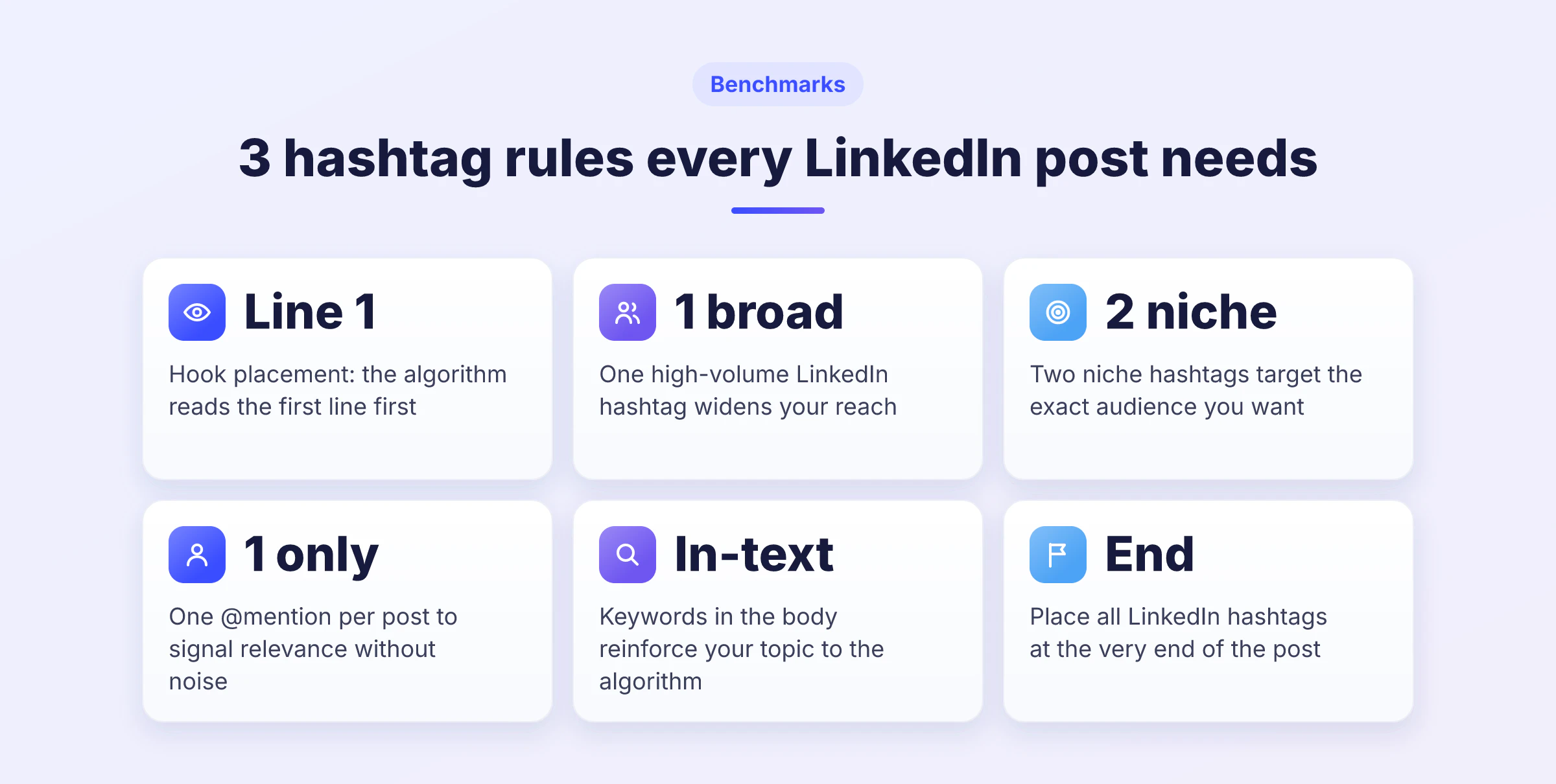
The formula that works is one broad tag, then two narrow ones. The broad one places you in a large conversation, the niche hashtags tell the algorithm precisely who should see the post. 🟣
Here are the tags with the largest followings, by field, to use as your broad one. They are starting points, not a list to copy wholesale.
Field | Broad hashtag | Narrower options |
|---|---|---|
Marketing | #digitalmarketing | #contentmarketing #seo #socialmedia |
Tech and data | #technology | #ai #saas #data #cybersecurity |
Business and startups | #innovation | #startup #entrepreneurship #b2b |
Management | #management | #leadership #softskills #futureofwork |
Sales | #sales | #salesstrategy #prospecting #socialselling |
Recruitment | #hiring | #jobsearch #recruitment #opentowork |
Read your post again once the tags are chosen. If one of them would not help a stranger understand the subject in a second, take it out. That single test removes most bad hashtags.
Hashtags for job seekers and recruiters
This is the one area where hashtags still carry real traffic, because both sides actively search these tags. Job seekers pair #opentowork with their role and city, recruiters pair #hiring with the same.
If you are hiring, our templates for a LinkedIn recruitment post show where the tags go in a complete announcement. If you are looking, the Open To Work status does more for you than any tag.
How to find hashtags on LinkedIn
You can no longer browse a hashtag feed, so finding the right tags now goes through LinkedIn search. Type your term in the bar at the top, with or without the #, then filter on Posts.
What you get is every post using that LinkedIn hashtag or talking about that topic, which is more useful than the old feed because it catches posts that never used the hashtag at all.

Combine a tag with plain keywords to narrow it down, for example "product manager" #hiring London. Save the queries that work and revisit them weekly, which turns the search bar into a monitoring feed. The finer points are in our guide to the LinkedIn search feature.
Are hashtag generators worth it?
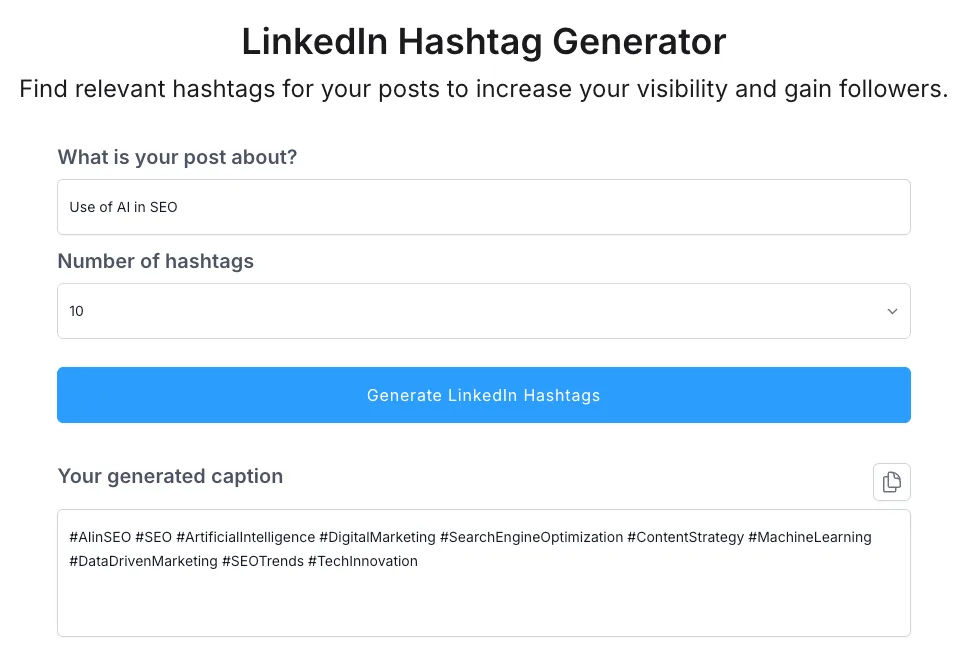
They save you a blank-page moment and nothing more. A hashtag generator proposes tags by topic and by country, sorted by volume, and you still have to throw out most of what it returns.
The same caution applies to the tools that write the post itself. A LinkedIn post generator gives you a draft, not an angle, and the draft still needs your own examples to be worth reading.
Never paste a raw list. Keep the two or three LinkedIn hashtags that match what your post actually says, drop the rest, and check that they sit in the same semantic field as the keywords already in your text. That edit is the difference between a tagged post and a post people find.
LinkedIn hashtags for B2B prospecting
In prospecting, a LinkedIn hashtag is a label on a shelf. It helps the right person find your content, it never closes a deal by itself. What converts is the content, the clarity of the value proposition and the conversation that follows. 💼
Four habits that pay off, in order of impact.
Use one or two tags that name your topic precisely, for example #saas or #recruitment.
Mention the people and pages genuinely concerned, sparingly, to start real discussions.
Put your commercial keywords in the text itself: job titles, industries, cities, outcomes.
Save your best searches, tag plus keywords, and check them weekly.

Mentions deserve the same discipline as tags. Tagging five people who have nothing to do with your post annoys them and teaches the algorithm nothing, so learn how to tag someone on LinkedIn before you use it as a reach tactic.
The point of all this is to make people react, because a comment on your post is a warmer entry than any cold message. Before writing anything, though, be clear about who you are writing for. Our method for defining your ideal customer profile comes first, the tags come after.
Once people engage with your posts, the follow-up is a separate job. With Waalaxy you import the profiles that reacted, then run a multi-channel sequence of profile visit, invitation and message from one queue, and the campaign keeps running in the cloud. The trial lasts 14 days without a card.
If you want the wider picture rather than the hashtag detail, our prospecting plan lays out the whole sequence, and our guide to performance indicators shows what to measure once it runs.
LinkedIn hashtags: what to remember
The LinkedIn hashtag lost its superpowers and kept its usefulness. It labels your topic, it helps the platform place your post in the right searches, and that is the whole of it. The follower counts, the topic feeds and the ten-tag posts belong to an earlier version of the product.
So keep it simple. One to three precise tags at the end of the post, real keywords inside the text, a first line worth stopping for, and answers to everyone who comments. Test a month with hashtags against a month without, look at your own numbers, and keep whichever wins for your audience.
FAQ: LinkedIn hashtags
No. #DigitalMarketing and #digitalmarketing point to exactly the same tag, so you can capitalise them any way you like without splitting your audience.
Camel case is still worth using, and not for the algorithm. #DigitalMarketing is easier to read at a glance than #digitalmarketing, and screen readers pronounce it correctly instead of running the words together. It costs nothing and makes your posts more accessible.
No, the feature was removed. If you followed tags in the past, those feeds no longer behave the way they used to, and there is no setting that brings them back.
Three alternatives cover the same need.
Search the topic and save the query, then revisit it weekly.
Follow the people and company pages that publish on it.
Turn on notifications for the handful of accounts you never want to miss.
Both work. LinkedIn reads your own first comment, so the topic signal registers either way, and there is no measurable reach penalty for choosing one over the other.
Use the post when you have one to three tags and they fit naturally at the end. Move them to the comment when your post is long, when you have four or five tags, or when the text ends on a question you would rather leave as the last thing people read.
In comments, yes, including on other people’s posts, though tagging someone else’s content rarely does much for you. In long-form articles they also work, and they matter a little more there because articles stay searchable far longer than posts.
One place they do nothing: your profile headline and about section. A hashtag there is just text, so use plain keywords instead. Our guide to optimising your LinkedIn profile covers what actually helps you get found.
Start with #opentowork, then add your role and city rather than another generic tag. #opentowork #productmanager #london tells a recruiter everything in three words, where #opentowork #jobs #career tells them nothing.
The tag is the smallest part of the job, though. Turning on the Open To Work status, writing a headline that names what you do, and posting about your field will do far more. A good LinkedIn headline is read hundreds of times a week, a hashtag once.
Look at the impressions from outside your network, in the analytics under each post. That is the only number a hashtag can realistically move, and comparing it across posts is more telling than any absolute figure.
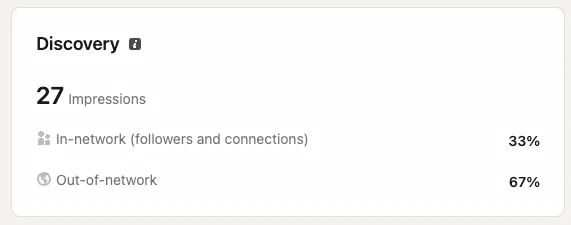
Run a simple test over a month. Publish the same kind of content with and without tags, keep everything else steady, and compare. If the difference is invisible, drop the tags and spend the time on your hook instead, because that is where the real variation comes from.