
You have your prospect's name and company, but not their email address. An email finder solves that in a few seconds. It works out the most likely work address, then checks that it exists before you use it. Some people call it a mail finder, and it's the same tool. In this comparison, you'll get 8 tools reviewed with their pricing and free plans, the criteria for picking the right one, and a walkthrough for finding work emails with Waalaxy. 🔍
What is an email finder (or mail finder)?
An email finder is a tool that finds a person's professional email address from their name and company. It combines the possible address formats, queries several sources and only gives you back verified addresses.
There are two ways to get prospect emails. The first is buying a ready-made database, a risky move we advise against, because when you buy an email list you end up with outdated addresses and compliance headaches. The second, used by modern tools, relies on guessing and verifying each address one by one.
The best tools go one step further with waterfall enrichment. They query several data providers in a row and move on to the next one when the first comes up empty. It's one building block of data enrichment, which also adds the job title, phone number or company size.
How an email finder works in 3 steps
Whatever the tool, the principle stays the same. Here are the three steps an email finder follows to turn a name into an address you can use:
Starting data. You enter a first name, a last name and a company or domain name. Some tools take a LinkedIn profile URL directly.
The search. The tool generates the likely address formats and queries its sources, or a waterfall of providers.
SMTP verification. It pings the mail server without sending an email and assigns a status: valid, risky, catch-all or invalid.
The catch-all status deserves your attention. Some servers accept every address on their domain, so the tool can't confirm the mailbox really exists. The guide on catch all email shows you how to handle these addresses without hurting your deliverability. Before a big campaign, a mail tester also helps you check the health of your sending domain.
Email finders and GDPR: is it legal in B2B?
Yes, with conditions. In the UK, the ICO's guidance on business-to-business marketing explains that you can email employees of companies without prior consent, as long as the message is relevant to their job. Under GDPR, that usually rests on legitimate interest. Pitching payroll software to an HR director works. Sending a holiday offer to the same HR director at her work address doesn't. Rules vary across Europe, though, and some countries such as Germany expect prior consent even in B2B, so check the law of the market you prospect.
Two obligations come on top. Your prospect needs to know who is contacting them, and they must be able to opt out of future messages in a simple, free way. In practice, an unsubscribe link or a clear line at the end of your email does the job. A serious email finder doesn't resell lists: it finds an address at the moment you need it.
Keep in mind that generic addresses like contact@ or info@ don't fall under the same rules, because they point to a company rather than a person. They rarely convert, but they're still an option when you can't identify a decision-maker. 📜

Your prospecting agent at half price, for life
€100€50/month, annual plan
Nov 27 12am to Nov 28 noon CET
Discover Waalaxy AI →14-day free trial
How to choose an email finder: 6 criteria
Every tool promises to find "any email". In reality, they differ on hit rate, real cost per address and what you can do next. Before you pick your email finder, run it through these six criteria:
Hit rate and verification quality. A tool that finds a lot but verifies poorly drives up your bounce rate, and your emails end up in spam.
Cost per email found. Check how many credits one address costs and whether credits are only used when the email is found.
The free plan. A few dozen credits a month is enough to test the tool on your target before you pay.
Ways to use it. Single lookup, file upload, LinkedIn extension or API, depending on how you work.
How it fits your prospecting. An email is useless until it's in a sequence or your CRM.
GDPR compliance. Go for tools that explain their sources and don't sell lists.
The most underrated criterion is integration. If you find the email in one tool, export it as a CSV, then import it into another to send your sequence, you lose time on every campaign. The best tool is often the one that takes you from the address you found to your first message without any copy-pasting. ⏱️
The 8 best email finders in 2026 (comparison table)
We picked eight email finders that cover different needs, from LinkedIn prospecting to CRM cleanup. The prices below are public entry prices, taken from each tool's official pricing page (prices checked in 2026). They change often, so double-check before you subscribe.
Tool | Best for | Free plan | Entry price | Billing |
|---|---|---|---|---|
Waalaxy | Prospecting on LinkedIn and by email | 14-day trial, no credit card | €19/month (Pro, 25 credits) | 1 credit per email found |
Hunter | Searching by name and domain | 50 credits/month | $49/month ($34 billed annually) | Monthly credits |
Dropcontact | Enriching a file or CRM | 50 trial credits | €79/month (Starter) | Credit refunded if not found |
Snov.io | Finding and sending in one place | 50 credits every 30 days | $39/month ($29.25 billed annually) | Monthly credits |
lemlist | Multichannel cold email | 14-day trial, 200 credits | $69/month + $20/month for enrichment | About 5 credits per email |
Kaspr | Emails and phone numbers from LinkedIn | A few credits/month | €45/month per user | Unlimited B2B emails from Starter |
Lusha | Emails and phone numbers | 40 credits/month | $49.90/month ($37.45 billed annually) | 1 credit per email, 5 per phone number |
FullEnrich | Waterfall across many sources | 50 credits, no credit card | $29/month (500 credits) | Charged only if found and verified |
This table gives you the big picture. To compare these email lookup tools properly, you also need to look at how they're positioned. Some just find the email, others build it into a real prospecting workflow.
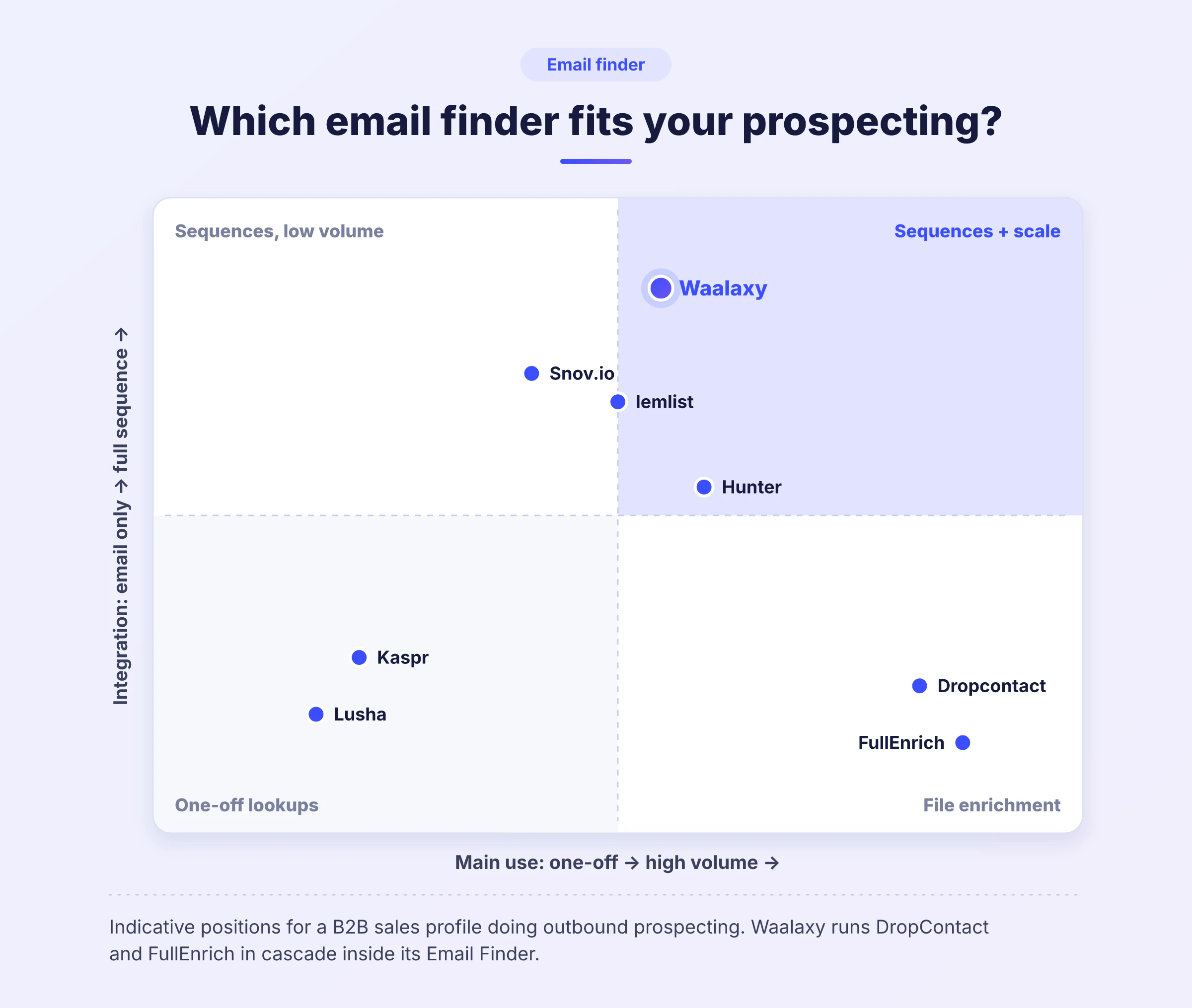
Let's go through each tool, with what it does well and where it falls short.
Waalaxy: the email finder built into LinkedIn and email prospecting
Waalaxy is first and foremost a multichannel prospecting tool for LinkedIn. Its Email Finder runs a waterfall through BetterContact, FullEnrich and DropContact to find your prospects' work addresses, and over 60% of profiles return a professional email. You only pay one credit per email found.

Its strength is what happens after the search. You can run the email finder on its own on a list, or add it to a sequence that chains an invitation, LinkedIn messages and a follow-up email. The addresses found are attached to each prospect automatically, and you can export them natively to HubSpot or Pipedrive.
Price. From €19/month on the Pro plan with 25 Email Finder credits, 500 credits on the Business plan (prices checked in 2026).
Free trial for 14 days, no credit card needed.
Limit. It isn't a CRM cleanup tool. It works from LinkedIn profiles.
If LinkedIn is your starting point, it's the most direct way to go from profile to email to follow-up. ✉️
Hunter
Hunter is one of the best-known email finders. You enter a name and a domain, and the tool returns the likely address with a confidence score. Its domain search lists a company's public addresses, which helps you spot the right person to contact.
The free plan gives you 50 credits a month, and the Starter plan costs $49/month, or $34/month billed annually, for 2,000 credits (prices checked in 2026). Hunter also offers a free Chrome extension, email sequences and an API. Its weak spot is LinkedIn. The tool starts from a domain, not a profile, and unused credits don't roll over from one month to the next.
Dropcontact
Dropcontact is mainly built for teams that want to enrich an existing file. You upload a CSV or connect your CRM (HubSpot, Pipedrive, Salesforce), and the tool fills in emails, job titles and company legal details. It also merges duplicates along the way.
Dropcontact says it doesn't own a database and runs on its own algorithms. The Starter plan starts at €79/month, with 50 credits to test, and a credit is refunded when the email isn't found (prices checked in 2026). It doesn't send sequences. If you want something more geared toward prospecting, take a look at these Dropcontact alternatives.
Snov.io
Snov.io brings an email finder, verification and email campaigns together in one interface. Its LinkedIn Prospect Finder extension, available from the Starter plan, pulls emails from LinkedIn profiles and searches.
The trial plan is free and renews every 30 days with 50 credits, but it leaves out bulk search and export. The Starter plan costs $39/month, or $29.25/month billed annually, for 1,000 credits (prices checked in 2026). LinkedIn automation is a separate paid module. To compare with other options, check out this list of Snov.io alternatives.
lemlist
lemlist is a multichannel cold email tool with an email finder built into its campaigns. Enrichment comes as a separate add-on, at $20/month or $16/month billed annually, with 2,000 credits a month, or roughly 400 emails. One address costs about 5 credits, charged only when a result is found.
The Email plan starts at $69/month, or $55/month billed annually, and the 14-day free trial includes 200 credits (prices checked in 2026). It's a solid pick if email is your main channel. If LinkedIn comes first, look at these lemlist alternatives instead.
Kaspr
Kaspr mostly works through its LinkedIn Chrome extension. You open a profile, and the tool shows the email and phone number when it has them. The free plan gives you access to the extension with a few credits each month.
The Starter plan starts at €45/month per user, with unlimited B2B email credits and a quota of phone credits (prices checked in 2026). Kaspr pairs well with an automation tool, as this guide on using Kaspr with Waalaxy shows.
Lusha
Lusha focuses on contact data in the broad sense, emails and phone numbers, available from its app and browser extension. One email costs 1 credit, one phone number costs 5.
The free plan gives you 40 credits a month. The Starter plan costs $49.90/month, or $37.45/month billed annually, for 400 credits (prices checked in 2026). It makes sense if you call your prospects a lot. For other options, here are the best Lusha alternatives.
FullEnrich
FullEnrich has made waterfall search its core business. The tool queries more than 20 data sources in a row to give you the best odds of finding the email or phone number. It's also part of the waterfall Waalaxy uses.
The trial gives you 50 credits with no credit card. The Pro plan costs $29/month for 500 credits, or $26/month billed annually (prices checked in 2026). A work email costs 1 credit, a personal email 3 credits, and nothing is charged if the data isn't found and verified. Like Dropcontact, it doesn't send your sequences.
You now have a clear view of each email finder's strengths. One question remains, and plenty of people ask it before reaching for their credit card. 💳
Free email finder: what you can really do without paying
A free email finder does exist, but it comes with limits. Most tools offer between 15 and 50 credits a month, or a one-off trial credit. That's enough to test result quality on your target, not to fuel a regular campaign.
Free plans also have feature limits. On several tools, bulk search, export or CRM integrations are reserved for paid plans. So you can look up a few addresses one by one, but you can't process a list of 300 prospects.
A few habits to get the most out of a free plan:
Test two or three tools on the same list of 20 prospects, and compare the number of valid addresses rather than the number of addresses found.
Save your credits for decision-makers you've actually qualified, not for a raw list.
Make the most of a full free trial, like Waalaxy's 14 days, to test search and sending in real conditions.
Without any tool, you can also find an address by hand. Free methods to find an email address by name use Google, the company website or social networks. They work, but they take several minutes per prospect.
If your list comes from LinkedIn, you can also enrich it for free with public profile data, in one click. 👇

LinkedIn CSV Enricher
A CSV file of LinkedIn profile URLs (20 max): the tool completes it with the data available on LinkedIn and gives you back a ready-to-use file.
Once your list is enriched, you still need to find the email addresses and use them in a sequence. That's where Waalaxy saves you the most time.
Tutorial: find work email addresses with Waalaxy's Email Finder
With Waalaxy, the email finder runs like a campaign. Here are the four steps to find professional email addresses across a whole list. The detailed, screen-by-screen walkthrough is in the tutorial to find professional email addresses with Waalaxy.
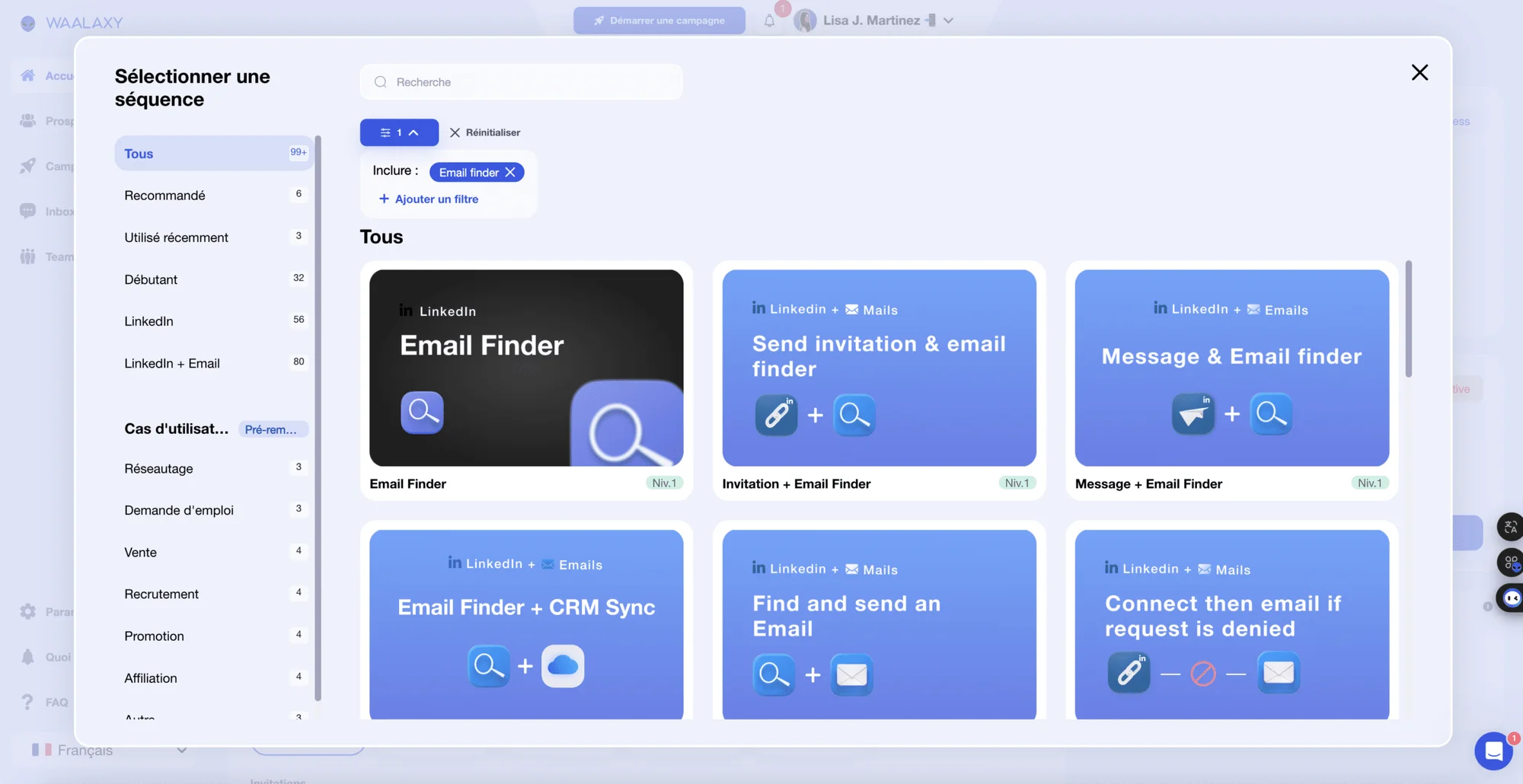
Start a campaign. Click "Start a campaign" and choose the Email Finder template, or a sequence that includes it, for example profile visit, Email Finder, invitation, then message.
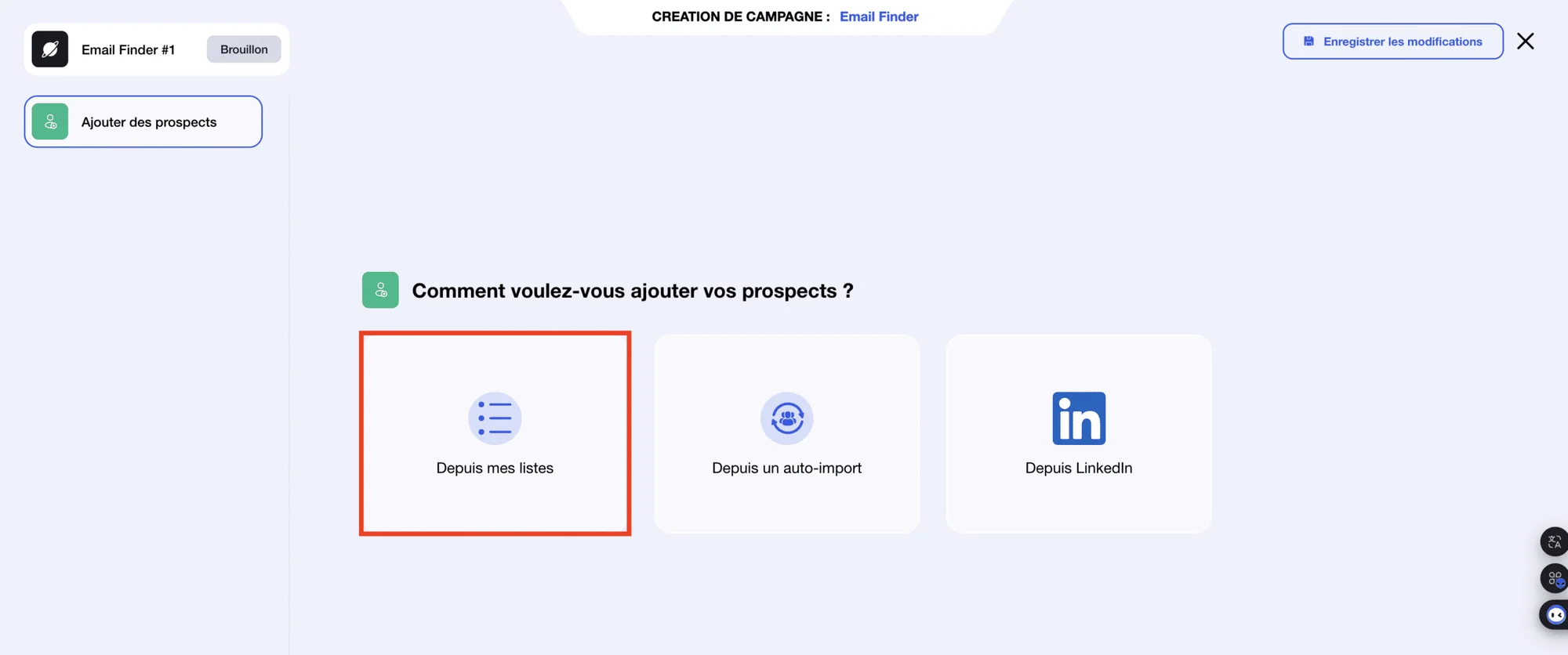
Import your prospects. From a LinkedIn search, an Auto-import or one of your existing lists.
Launch the campaign. Credits are only used for emails that are found.
Get the emails. They show up on each prospect, and you can export them as a CSV or to your CRM.
In step 2, you pick where your prospects come from. A well-targeted prospect list upfront saves you credits, since every search covers a contact you actually care about.
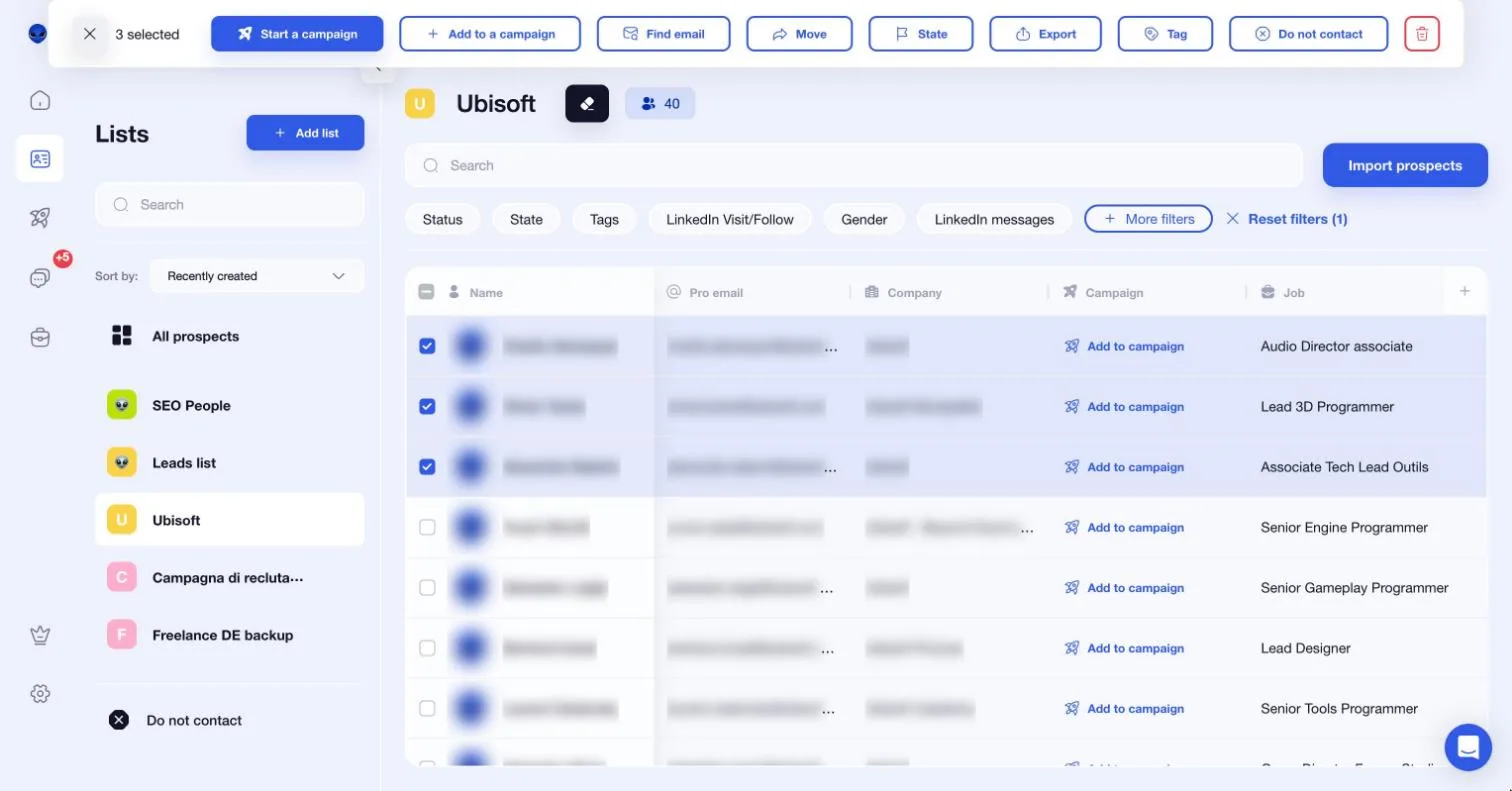
If you work in a team, Waalaxy's duplicate check stops two colleagues from paying for the same email. The "Clean up my import" option also filters out prospects who are already in your campaigns.
A few minutes later, the addresses found appear on your prospects. You can then send them to your CRM tools, natively to HubSpot and Pipedrive, or through Zapier and Make to Salesforce and others.
Find the email of a LinkedIn contact
A LinkedIn profile is enough to start the search, so you don't need to know the company's domain. For your first-degree connections, LinkedIn sometimes shows the address in their contact info, but it's often a personal one. To find a LinkedIn email and export the ones from your network, follow this dedicated guide.
Next step: chain LinkedIn and email in the same sequence
Finding the email is only half the job. Waalaxy's real value is using that address in the same campaign. You send an invitation, then LinkedIn messages, and a follow-up email goes out automatically to people who didn't accept or didn't reply. All LinkedIn replies land in the Inbox.
To make sure that email reaches the inbox, prepare your domain with an email warmup and polish your copy. These LinkedIn cold outreach tips and these cold email templates give you a base that sounds human.
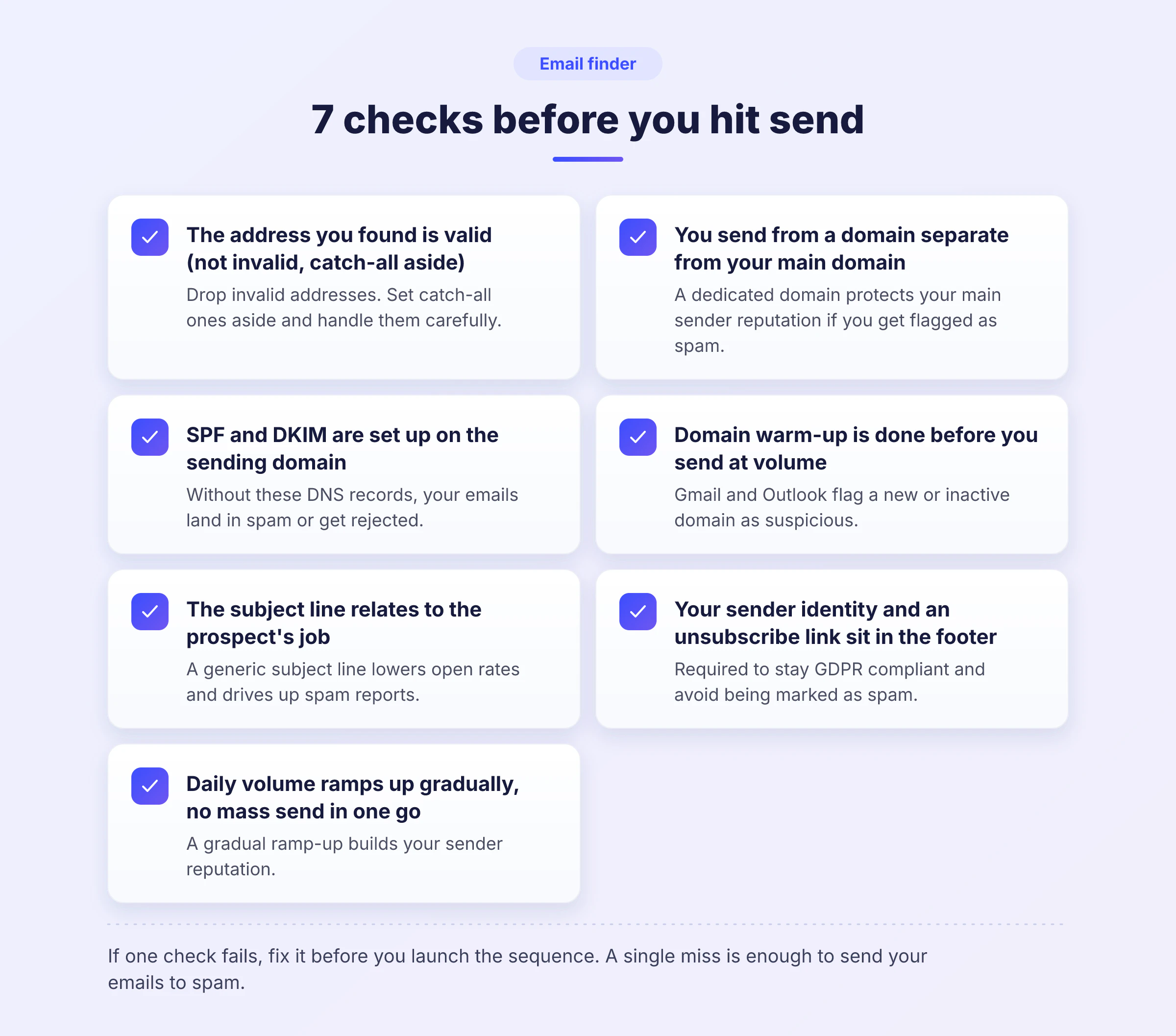
With these settings in place, every address you find has a good chance of turning into a conversation. 💬
Which email finder should you choose for your profile?
There's no single best email finder. The right choice depends on your volume, your main channel and what you do with the email once you have it. Here's what we recommend for the most common situations.
Your profile | Your need | Recommended tool |
|---|---|---|
Freelancer or consultant | A few addresses a month, tight budget | A free plan (Hunter, Lusha) or the Waalaxy trial |
Sales rep or SDR on LinkedIn | Find the email and follow up in the same sequence | Waalaxy |
Team cleaning up its CRM | Enrich thousands of rows | Dropcontact or FullEnrich |
Phone prospecting | Emails and phone numbers | Kaspr or Lusha |
Tech or product team | Plug search into its own tools | Hunter and its API |
If you already prospect on LinkedIn, the simplest option is to have email search and sending in the same place. Over 200,000 users trust Waalaxy, rated 4.8/5 across more than 5,000 reviews. You stay in control of your target and your messages, and the tool handles the execution.
The agent starts from your website to suggest your targets, and you can take over any conversation whenever you want. 🤖
Email finder: key takeaways
An email finder works out and verifies your prospects' work addresses in seconds, as long as you pick a tool that verifies well and stays GDPR compliant. Hunter, Dropcontact, FullEnrich, Kaspr and Lusha each shine at one specific use, from domain search to CRM cleanup. For prospecting, the real gain comes from what you do with the address next.
If your prospects are on LinkedIn, Waalaxy's Email Finder takes you from profile to email to follow-up in a single sequence. Try it for 14 days with no credit card, on your own target, and compare the results. 🚀
FAQ: email finder
The best email finder depends on how you use it. To prospect on LinkedIn and send your follow-ups from the same place, Waalaxy is the most direct option. To enrich a large file or a CRM, Dropcontact and FullEnrich are a better fit. Hunter remains a go-to for domain search and its API. Test two tools on the same list and keep the one that gives you the most valid addresses.
Yes, most tools offer a free plan, but with few credits. Here's what the main free plans give you (prices checked in 2026):
Hunter offers 50 credits a month.
Lusha offers 40 credits a month.
Snov.io offers 50 credits every 30 days, without bulk search.
Waalaxy offers a 14-day trial with no credit card.
For a handful of one-off addresses, that's enough. For a regular campaign, you'll need a paid plan.
The fastest way is to use an email finder with their first name, last name and company domain, or their LinkedIn profile URL. The tool tests the possible formats and verifies the address. Without a tool, you can search the company website or guess the format from a known address at the same company. Avoid buying a ready-made prospecting database, though, since it's often out of date.
No, not always. A good tool checks each address with the mail server, but some cases stay uncertain:
Catch-all domains accept every address, so the mailbox can't be confirmed.
Someone who left their company can keep an active address for a few weeks.
Addresses from your LinkedIn connections are often personal, not professional.
Email the addresses marked valid first, and keep an eye on your bounce rate so your cold email doesn't land in spam.
Yes, in the UK and many other countries, B2B email prospecting can rely on legitimate interest, without prior consent. Your message must relate to the person's job. You also need to say clearly who you are and let people opt out of future messages simply and for free. Some EU countries, like Germany, are stricter and require prior consent. Pick a tool that finds addresses on demand rather than a purchased list, which is safer for compliance and for your deliverability.
If the person is one of your connections, check their contact info on their profile first, but it will often be a personal address. To get their work email, run an email finder from their LinkedIn profile. With Waalaxy, you import profiles from LinkedIn, the tool finds the addresses and you can follow up with a sequence. It's the fastest method once you have more than a handful of contacts to process.