
LinkedIn lead generation is the art of turning strangers on the network into prospects who raise their hand. On paper, it sounds simple. In real life, you quickly end up with 2,000 connections, three likes per post and zero meetings. 👽 Want to generate leads on LinkedIn without spending your evenings chasing people by hand? This guide gives you 9 practical methods, from targeting to booked meetings, with message examples, the KPIs to track and the mistakes to avoid.
LinkedIn lead generation doesn't replace your other channels. It often becomes the most profitable one when you sell B2B. Ready? Let's take off. 🚀
What is LinkedIn lead generation?
Lead generation on LinkedIn means attracting and identifying people on LinkedIn who are interested in your offer. You go from an unknown profile to a prospect who has shown interest, then to a customer. It's one slice of B2B lead generation, focused on a single network, the one where your buyers already have a detailed profile.
Lead, qualified lead, customer: the stages
On LinkedIn, someone doesn't become a lead just because they're on your list. They become one when they take an interested action toward you: a like, a comment, a reply to your message or a sign-up for your event. The journey follows the classic stages of the marketing funnel, from awareness to decision.
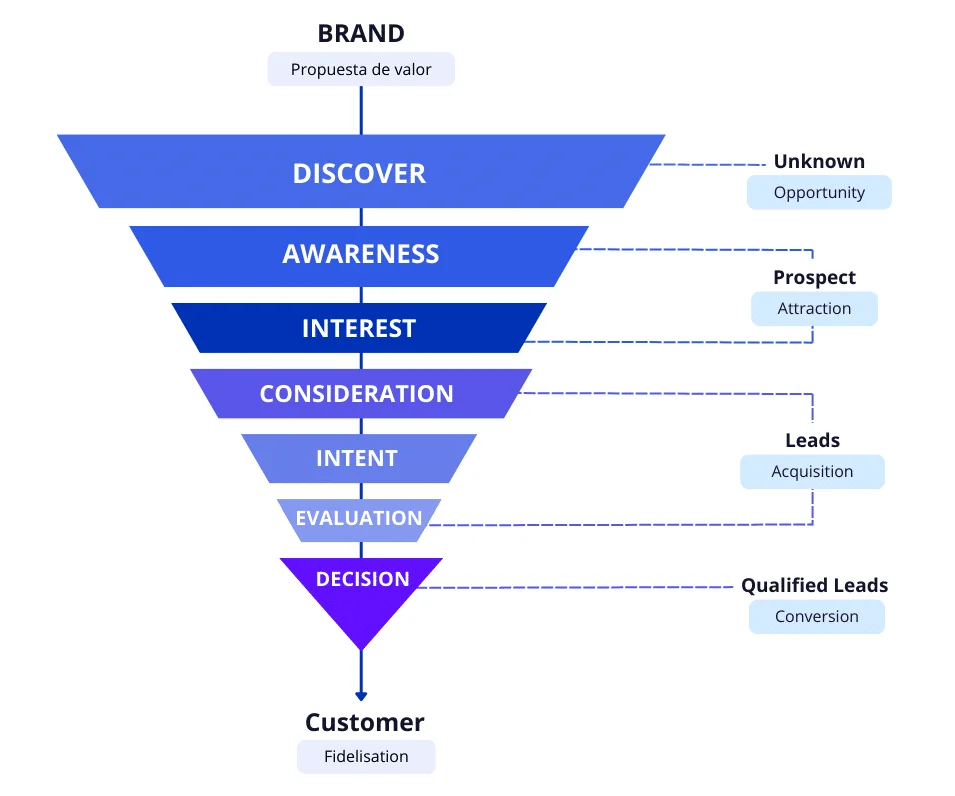
A qualified lead goes further than a simple contact. They tick three boxes:
They match your persona (job title, industry, company size).
They've interacted with you, on a post or in a message.
They've expressed a need, even a vague one, that your offer can solve.
This distinction changes everything for your LinkedIn lead generation. A hundred contacts who don't fit your target are worth less than ten qualified leads. You'll spend your time on the people who can actually buy. 💎
Inbound or outbound: the two sides of lead generation
There are two ways to bring in leads. With inbound, they come to you thanks to your profile and your content. With outbound, you go after them with connection requests and messages.
Inbound | Outbound | |
|---|---|---|
Channels | Profile, posts, comments, LinkedIn Live, Lead Gen Forms | Prospect search, connection requests, messages, emails |
Time to first results | A few weeks to a few months | A few days |
Main effort | Consistent, high-quality content | Targeting and message writing |
Type of lead | Already warm, they know you | Cold at first, warmed up with a sequence |
The two work hand in hand. Your content makes your messages credible, and your messages bring people to your content. Good LinkedIn lead generation mixes both, in a ratio that depends on your time and budget.
Why generate leads on LinkedIn?
LinkedIn describes itself as the world's largest professional network. You'll find every profession there, from marketing to engineering, finance and training. For a B2B salesperson, it's a unique playground:
B2B decision-makers are there, with up-to-date job titles.
Profile data (job title, industry, seniority) lets you target precisely.
The channel is less crowded than your prospects' inboxes.
You can mix content and outreach in the same place.
The question is where to start. The 9 steps below go from preparation to conversion, in the order you should apply them. 🧭

Your prospecting agent at half price, for life
€100€50/month, annual plan
Nov 27 12am to Nov 28 noon CET
Discover Waalaxy AI →14-day free trial
Steps 1 and 2: prepare your LinkedIn lead generation
Before you write a single message, two foundations must be solid: knowing who you're talking to and having a profile that makes people want to reply. Without them, your LinkedIn lead generation spins its wheels.
1. Define your target before you generate leads
The first mistake is trying to talk to everyone. Start with your ideal customer profile (ICP) on the company side: industry, size, location. Then describe your buyer persona on the human side: job title, seniority, day-to-day problems, objections.
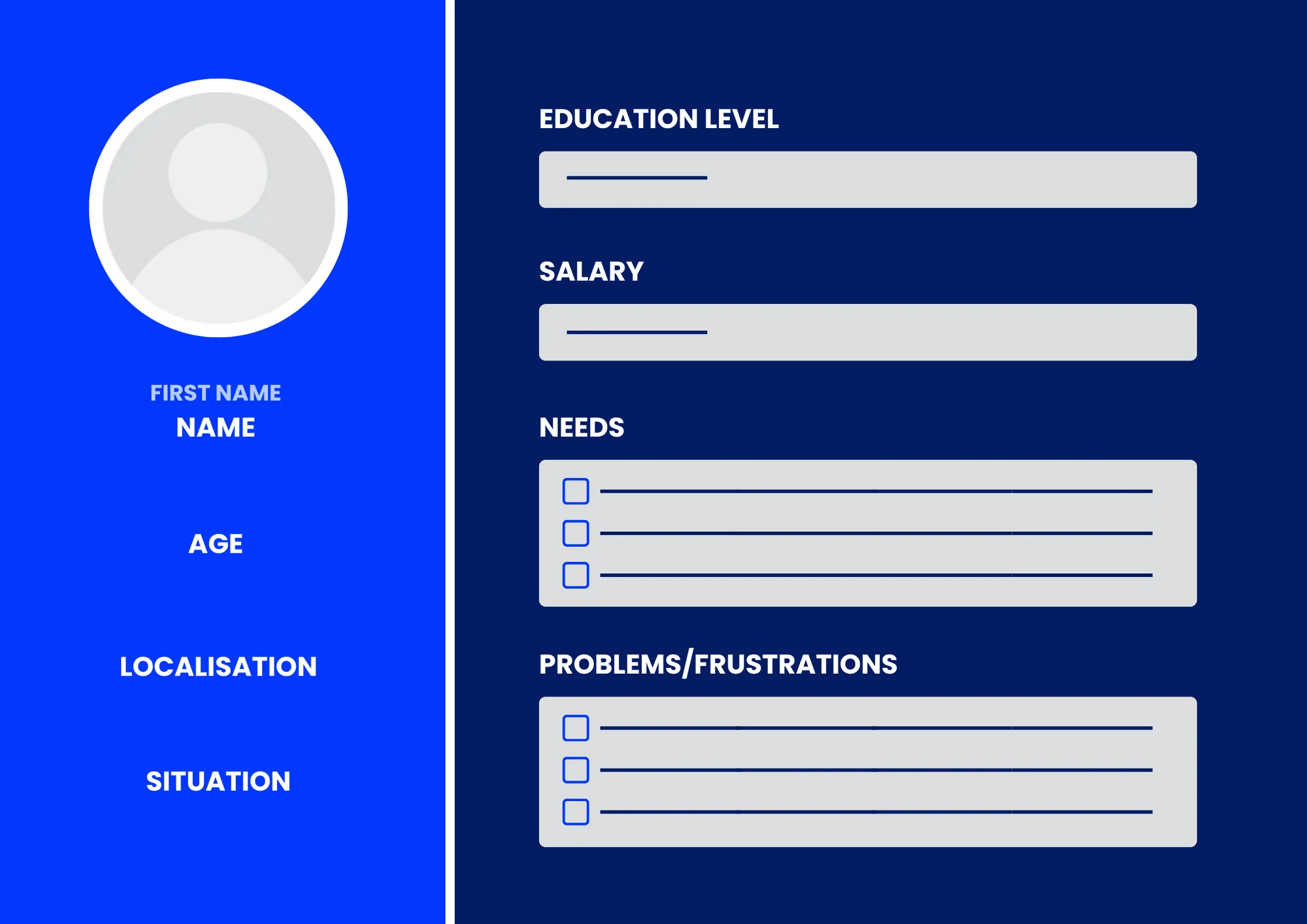
To build this persona, start from your market research, then from what your current customers tell you in meetings. The sharper your niche marketing strategy, the more your messages will hit home. 🎯
Don't feel like starting from a blank page? The generator below helps you set out your ICP and persona in a few minutes.

ICP Generator
Describe your product, the problem it solves and your industry: AI suggests your 3 ideal customer profiles, with the decision-maker to reach on LinkedIn.
2. Optimize your LinkedIn profile to attract leads
Every connection request you send leads back to your profile. It's your shop window, and you won't get a second chance at a first impression. To optimize your LinkedIn profile, work on three areas that shape how much trust, integrity and expertise people see in you.
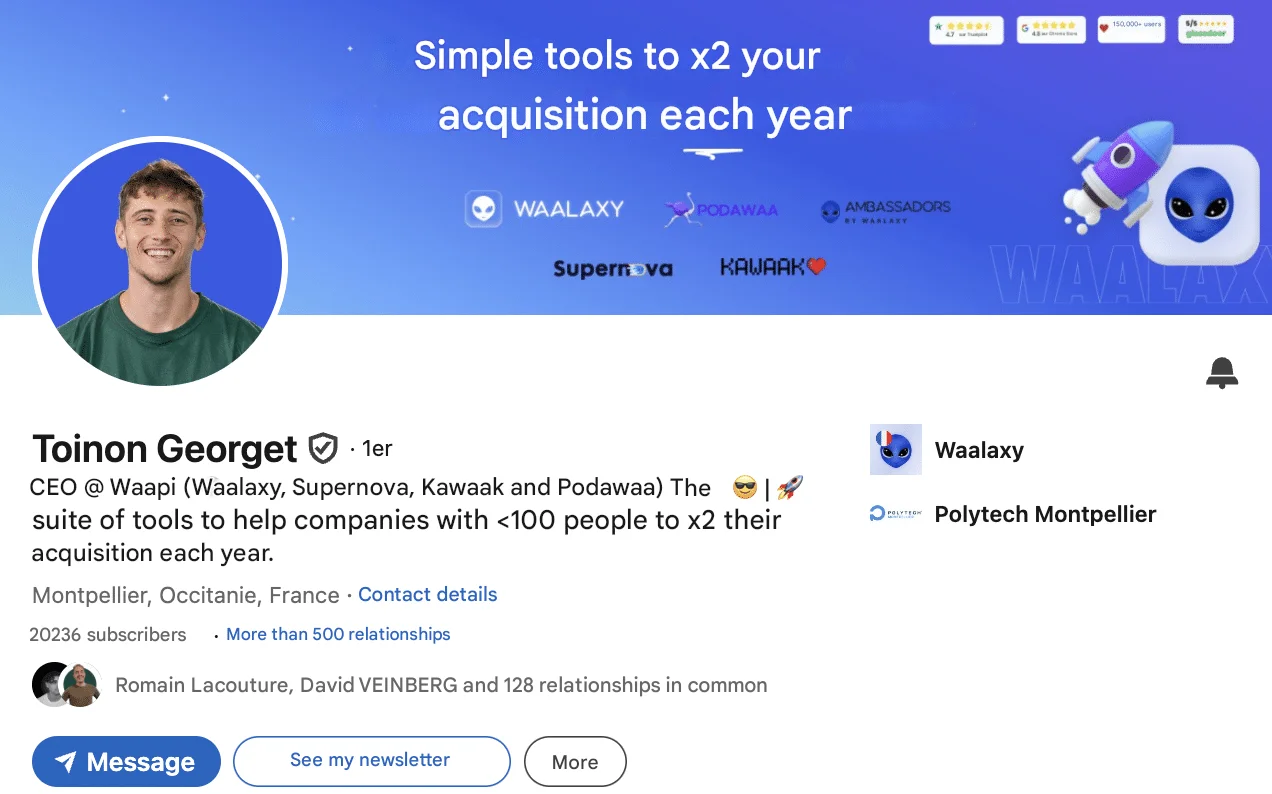
Photo and banner
A sharp, smiling LinkedIn profile picture framed on your face makes you instantly more approachable. 😊 Your banner should say what you do for your target, with a one-line value proposition and, if possible, some social proof. You can draw ideas from these LinkedIn banner templates and adapt one to an offer or an event.
Headline
Your headline shows up everywhere: in connection requests, comments and search results. Put the benefit for your target before your job title, and keep it short. Here are two before/after examples for your LinkedIn headline:
Before: "SEO Consultant at Agency X". After: "I help e-commerce brands double their organic traffic | SEO Consultant".
Before: "CEO & Founder". After: "We fill web agencies' calendars in 90 days | Founder of Y".
About, Featured and recommendations
Your About section tells the story of your target's problem, then how you solve it. Add customer case studies and recommendations, and pin a post or resource in Featured that proves your expertise. An honest profile, with no inflated title or padded experience, is more reassuring than a perfect one.
Steps 3 and 4: find prospects and attract inbound leads
Once your target is defined, you need to find it on LinkedIn and give it a reason to care about you. This is the heart of LinkedIn lead generation: an outbound side to go and get prospects, and an inbound side to attract them.
3. Find the right prospects on LinkedIn
To find qualified prospects, two sources work together: criteria-based search and intent signals. We cover the essentials here. If you want to go further and find clients on LinkedIn, that topic has its own step-by-step guide.
Advanced search and Sales Navigator
Free LinkedIn advanced search already lets you filter by job title, location, industry and current company. With LinkedIn Sales Navigator, you add company size, time in role or recent activity, and you can save your searches to get new profiles as they appear.
A Boolean search sharpens the results even more. Example query in the Title field: (founder OR CEO OR "managing director") AND agency NOT intern. You get agency leaders without the junior profiles, a clean base for your LinkedIn lead generation.
Spot intent signals
Some profiles are already waving at you. They're your warmest leads, because they've shown interest in your topic:
People who viewed your LinkedIn profile.
People who comment on a post, yours or a competitor's.
Attendees of a LinkedIn event on your topic.
Members of a group where your target hangs out.
Prospects who just changed jobs.
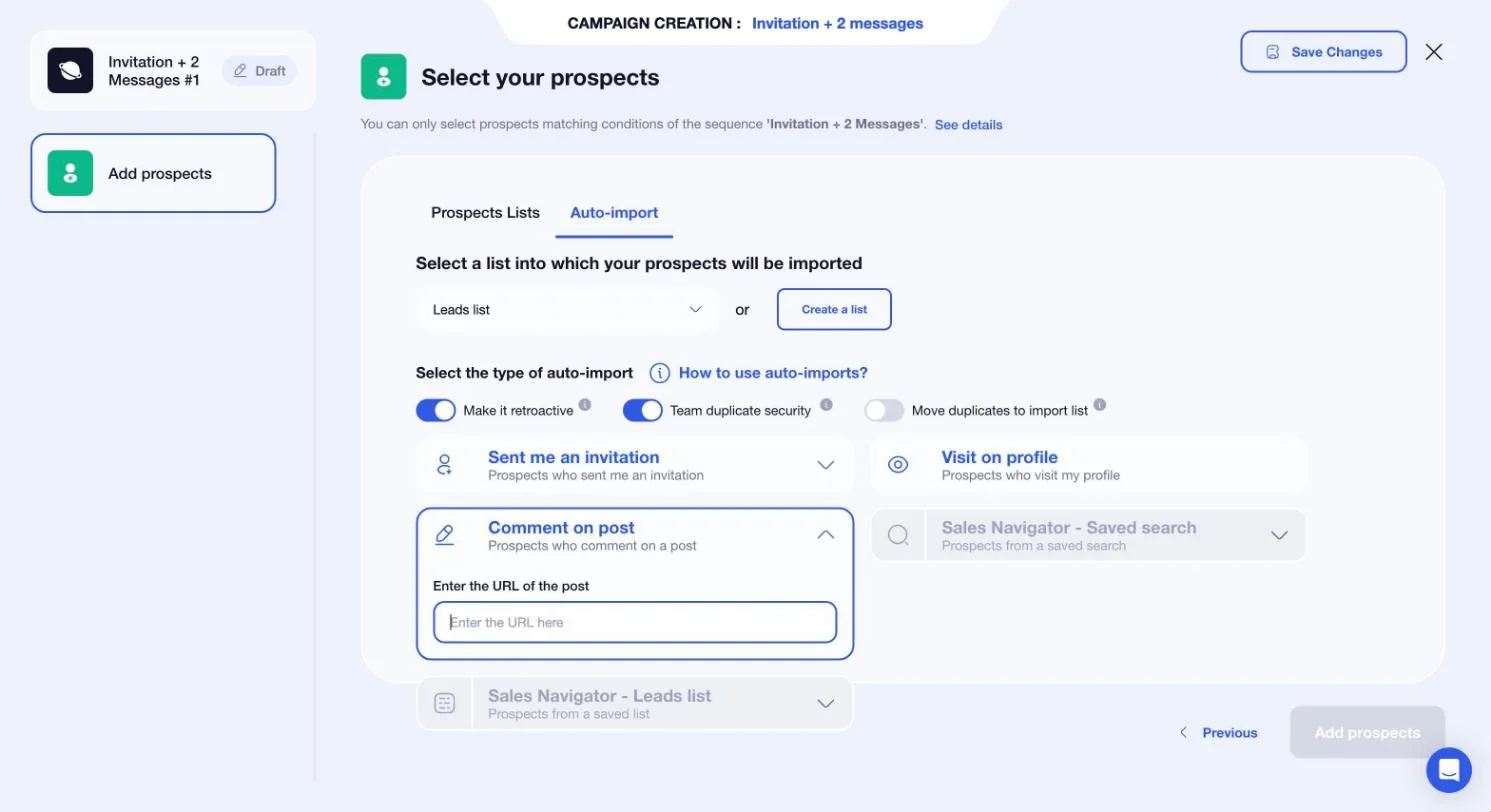
With Waalaxy, Auto-import pulls these lists in automatically: post commenters, profile visitors, saved Sales Navigator searches. This tutorial to scrape LinkedIn profiles walks you through the setup step by step. ⚡
4. Post and comment to generate inbound leads
Content is your prospect magnet. Every well-targeted post brings in people who match your persona, and each of them is a potential lead. It's the foundation of LinkedIn personal branding and social selling.
Content formats that generate leads
Not all posts are equal. Keep one main theme tied to your persona's problems, then mix up the formats in your LinkedIn content strategy:
The value post: a method, a checklist, results with numbers.
Storytelling: a failure, a win, a lesson learned from a customer.
The opinion post, which gets people talking without bashing anyone.
The lead magnet post: "Comment GUIDE and I'll send you the resource."
That last format works wonders for your LinkedIn lead generation. Every comment becomes a prospect who raised their hand, and you can reach out with a follow-up message. To prepare your resource properly, check out these types of lead magnets. As for rhythm, start with one post a week, then move to 2 to 4 posts once you've found your voice. 🗓️
Comment on your target's posts
Commenting on your target's posts makes you visible to their network, without publishing anything. Done well, it's a soft first touchpoint before the connection request. Here are three types of comments that work:
The question: "How do you handle it when a client turns down the quote after the demo?".
The experience share: "We tested the same approach, and our reply rate went up as soon as we shortened the first message.".
The resource: "I put together a checklist on this, happy to send it if you're interested.".
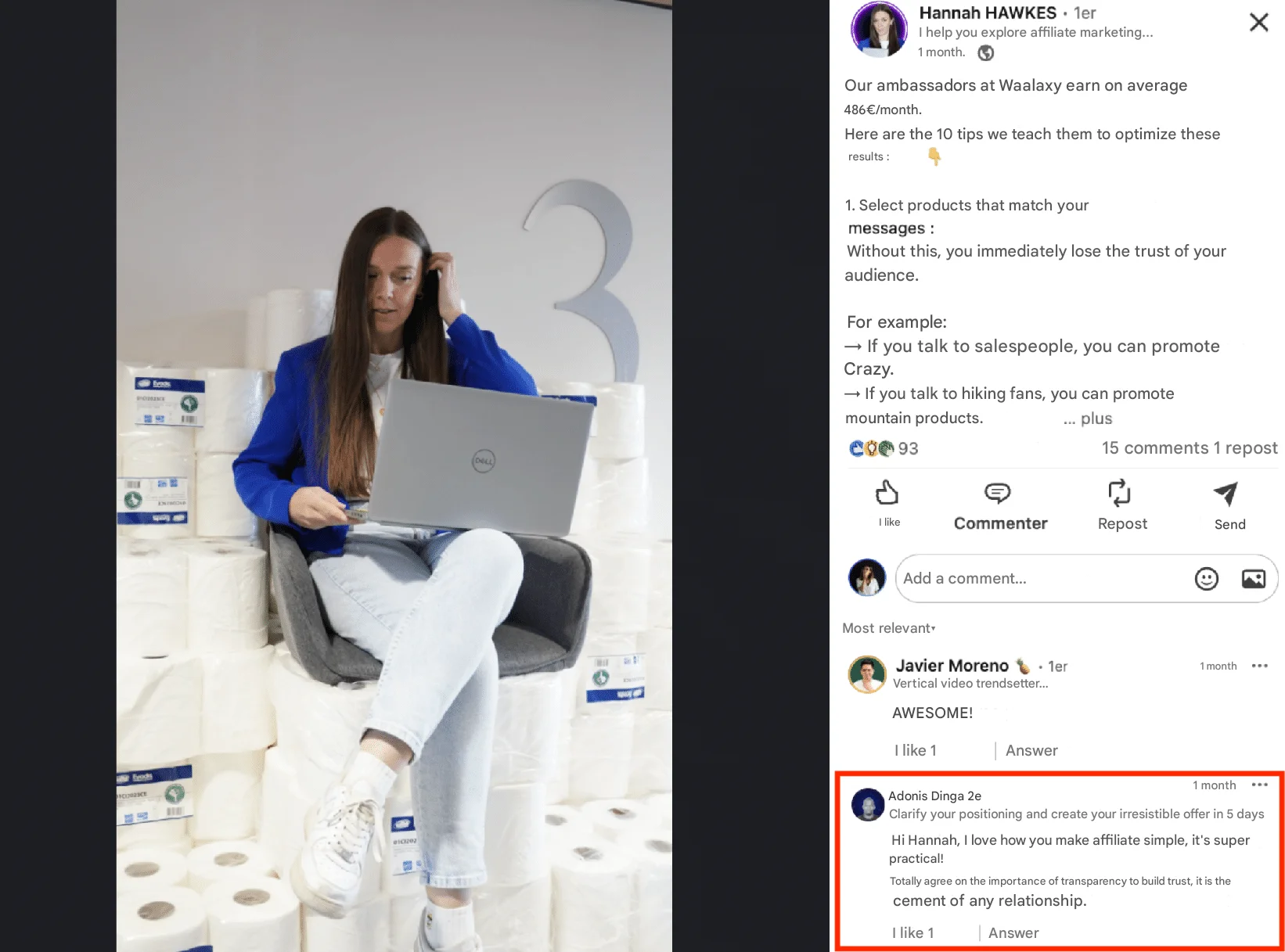
Skip the "Great post!" comments that add nothing, and never knock other people's work, competitors included. Set aside 15 minutes a day for it, and you stay consistent without spending your whole day on it.
LinkedIn Live and events
Buying from someone you've never seen or heard is a hurdle. A LinkedIn Live removes it, because your target watches you answer questions in real time. Here's a 4-step method:
Run a poll on one of your target's problems, for example "What mistake stops your landing page from selling?".
Read the answers and comments you get.
Pick the 2 or 3 topics that come up most to build your live session.
Schedule a LinkedIn event in advance and invite the people who voted in the poll.
Your event sign-ups then become a list of warm leads, perfect for moving on to outbound LinkedIn lead generation. 🎤
Steps 5 and 6: outbound LinkedIn lead generation
You have your target, your profile and your first signals. Time for direct outreach. This is where LinkedIn lead generation books meetings fast, as long as you write good messages and keep up with your follow-ups.
5. Reach out to prospects with messages that convert
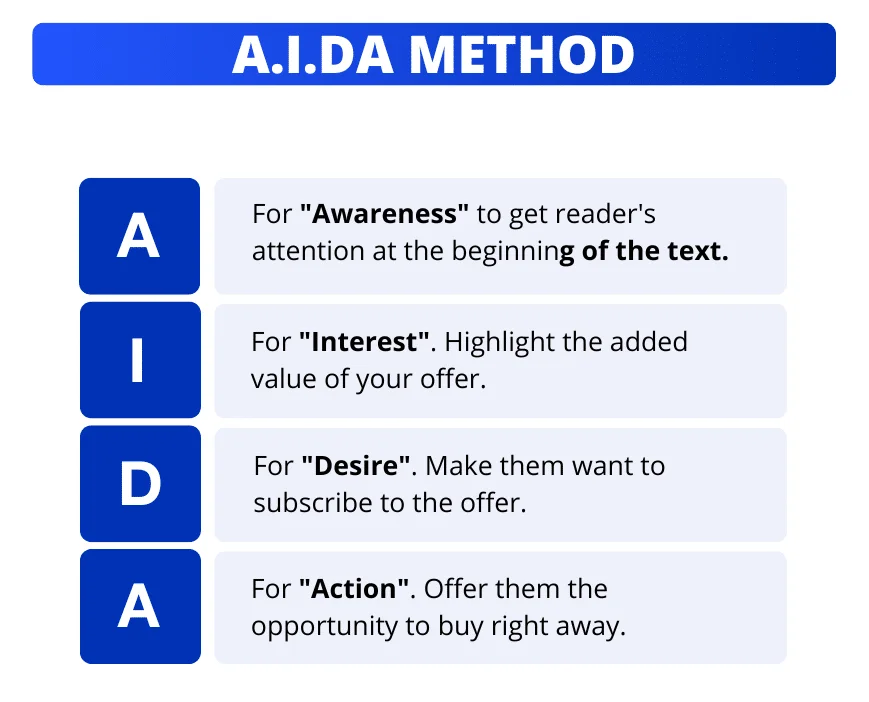
A good prospecting message follows the AIDA method: a hook that grabs attention, a problem your prospect recognizes, a benefit that creates desire, then a simple call to action. The guide to writing a LinkedIn prospecting message breaks down each step.
Connection request: with or without a note?
A connection request without a note works very well when your profile is clear. Add a note when you have a real hook, like a post you commented on or an event you both attended. Keep it short, with no pitch:
"Hi Julie, I read your comment on Mark's post about turned-down quotes. I see the same thing with the agencies I work with. Happy to connect here!"
First message and follow-ups: 3 examples
An effective sequence fits in three messages. Each one has a specific job, and none of them should read like a sales brochure.
First message, after acceptance: "Thanks for connecting, Julie. I see your agency has grown this year. How do you bring in new clients today, mostly word of mouth or outreach?".
Follow-up on day 4: "Bumping this in case my message got buried. I share a method with agencies to smooth out their order book. Want me to send it over?".
Last message, a week later: "Last message from me. If the topic comes back on the table, I'm around. Have a great end of the week!".
When it comes to timing and the number of follow-up messages on LinkedIn, two follow-ups are enough in most cases. Beyond that, you're more likely to annoy than convince.
Need a first draft for your own sequence? The prospecting message generator gives you a base to personalize for your target.

LinkedIn prospecting message generator
Describe what you sell and to whom: the tool writes your first message, focused on your target’s problem.
Cialdini's principles of influence in your messages
Psychologist Robert Cialdini described principles of influence that apply very well to prospecting. Use them honestly, without manipulation:
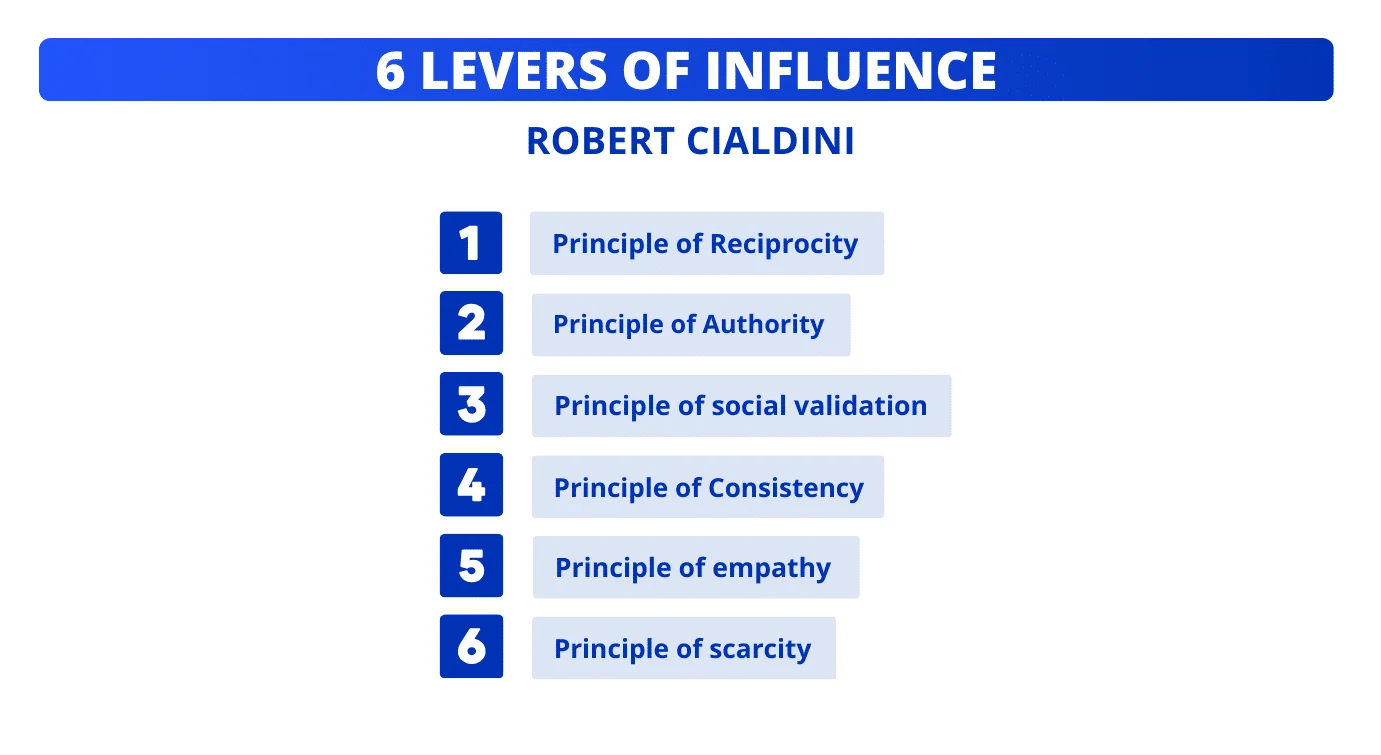
Reciprocity: offer a useful resource before asking for a meeting.
Social proof: mention a customer in the same industry as your prospect.
Authority: back yourself up with a concrete result or recognized expertise.
Liking: find a genuine common ground, a school, an event, a post.
Commitment: start with a small question before the big ask.
Scarcity: mention limited spots only if it's true.
6. Automate your LinkedIn prospecting and go multichannel
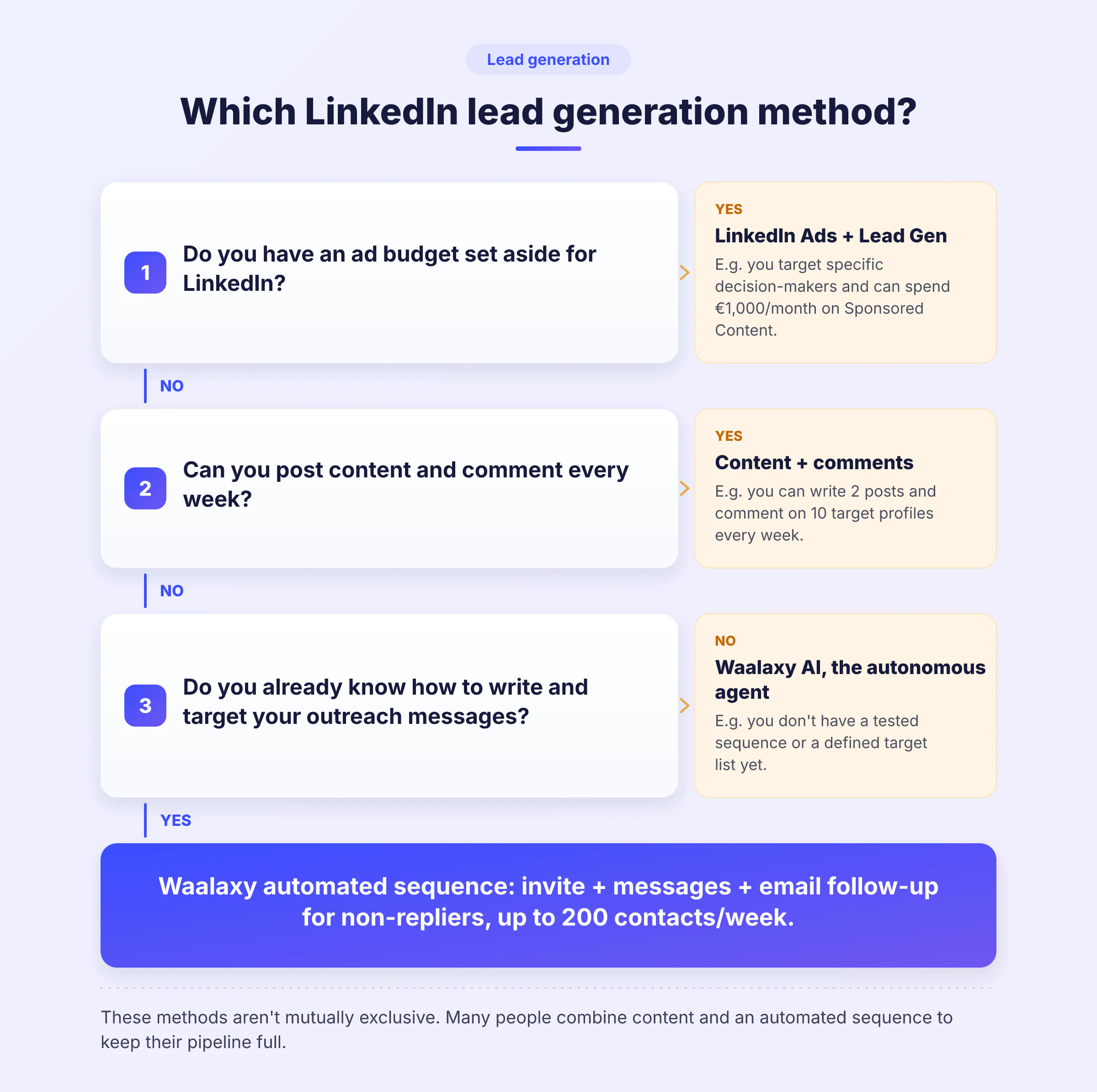
Sending connection requests, tracking who accepted, following up at the right time: done by hand, this takes hours every week. An automation tool keeps the pace for you while you focus on conversations. Keep in mind that LinkedIn's weekly invitation limit applies to your account whatever tool you use, about 200 connection requests per week.
Launch a LinkedIn + email sequence with Waalaxy
Waalaxy turns your prospect lists into automated sequences. Campaigns run in the Cloud, even with your computer turned off. Here's how to launch your first campaign:
Install the Waalaxy Chrome extension and connect your LinkedIn account.
Import your prospects from a LinkedIn search, Sales Navigator or Auto-import.
Pick a sequence template, for example "Invitation + 2 Messages".
Write your messages, with help from Waami, the AI writing assistant, if you want a first draft.
Launch the campaign and track replies in your dashboard.
To go multichannel, the Email Finder finds your prospects' work email addresses. Prospects who don't accept your connection request then get a follow-up email. Your leads then flow into your CRM, with native integrations for HubSpot and Pipedrive. More than 200,000 users already trust Waalaxy, rated 4.8/5 from over 5,000 reviews. 🛸
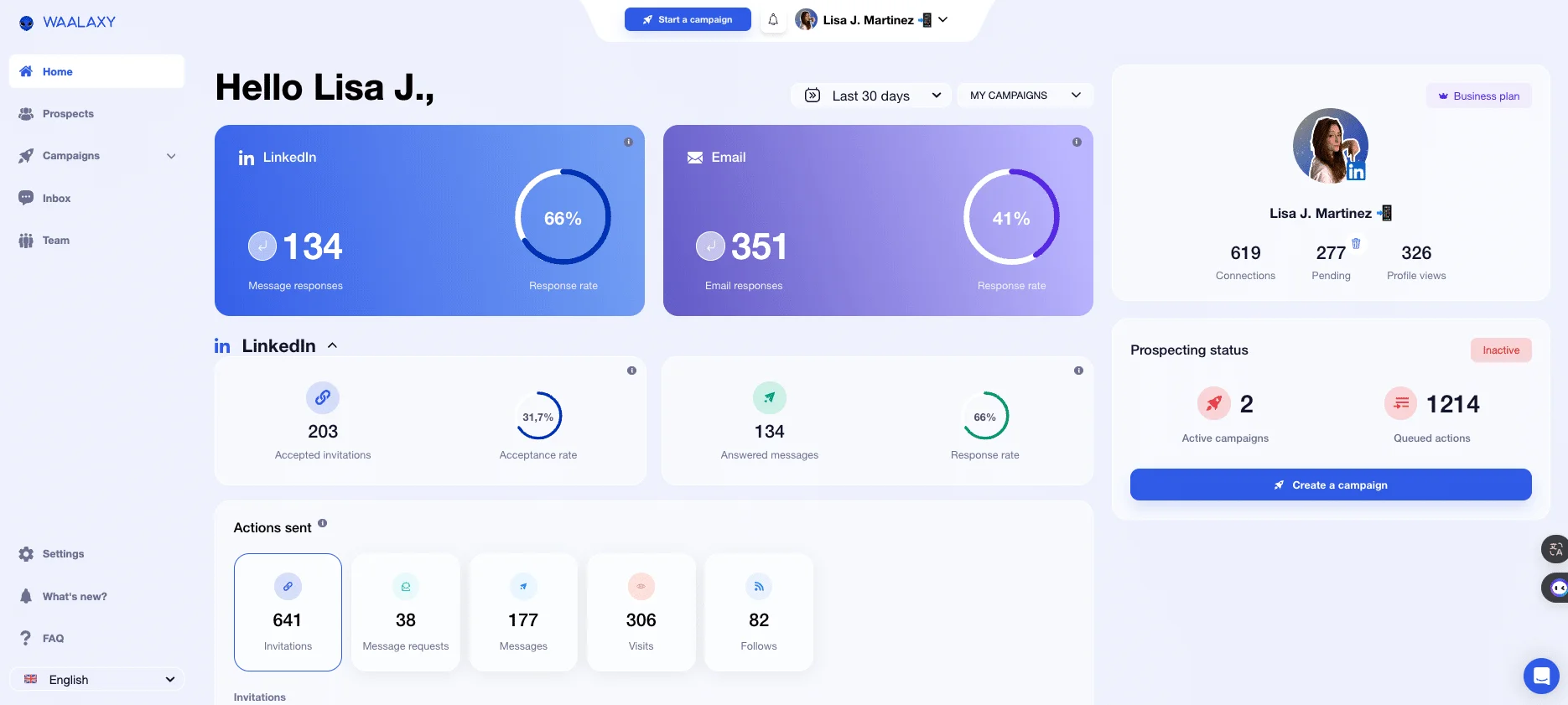
You can test all these features for free for 14 days, no credit card required.
Hand prospecting over to an AI agent: Waalaxy AI
Not sure who to target or what to write? That's often a matter of skill, not effort. Waalaxy AI is an autonomous LinkedIn prospecting agent, a separate product from Waalaxy, built for people who have never prospected.
To see how AI is changing lead generation more broadly, take a look at these AI lead generation tools. The agent is still just a means to an end: a human stays in control and closes the sale.
Manual, Waalaxy or Waalaxy AI?
Three ways to run outbound LinkedIn lead generation, three levels of involvement. This table helps you choose based on your profile.
Manual | Waalaxy | Waalaxy AI | |
|---|---|---|---|
Who picks the target? | You | You | The agent suggests, you approve |
Who writes the messages? | You | You, with help from Waami | The agent, for each prospect |
Who handles replies? | You | You, from the inbox | The agent, until you close |
Channels | LinkedIn and email | ||
Best for | Small volumes, tests | Sales reps, founders and agencies who know how to prospect | People who have never prospected |
Whatever you choose, the basics stay the same: a clear target and messages that talk about your prospect's problem. 🤝
Steps 7 to 9: LinkedIn Ads, KPIs and turning leads into customers
The last three steps round out your LinkedIn lead generation. Advertising adds volume, KPIs tell you what to fix, and the sales funnel turns your leads into revenue.
7. LinkedIn Ads and Lead Gen Forms
If you have a budget, LinkedIn Ads let you reach your target without waiting for your content to take off. The formats most used to generate leads are Sponsored Content paired with a form, and message ads. The cost per lead often stays high, so keep Ads for high-value offers. 💰
How LinkedIn Lead Gen Forms work
When a member clicks your ad, a Lead Gen Form opens, already pre-filled with their profile info: name, email, job title, company. All they have to do is submit. Less friction means more leads collected.
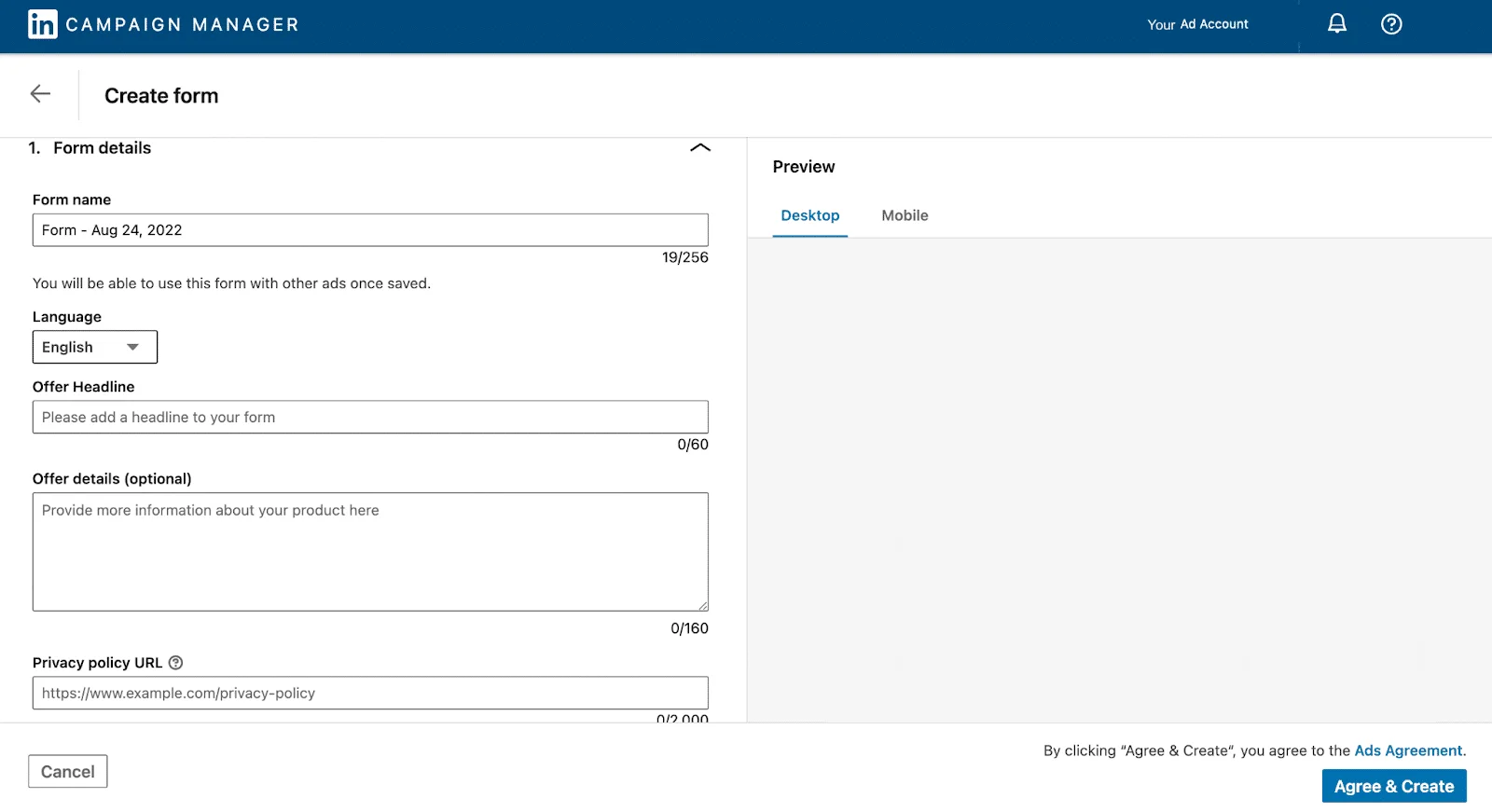
These forms are mostly used to offer a white paper, a webinar sign-up or a demo. For a detailed setup, follow the guide to LinkedIn Lead Gen Forms.
Create a campaign in Campaign Manager
All ads are managed in Campaign Manager, LinkedIn's advertising platform. The key steps:
Choose the "Lead generation" objective.
Define your audience from your persona: job title, industry, company size.
Select the format, for example a single image ad with a form.
Set your budget and bidding strategy.
Launch the campaign, then track the cost per lead to adjust.
8. Track the right KPIs for your LinkedIn lead generation
Without numbers, you're flying blind. Track a few simple metrics every week, and read them in the order of the journey. The full list of LinkedIn KPIs goes further if you want to fine-tune.
KPI | What it measures | If the number is low |
|---|---|---|
Acceptance rate | The share of connection requests accepted | Rework your target or your profile |
Reply rate | The share of prospects who reply | Rework your first message and your hook |
Positive reply rate | Interested replies | Rework your offer or your call to action |
Meetings booked | What ends up in your calendar | Work on your follow-ups and qualification |
Cost per lead (Ads) | What one completed form costs you | Narrow your audience or change your visual |
Profile views | The curiosity your activity sparks | Post and comment more consistently |
For reference, the average reply rate for Waalaxy campaigns is 16.6%, and the best strategies reach 47.8%. Your LinkedIn SSI score completes these numbers by measuring your overall presence on the network. 📊
9. Turn your leads into customers with a sales funnel
Successful LinkedIn lead generation doesn't stop at the first meeting, because a lead doesn't sign on their own. The sales funnel organizes the stages that turn a stranger into a customer, then an advocate. Your prospect hears about you, gets interested in your offer, decides to buy, then becomes a customer.
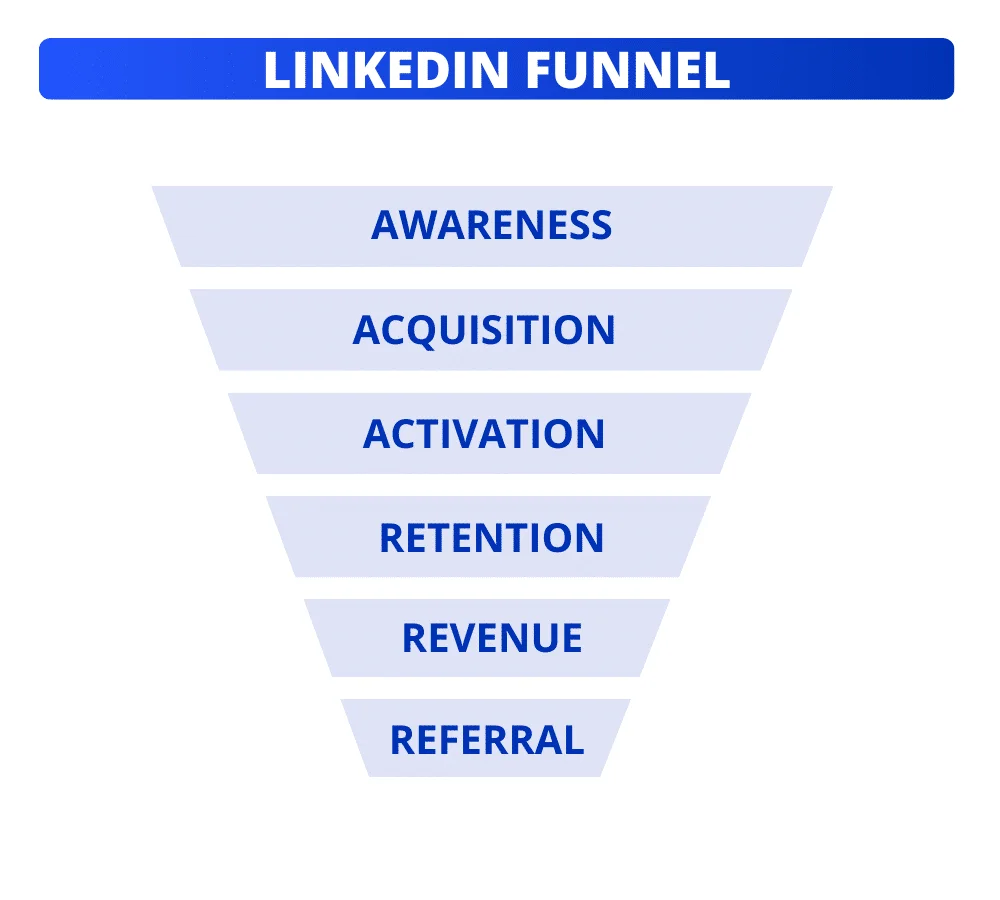
After the deal is signed, keep the relationship alive with lead nurturing: useful content, regular check-ins, a request for a recommendation. Map each stage in your CRM so no lead slips through the cracks.
Mistakes that block your lead generation on LinkedIn
Most campaigns that go nowhere fall into the same traps. Check that you're not making any of them before blaming LinkedIn. ⚠️
A target that's too broad, which makes your messages generic.
An unoptimized profile, which scares people off after they accept.
A pitch in the connection request, which drags down your acceptance rate.
No follow-up, even though busy prospects often reply only after a reminder.
Too much volume, which makes you hit LinkedIn's limits.
No KPI tracking, so no idea what to fix.
To avoid these mistakes, keep this recap of the 9 LinkedIn lead generation methods close at hand, with their type, effort, timeline and cost.
Method | Type | Effort | Timeline | Cost |
|---|---|---|---|---|
1. Define your target | Preparation | Medium | Immediate | Free |
2. Optimize your profile | Inbound | Low | A few days | Free |
3. Find your prospects | Outbound | Medium | Immediate | Free or Sales Navigator |
4. Post and comment | Inbound | High | Several weeks | Free |
5. Send messages | Outbound | Medium | A few days | Free |
6. Automate | Outbound | Low | A few days | Subscription |
7. LinkedIn Ads | Inbound | Medium | Immediate | Ad budget |
8. Track KPIs | Monitoring | Low | Ongoing | Free |
9. Sales funnel | Conversion | Medium | Ongoing | Varies |
You now have everything you need to launch your first campaign and convert leads into customers. The hardest part is getting started.
LinkedIn lead generation: key takeaways
Getting LinkedIn lead generation right starts with targeting a specific niche and polishing your profile. Then you combine inbound, with content and comments, and outbound, with short messages and two follow-ups. Ads and Lead Gen Forms speed things up if you have a budget, and your KPIs tell you where to adjust.
Start small: one target, one sequence, one week of testing. Measure, adjust, then scale up the volume. And if the follow-up work eats up too much time, let Waalaxy follow up for you, or hand prospecting over to Waalaxy AI. 👽
FAQ: LinkedIn lead generation
You can start your LinkedIn lead generation without spending a cent. What you mostly need is time and consistency. The most effective free tactics:
A profile optimized for your target, with a benefit-driven headline.
One or two posts a week on a single theme.
Useful comments on your target's posts.
Targeted connection requests followed by short messages and follow-ups.
Free LinkedIn search is enough to get started. You'll move to Sales Navigator or automation once your volume grows.
A qualified lead is someone who matches your persona, has interacted with you and has expressed a need. A simple contact on your list doesn't count. For example, an agency founder who replies "yes, we're struggling to find clients" to your first message is a qualified lead. Qualifying your leads keeps you from wasting time on people who will never buy. It also makes your meetings more productive.
Lead Gen Forms appear when a member clicks a LinkedIn ad. They're pre-filled with the member's profile data, which cuts the effort down to one click. You then collect the leads in Campaign Manager or in your CRM through an integration. They're mostly used to distribute a white paper, fill a webinar or get demo requests. Unlike message-based prospecting, they require an ad budget.
LinkedIn limits connection requests to about 200 per week per account, whatever tool you use. That cap can vary depending on your account's age and activity. It's better to send fewer requests, but better targeted ones. A high acceptance rate protects your account and gets you more conversations. To go further, combine LinkedIn and email so you can also reach people who don't accept.
No, you don't need it to get started. Free LinkedIn search already lets you filter by job title, location and industry. Sales Navigator becomes useful when you need finer filters:
Company size and time in role.
Saved searches with alerts on new profiles.
Lead lists to import into a tool like Waalaxy.
If your target is very specific or your volume is high, the subscription quickly pays for itself in your LinkedIn lead generation. Otherwise, start without it.
Yes, on two levels. With Waalaxy, you automate connection requests, messages and follow-ups, and Waami helps you write. With Waalaxy AI, a prospecting agent also builds the strategy: it suggests your targets, finds prospects, writes each sequence and handles the conversation. In both cases, a human stays in charge and you're the one who closes the sale. The guide to LinkedIn prospecting helps you lay the groundwork before you automate.