
Wondering how to find clients on LinkedIn without giving up your evenings? Good news: the network is a huge, free B2B database, as long as you know where to look. In this guide, you'll first set your target and your profile, then go through 9 sources of prospects, qualify your list and send your first message. You'll also see how to find prospects on LinkedIn on autopilot with Waalaxy, or hand the whole job to an AI agent. 👽
Before you search: define your target and polish your profile
Before asking yourself how to find clients on LinkedIn, set two foundations. A precise target keeps you from contacting hundreds of useless profiles. A polished profile makes those profiles want to reply. 🎯
Define your ideal customer profile (ICP) with 5 criteria
Your ideal customer (or ICP) describes the company and the person most likely to buy. In B2B, forget age or gender and look at the job title, the company and the problem to solve. Here are 5 criteria, using a web agency as an example.
Criterion | Question to ask yourself | Filled-in example |
|---|---|---|
Job title and seniority | Who makes or influences the buying decision? | Founder, managing director or head of marketing. |
Industry | In which industries has your offer already proven itself? | Consulting firms, real estate agencies. |
Company size | What size of company can pay for your offer without a heavy buying process? | 2 to 50 employees. |
Location | Where can you sell and deliver? | United States, Canada, United Kingdom. |
Buying signal | Which event makes the need urgent? | Fundraising, first sales hire, outdated website. |
The easiest way to go from theory to practice? Find the right LinkedIn industries and generate your search URL for free, in one click. 👇

LinkedIn industry search
Find the right industry among LinkedIn’s 430 official categories and get your search URL.
Type your field: the tool suggests the official LinkedIn industries. Pick one or more.
Once your target is set, take a look at your competitors too. They say a lot about your future prospects.
Optimize your profile so prospects reply
How do you find clients on LinkedIn who actually reply? Everyone you contact will check your profile before they trust you. An optimized LinkedIn profile speaks to your ideal customer, not to a recruiter. Focus on 4 elements.
Professional photo, recent, with your face clearly visible and a smile.
Client-focused headline that says who you help and what result they get, rather than just your job title.
About section that covers your target's problem, your method and one concrete proof.
Banner that shows your offer or a client result, with a clear invitation to get in touch.

Your prospecting agent at half price, for life
€100€50/month, annual plan
Nov 27 12am to Nov 28 noon CET
Discover Waalaxy AI →14-day free trial
Where to find prospects on LinkedIn: 9 sources
This is where it all happens. Knowing how to find clients on LinkedIn mostly means knowing the right places to dig. Some give you volume, others give you profiles that are already engaged with your topic. The best approach is to combine them. 🔎
1. LinkedIn search and its filters (with Boolean operators)
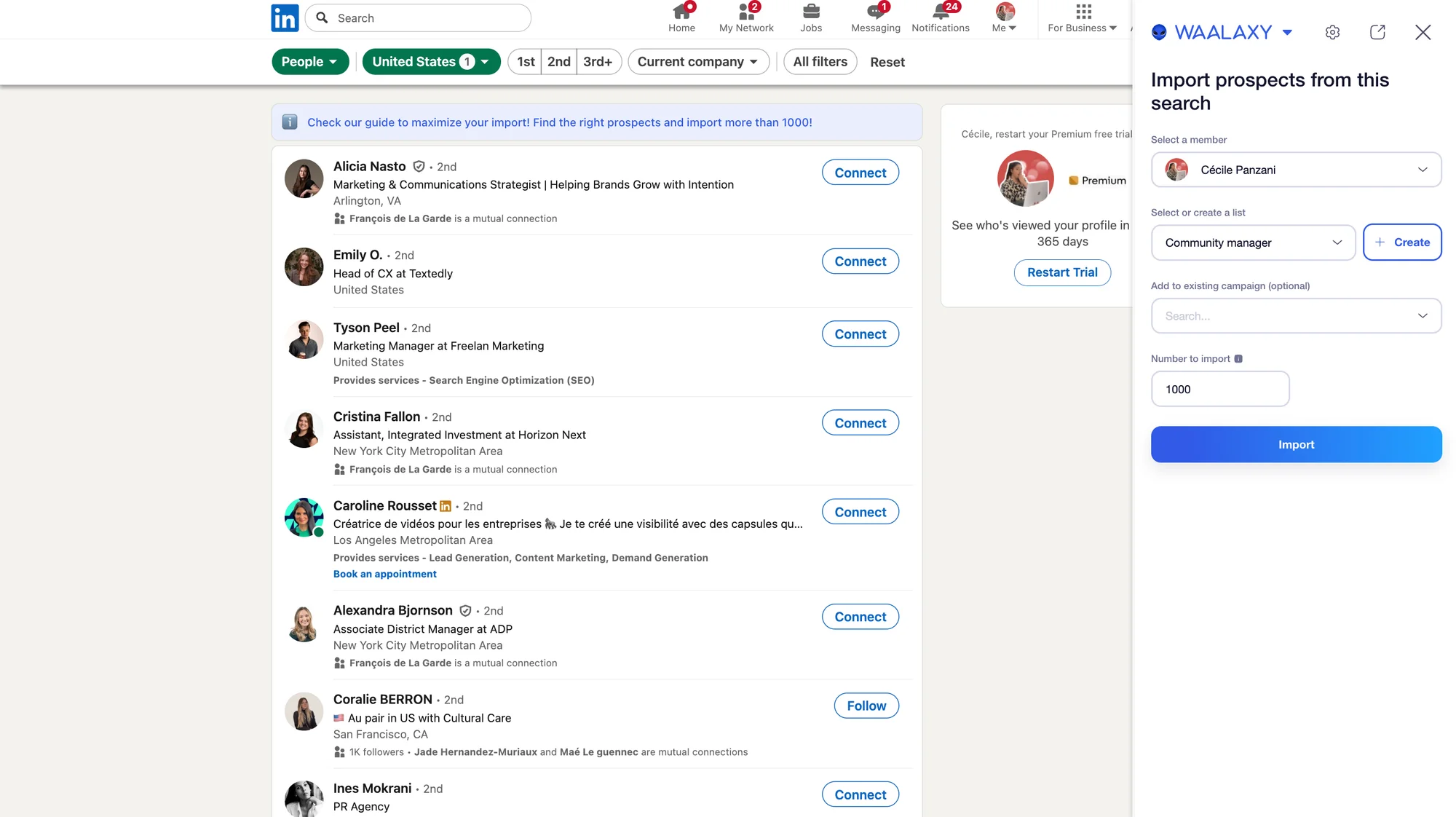
Type a job title, pick the “People” category, then filter by location, current company, industry and connection degree. To go further, LinkedIn search accepts Boolean operators AND, OR, NOT, quotes and parentheses, all explained in LinkedIn's official help page. Example: ("sales director" OR "head of sales") NOT intern.
Don't want to write your query by hand? Generate it here, then paste it into LinkedIn.

LinkedIn Boolean Search Generator
Your job titles, the keywords to include and exclude: the tool writes your LinkedIn Boolean search, with AND, OR, NOT and quotes in the right place.
Separate terms with commas.
Fill in at least one job title or keyword to include: your Boolean search shows up here.
With Waalaxy, you then import the results into a list in one click, without copying each profile.
2. LinkedIn Sales Navigator: lists and alerts
Sales Navigator, LinkedIn's paid plan for salespeople, adds advanced filters (years in current role, recent job change), lead lists and alerts on your saved searches. Before you pay, learn how to use LinkedIn Sales Navigator during the free trial. Waalaxy imports a search or a Sales Navigator lead list as a prospect list.
3. The “More profiles for you” section
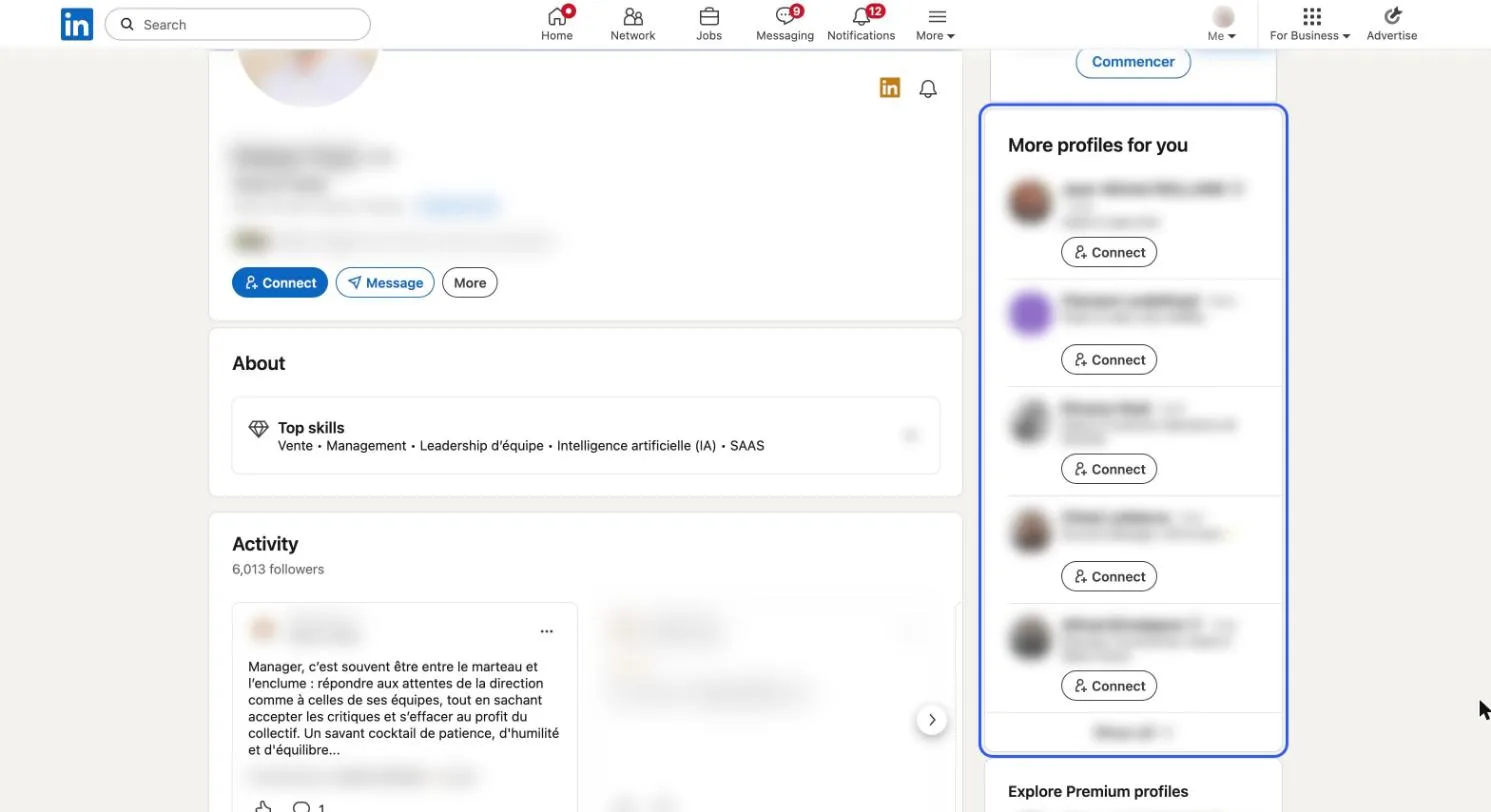
On the profile of one of your best clients, the right-hand column shows a “More profiles for you” section, with profiles similar to theirs. It's a goldmine of lookalike prospects, often in the same role and the same industry.
4. Your competitors' network and followers
Look at who reacts to posts from your competitors' company pages and from their salespeople. These people care about the topic, which makes them qualified prospects. The idea isn't to bash the other offer, it's to target your competitors' clients with an angle of your own.
5. Post comments and reactions
A post from an influencer in your industry with 300 comments means 300 people who raised their hand on a topic. These very warm prospects come with ready-made context for your message. Waalaxy imports the people who commented on or reacted to a post, straight from the feed.
6. LinkedIn events
Attendees of an online event on your topic share a specific interest on a specific date. Spot the LinkedIn events in your industry, sign up, then import the attendee list into Waalaxy to contact them with an opener tied to the topic.
7. LinkedIn groups
Group members come together around a job or a problem. Join a few LinkedIn groups related to your target, then import their members with Waalaxy. The group also gives you something in common to mention in your first message.
8. Your profile viewers and received invitations
A profile visit or an incoming invitation is an intent signal. Check who viewed your LinkedIn profile regularly. Waalaxy offers an Auto-import of your profile viewers and of the people who sent you an invitation, so none of them slip through the cracks.
9. Company pages and the “People” tab
Already have a list of target accounts? Start from the company. On each company page, the “People” tab lists the employees, which you can filter by job title. This account-based approach (or ABM approach) lets you target profiles from a list of companies without spreading yourself thin.
Here are the 9 answers to the question “how to find clients on LinkedIn”, compared by intent level, cost and import into Waalaxy. The main thing to remember: high-intent sources are worth more than a big cold list.
Source | Intent level | Free or paid | Waalaxy import |
|---|---|---|---|
Search and filters | Low | Free | Yes. |
Sales Navigator | Low to medium | Paid | Yes. |
More profiles for you | Low | Free | No, manual spotting. |
Competitors' network | Medium | Free | Yes, through reactions and comments on their posts. |
Comments and reactions | High | Free | Yes. |
Events | High | Free | Yes. |
Groups | Medium | Free | Yes. |
Profile viewers and received invitations | Very high | Free | Yes, with Auto-import. |
Company pages | Medium | Free | Yes, through a search filtered by company. |
Find clients on LinkedIn by attracting them: visits, content and comments
Getting them to come to you is the other half of the answer. Here's how to find clients on LinkedIn without cold outreach, thanks to your LinkedIn visibility. It's also the most natural way to find customers on LinkedIn who already trust you. This approach complements your LinkedIn lead generation efforts. 😏
Visit and follow your target profiles
When you visit or follow a profile, the person often gets a notification and comes to see who you are. If your profile is polished, they may add you or message you. Save follows, which are more visible, for your priority profiles.
Post so prospects come to you
Want to know how to find clients on LinkedIn without hunting for them? Post regularly and they'll come to you. When posting on LinkedIn with a sales goal, keep in mind what the algorithm favors.
Authentic posts written in the first person.
Concrete lessons from real experience.
Content that sparks real comments.
Consistency, with 2 thoughtful posts a week rather than 5 rushed ones.
As for topics, don't talk only about your solution. Share your target's problems, your method, case studies and even your mistakes. You bring value before you sell, and prospects come to you. 🕺
Comment on your prospects' posts
Go where the attention is, under your prospects' posts. A useful comment shows your expertise and creates a first touchpoint before the invitation.
❌ To avoid | ✅ What really works |
|---|---|
“Great post 👏” comments. | Add a complementary point of view. |
Generic copy-paste comments. | Ask a relevant question. |
Off-topic walls of text. | Share a short lesson from experience. |
Commenting just to show off. | Add a resource or a concrete example. |
If you reply to someone in a thread, tag them so they see your answer.
Qualify and contact your prospects
Learning how to find leads on LinkedIn is only step one, because an imported list isn't a qualified list. Before you write, you sort, then you take care of your messages. 📈
Qualify your list before reaching out
According to Waalaxy data, a hand-built prospect list contains 30% false positives on average. So the question becomes less how to find clients on LinkedIn and more how to weed out the people who aren't. Check these 3 points.
The job title matches a decision-maker or someone who influences the purchase.
The company fits your target in size, industry and location.
The profile is active, with a photo and recent activity.
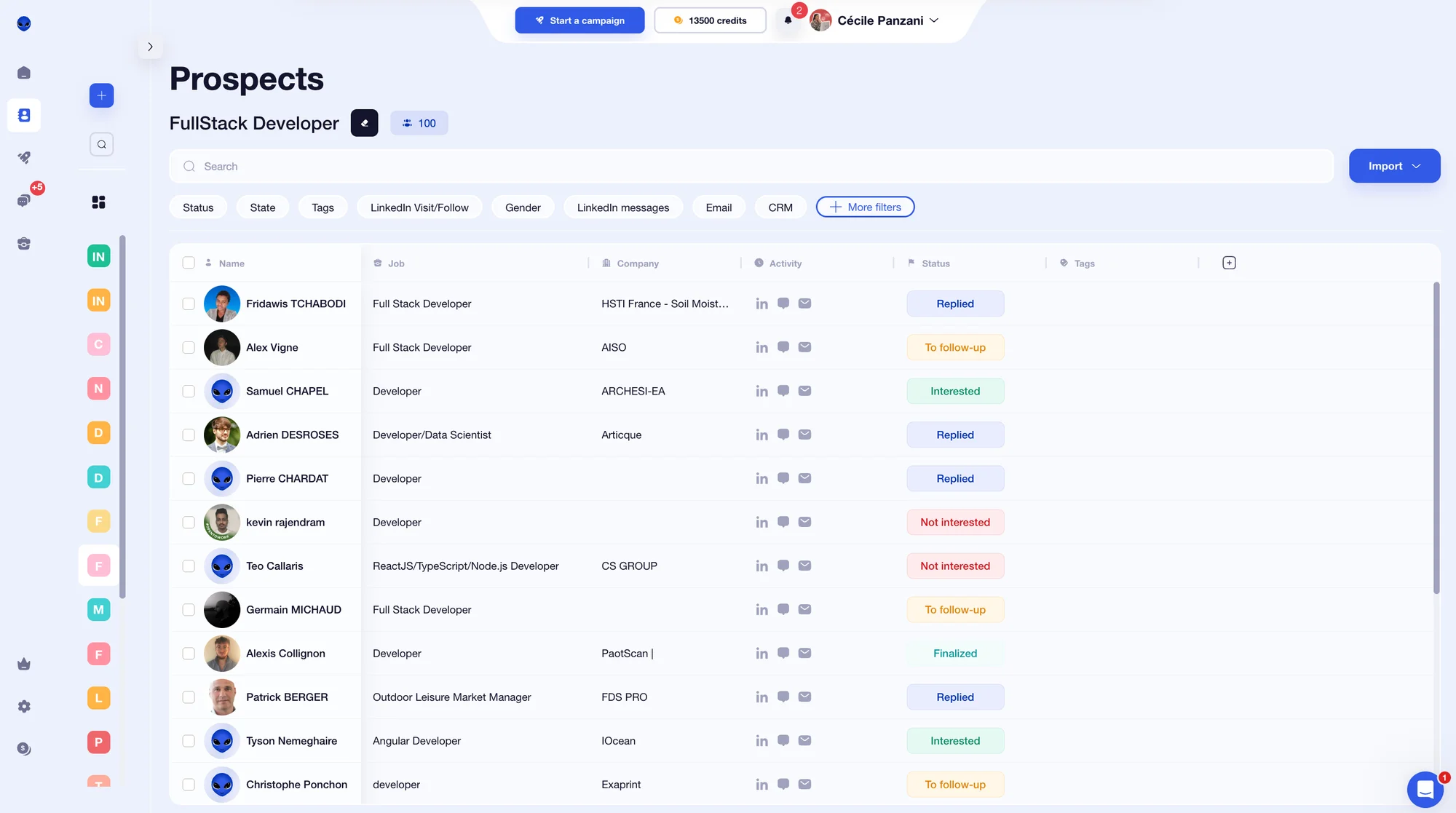
In Waalaxy, open the “Prospects” tab and select your list. You can then blacklist the contacts you never want to reach, add tags by segment, delete off-target profiles and split your list into more precise sub-lists.
Contact your prospects: first messages and follow-ups
The average reply rate of Waalaxy campaigns is 16.6%, and the best strategies reach 47.8%. How do you find clients on LinkedIn who reply? The gap comes mostly from targeting and messaging. To go beyond the templates below, build on the basics of a good LinkedIn prospecting message.
The invitation note: with or without?
Without a note, the invitation goes through fine if your profile already speaks for you. Add a short note with no pitch when you have real context to mention. You'll find more LinkedIn invitation message examples for inspiration.
“Hi Julie, I caught your talk on hiring your first salespeople. Your point on onboarding really resonated, happy to join your network.”
3 first-message templates based on where you found the prospect
Bring up the context where you found the person in the very first line, to prove your message isn't going out to everyone.
Prospect source | Sample first message |
|---|---|
After a comment | “Thanks for connecting, Mark. Your comment on Lea's post got me thinking. Do you see the same problem in your team?” |
After an event | “Glad to connect, Sarah. We were both at the B2B prospecting webinar. What did you take away from it for your team?” |
After a profile visit | “Thanks for stopping by, Thomas. I see you're growing your agency in Austin. Are you mostly after local clients or nationwide?” |
These messages end with an open question, not a meeting request. Your first goal is to get a reply, not to sell. A “Hi, I sell X” triggers the spam reflex.
Follow up without being pushy
Plan one or two follow-up messages on LinkedIn, a few days apart, with a new angle each time. No reply? Switch to email. Waalaxy chains LinkedIn and email in the same sequence, and its Email Finder looks up the prospect's work address. In the UK, the ICO allows this kind of B2B email to a company address without prior consent, as long as you say who you are and give an easy way to opt out. Rules are stricter in several EU countries, so check the law where your prospects are. 📩
Automate or delegate: Waalaxy and Waalaxy AI
Doing everything by hand quickly eats several hours a week. With Waalaxy, you automate your own strategy. With Waalaxy AI, an agent builds it and runs it for you. 🤖
Automate your prospect search with Waalaxy (tutorial)
Waalaxy is a LinkedIn and email prospecting automation tool (Chrome extension and web app) that runs in the Cloud, even when your computer is off. More than 200,000 users rely on it, with a 4.8/5 rating from over 5,000 reviews. Here's how to find clients on LinkedIn and contact them with it, in 4 steps.
Step 1: Import your prospects
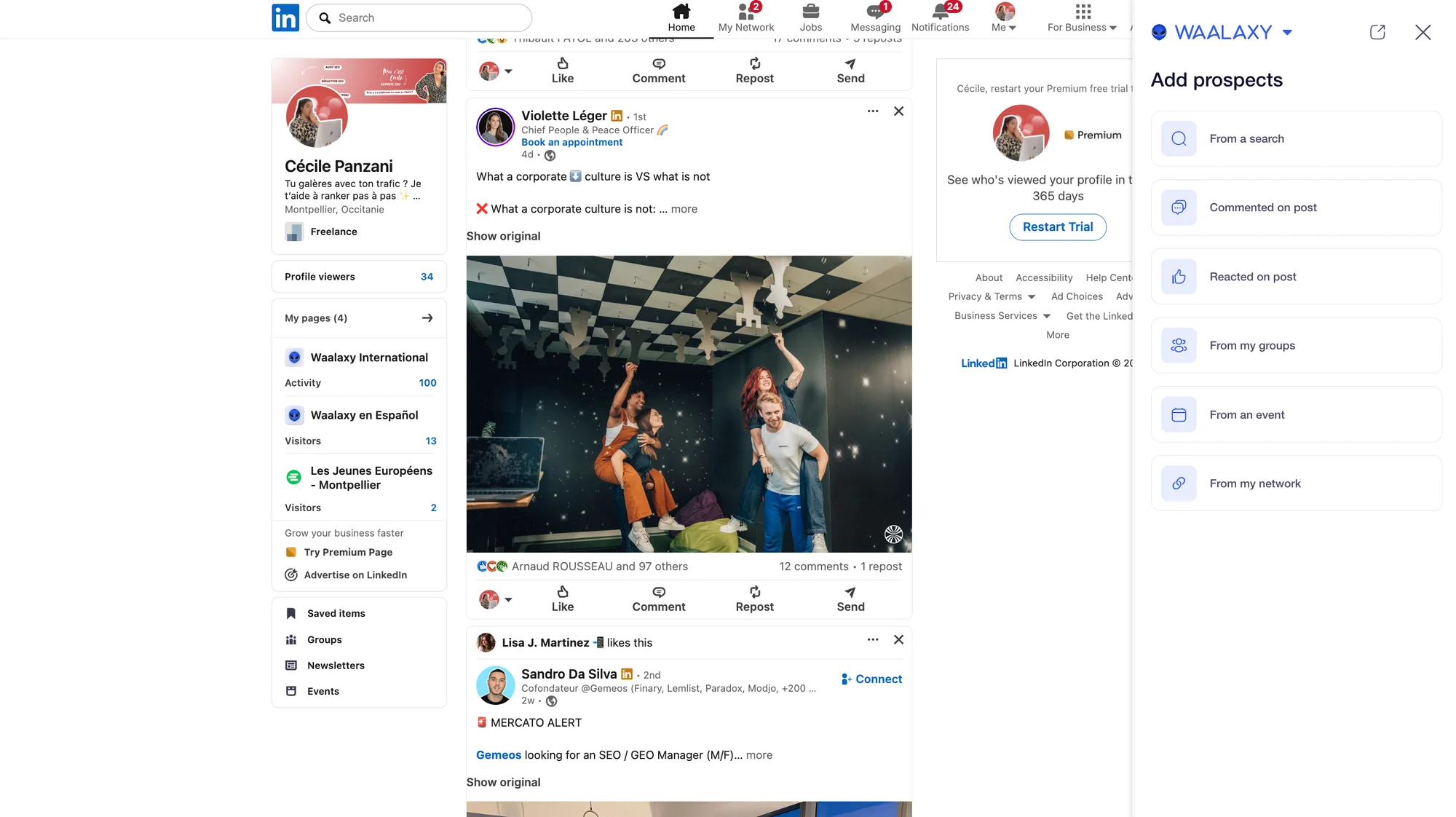
Install the extension and log in to LinkedIn. An “Add prospects” panel appears on the right of your feed. Pick your source: search, post comments or reactions, group, event or network. Each source is detailed in the guide to import LinkedIn leads.
Step 2: Pick a sequence and write your messages
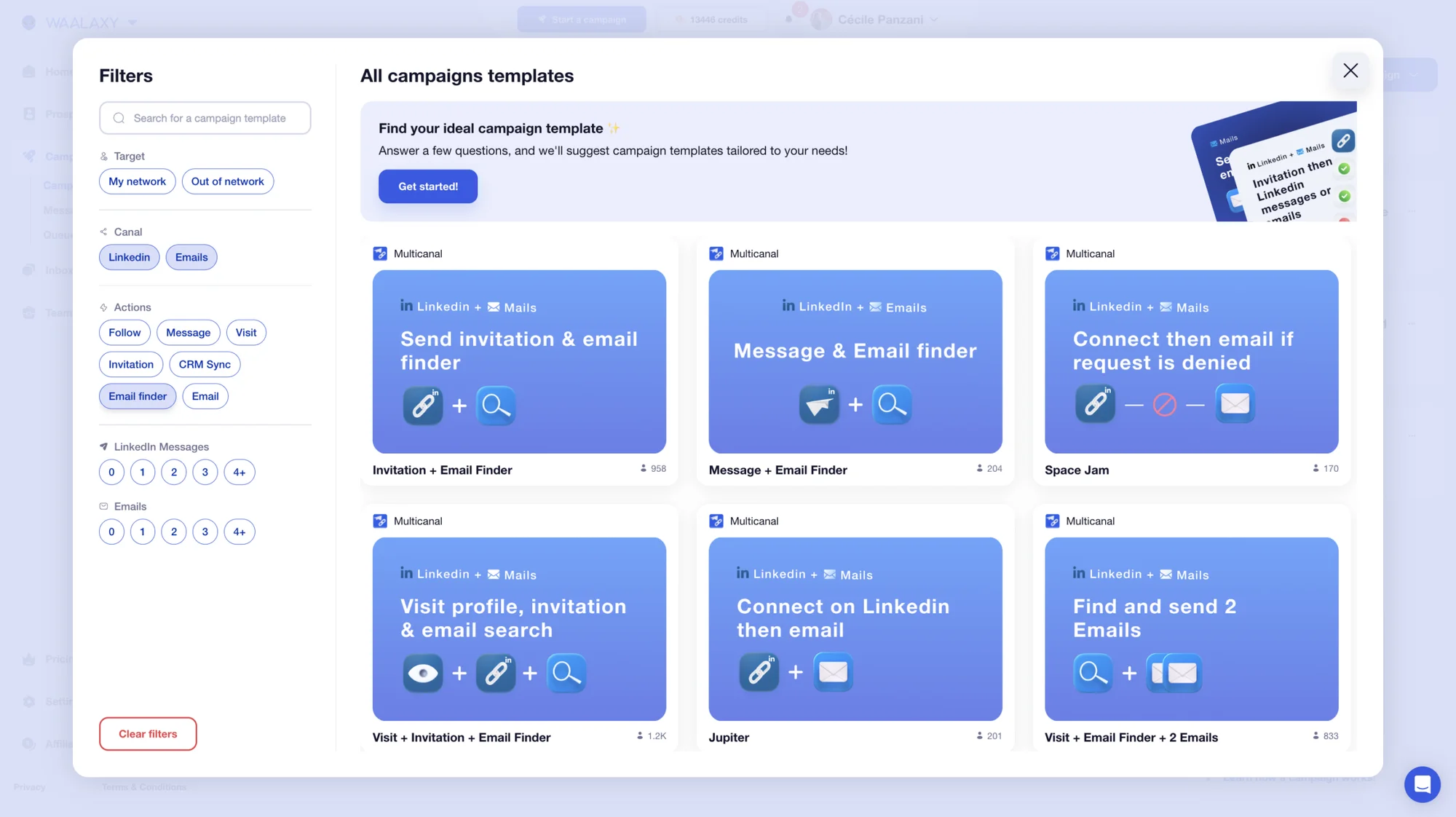
Click “Start a campaign”, then browse the catalog of ready-made Waalaxy sequences. To start, “Invitation + 2 Messages” is simple and effective. You can also pick a LinkedIn and email multichannel sequence. For your messages, Waami AI helps you write based on your target, then you add your personalization variables.
Step 3: Track your results
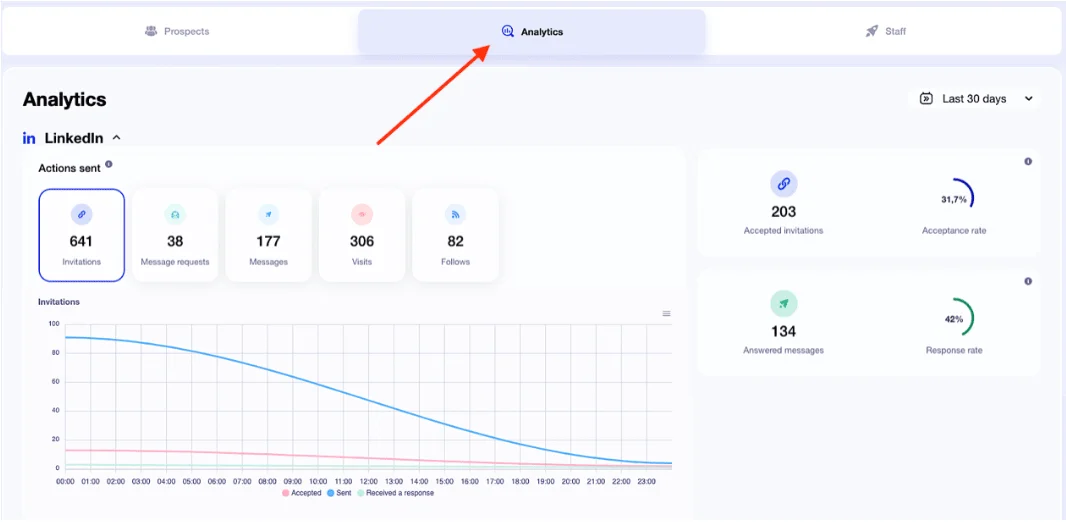
The dashboard shows invitations sent, your acceptance rate and your reply rate, per campaign or overall. Check them every week to see which source and which message work best.
Step 4: Manage your conversations
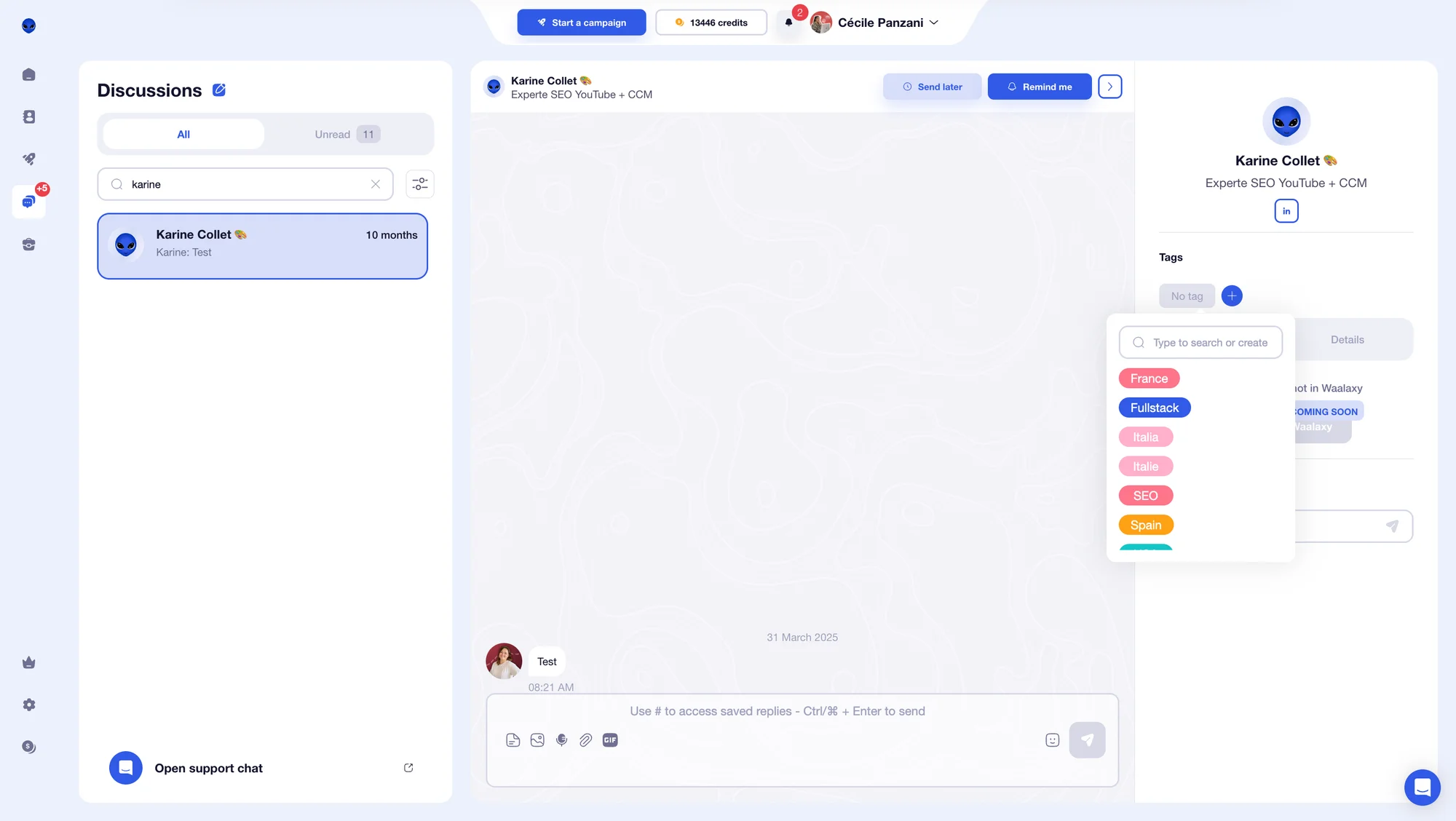
With volume, LinkedIn messaging soon becomes unmanageable. The Waalaxy Inbox, a paid add-on, groups your conversations with saved replies, reminders and tags. The Waalaxy Inbox FAQ explains how to use it. Your warm prospects then go to your CRM, with native HubSpot, Pipedrive and noCRM.io integrations.
Try the approach on a first list of 50 well-qualified prospects. The free trial lasts 14 days, no credit card required.
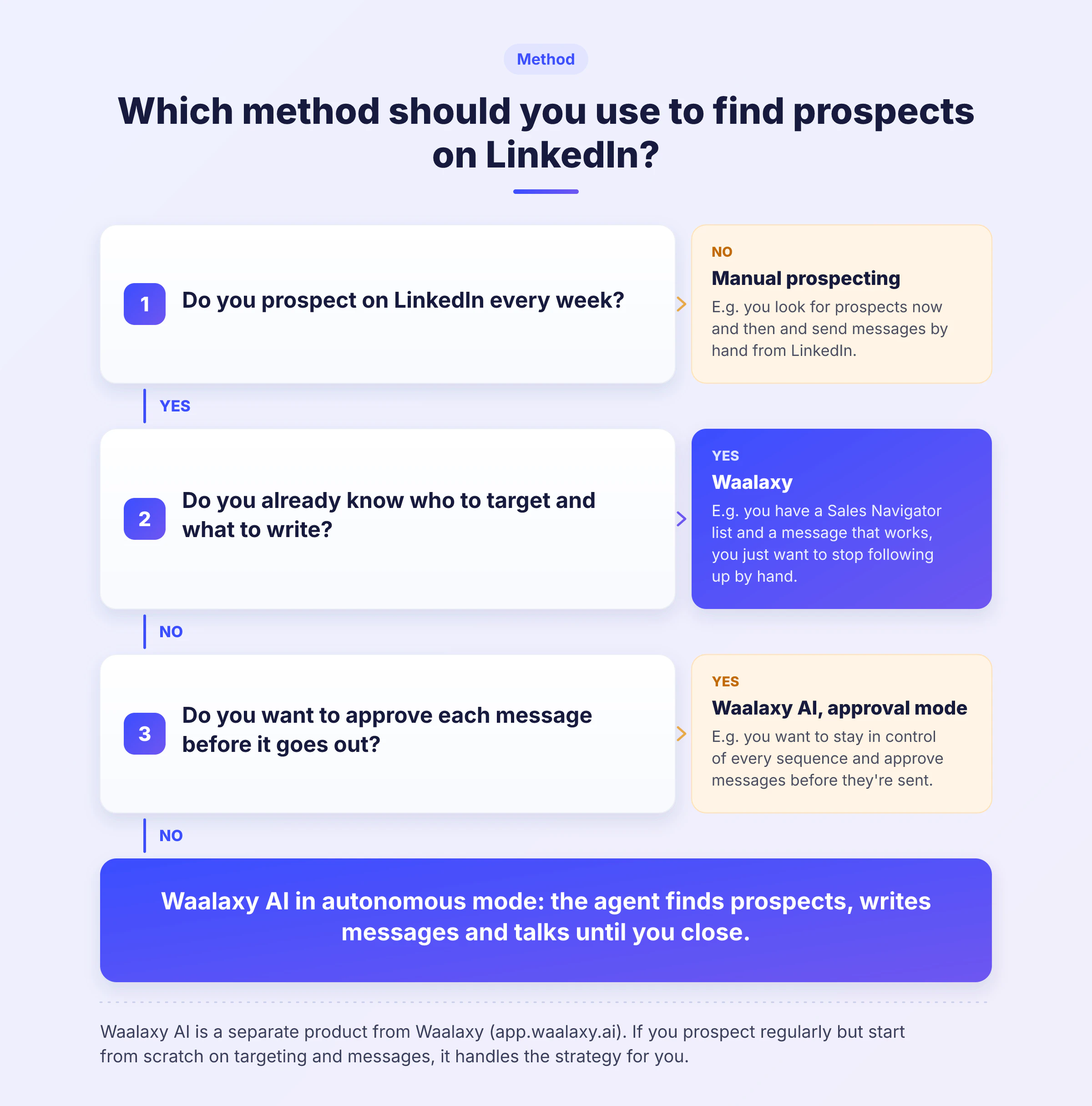
Not sure yet which option suits you? This chart helps you decide in a few questions.
Delegate your prospect search to an AI agent: Waalaxy AI
Don't want to ask yourself every week how to find clients on LinkedIn? Waalaxy AI is a LinkedIn prospecting AI agent, sold separately from Waalaxy, built for people who have never prospected. You give it your website URL. The agent suggests 2 to 4 targets, finds the prospects and filters out those who don't fit. It then writes a personalized sequence for each one and runs the conversation until it's your turn to close.
No need for Sales Navigator, the agent does the searching itself. You pick one of three autonomy levels: Assisted, where you approve every message, Semi-autonomous, where you only approve its replies, and Autonomous, where it only checks in with you when it needs context. In short, Waalaxy runs your strategy, while Waalaxy AI also builds it. It costs $100 per LinkedIn account per month, with a 14-day trial, with or without a card.
Nurture your network and avoid the classic mistakes
Knowing how to find clients on LinkedIn isn't enough if the relationship stops at the first message. A well-kept network turns your contacts into clients. 🗺️
Keep your network warm to turn prospects into clients
Apply the 95/5 rule: at any given time, about 95% of your market isn't ready to buy and 5% is actively looking for a solution. If you only go after warm leads, you miss most of your future sales. Stay present for the others with these 4 habits.
Map your contacts into referrers, potential partners and direct prospects, so you know where to put your energy.
Follow up with context, mentioning a job change, a recent post or a project launch.
Create micro-opportunities, like a 15-minute chat or a useful introduction.
Trigger reciprocity by recommending a contact or sharing a resource, without asking for anything in return.
With a former colleague or classmate, put the relationship first. Business comes naturally once trust is there. 🤝
5 mistakes that stop you from finding prospects on LinkedIn
You now know how to find clients on LinkedIn. All that's left is not to waste that work with these common mistakes.
Going after a target that's too broad, like “every small business in the country”.
Leaving an unoptimized profile that doesn't say who you help.
Pitching in the invitation, before the person has even accepted.
Copy-pasting the same message without personalization.
Giving up after a week, never following up, or going over the LinkedIn limits, about 200 invitations a week.
On that last point, keep a steady pace and learn how to work around the LinkedIn invitation limit to protect your account.
How to find clients on LinkedIn: key takeaways
To know how to find clients on LinkedIn, start with a clear target and a profile that speaks to your ideal customer. Then draw on the 9 sources, prioritizing the high-intent ones. Qualify your list, then write messages that mention each prospect's context.
When the volume grows, automate with Waalaxy or delegate to Waalaxy AI. Launch a first list of 50 prospects this week, measure your replies and adjust. For the bigger picture, keep the guide to LinkedIn prospecting at hand. 🚀
FAQ: how to find clients on LinkedIn
The free version of LinkedIn is enough to get started. Several sources cost nothing and give you lists that are already targeted.
The “People” search with its filters and Boolean queries.
Comments and reactions under posts in your industry.
Event attendees and group members.
Your profile viewers and received invitations.
You can then import these profiles into Waalaxy during the free trial. There are other ways outside LinkedIn to find prospects, such as these free lead generation tools for B2B.
As a freelancer, your profile is your shop window, with a headline that says who you help and concrete projects in your About section. Post once or twice a week about your clients' problems, and comment on your target's posts. To land your first contracts, these LinkedIn tips for entrepreneurs will help you get going. Aim for few prospects, but very well chosen ones.
No. To work out how to find clients on LinkedIn, free search, posts, groups and events are often enough. Sales Navigator becomes useful when you prospect every week and want fine-grained filters, like years in current role, plus alerts on your searches. And if you go with Waalaxy AI, the agent finds the prospects itself, without Sales Navigator.
LinkedIn caps invitations at around 200 a week, whatever tool you use. If you're figuring out how to find clients on LinkedIn without hurting your account, don't aim for that ceiling from day one.
Start well below it and increase the volume in steps, on a well-qualified target.
Watch your acceptance rate, and rework your target or your profile if it drops.
Withdraw old pending invitations from time to time.
Once you know how to find clients on LinkedIn, import them into a tool like Waalaxy. Pick a ready-made sequence, for example “Invitation + 2 Messages”, write your messages with Waami and launch the campaign. The tool sends the invitations, messages and follow-ups, even with your computer off. All you have to do is track your stats and reply to interested prospects.
The 95/5 rule says that about 95% of your market isn't ready to buy right now, and 5% is actively looking for a solution. That's why visibility, content and consistency matter as much as direct prospecting. You stay top of mind with the 95%, and you're the one they contact the day the need shows up.