
Are you investing time and money 💸 in your LinkedIn Ads campaigns, yet your landing pages are not converting as well as you had hoped? You're not alone!
Good news! 🎉 LinkedIn has considered you for Lead Gen forms. In concrete terms, these forms integrated directly into the platform enable users to fill in (or rather... validate ✅) their information with a single click. The result: less friction, more qualified leads and lower acquisition costs.
You're about to find out how LinkedIn Lead Gen forms work, why they're formidable in B2B and, above all, how to set them up to generate more leads effortlessly 🚀.
What is a LinkedIn Lead Gen form campaign ?
LinkedIn Lead Gen forms are a tool integrated directly into your LinkedIn ads. Rather than redirecting your prospects to an external landing page, the platform offers them a form already pre-filled with their profile info (name, position, company, pro email...). In other words, one click and you've got a lead 🎯.
What's the difference with a classic landing page?
The easiest way? Audit your website (UX, design, copy) for free, in one click 👇
👉 With an external landing page, the user must:
Click on the ad.
Wait for the page to load.
Fill in your details manually.
Validate the form.
Result: many give up 😬.
Conversely, LinkedIn's Lead Gen forms display directly in the platform, pre-fill with profile info, and require just a click to validate ✅.
Why use Lead Gen Forms on LinkedIn?
If you're in marketing, you know how much every click counts. LinkedIn Lead Gen Forms are designed to reduce friction and maximize your chances of turning a visitor into a qualified lead.
Key benefits:👇🏻
✨ Higher conversion: thanks to pre-filling, the conversion rate is on average up to 5× higher than with a classic landing page.
💸 Lower cost per lead: some LinkedIn studies show a drop of up to 40% in CPL.
🔗 Seamless integration: you can connect your forms to your CRM (HubSpot, Salesforce, Zapier...) for real-time tracking.
📱 Optimized mobile experience: as the majority of LinkedIn traffic is mobile, having a simple, native form is a real plus.
To give you an idea, here's a comparison of the average performance of competing tools: 👇🏻
Platform | Average conversion rate | User experience | CRM integration |
|---|---|---|---|
LinkedIn Lead Gen | ~13 % | Native, pre-filled | Yes direct |
Meta Lead Ads | 7-10 % | Mobile first | Yes via API |
Google Ads Lead Form Extensions | 5-8 % | Less fluid often desktop | Yes, but more limited |
👉 As you can see, LinkedIn remains the benchmark for B2B, with a higher conversion rate and generally higher lead quality.
How to create Lead Gen forms on LinkedIn?
You don't need to be a LinkedIn Ads expert to create a Lead Gen form: the platform has simplified everything. How to use linkedin lead gen forms ? Here's the step-by-step guide! 👇
Step 1: Access Campaign Manager.
Go to your LinkedIn Campaign Manager (the platform's official advertising tool). This is where you'll manage your campaigns, LinkedIn audiences, and... your forms. All you have to do is click on "Advertise" in the menu.
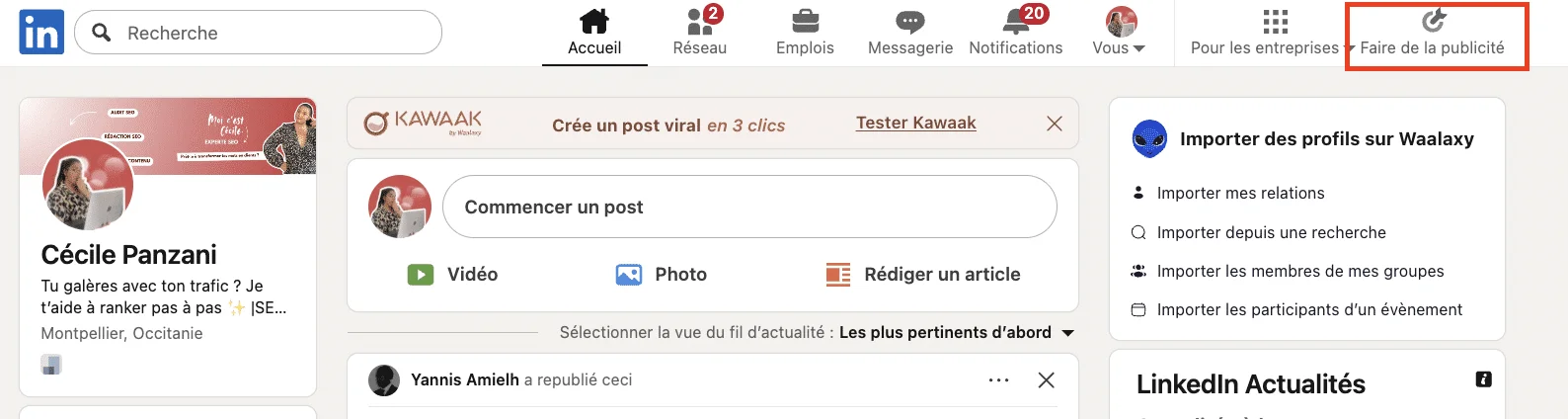
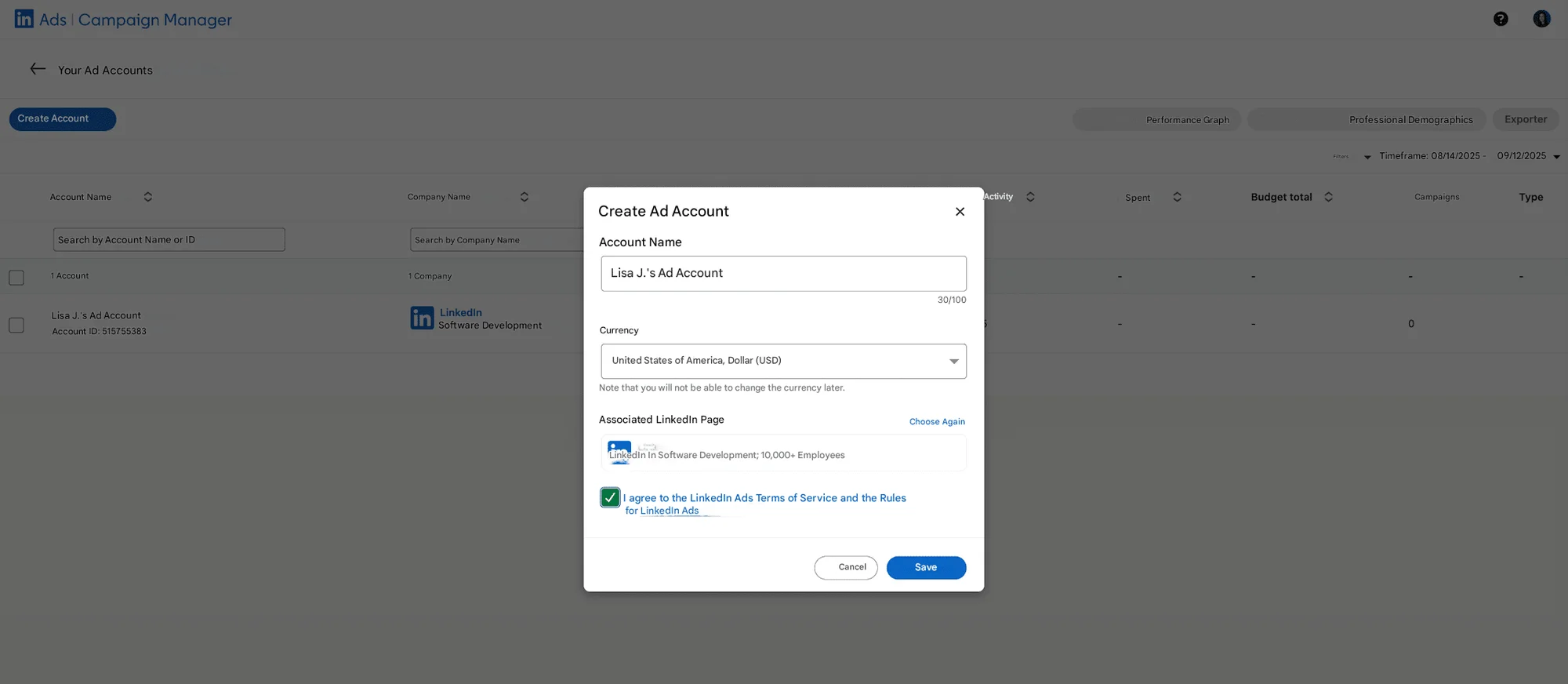
Next, create your Campaign Manager account. You'll need to set up double authentication to access the LinkedIn page to be added to the campaign.
Step 2: Create a campaign with the objective “Lead generation”. This is the
lead gen forms example. 👇🏻
To use a Lead Gen Form, you must first create an advertising campaign.
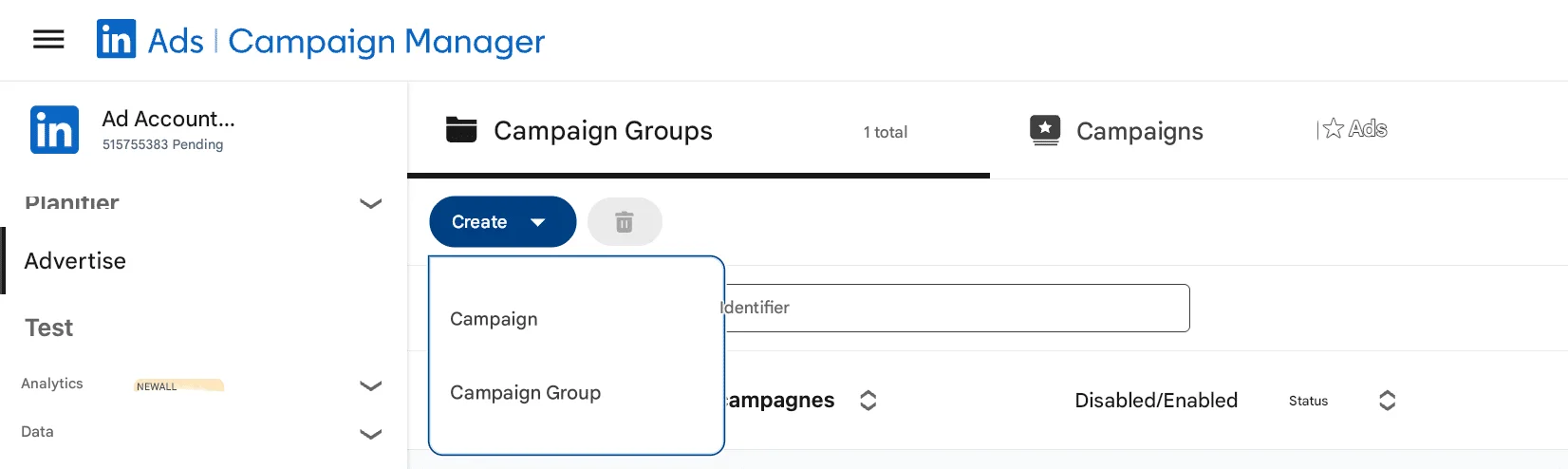
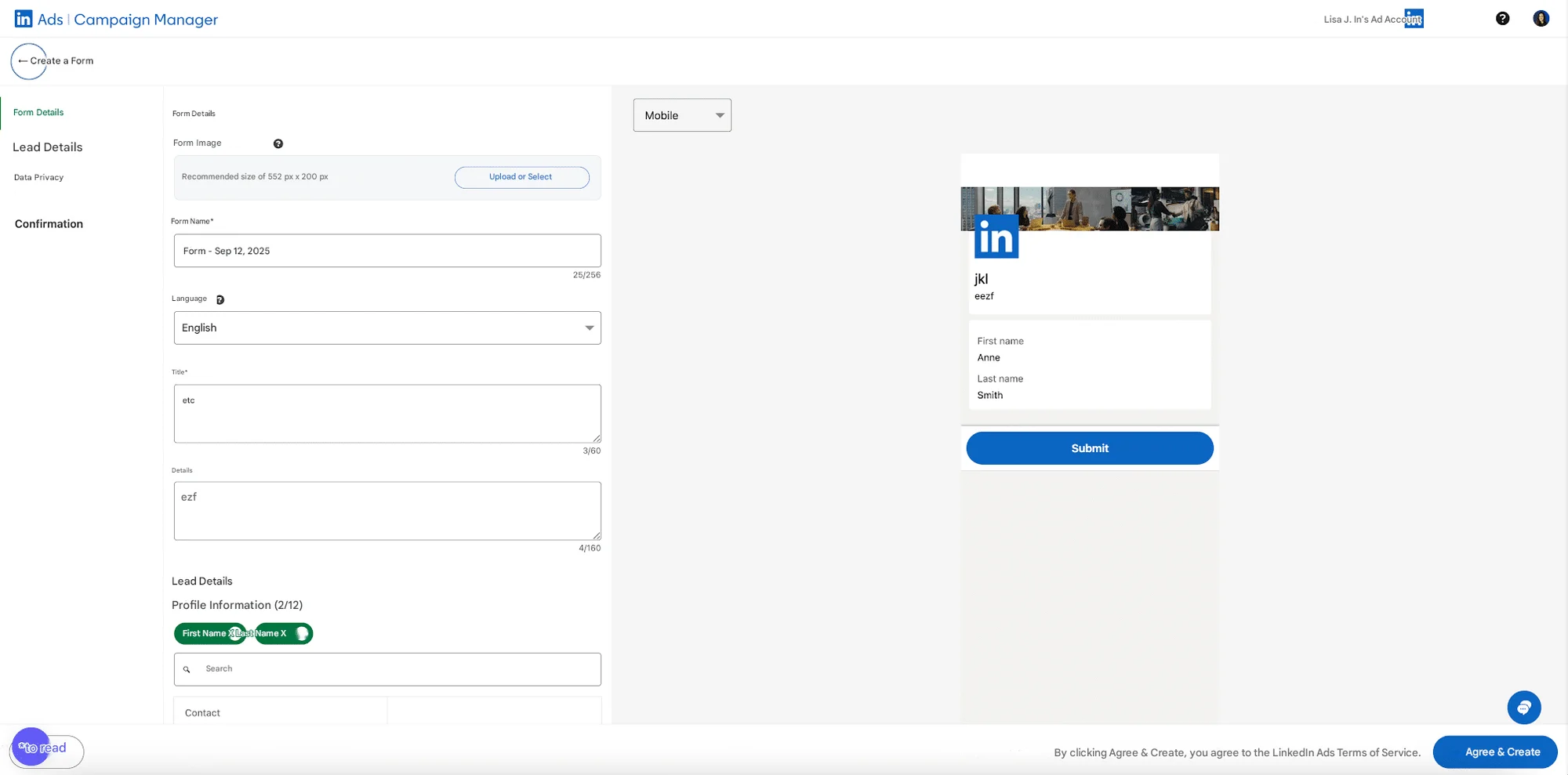
Click on Resources and choose lead generation form.
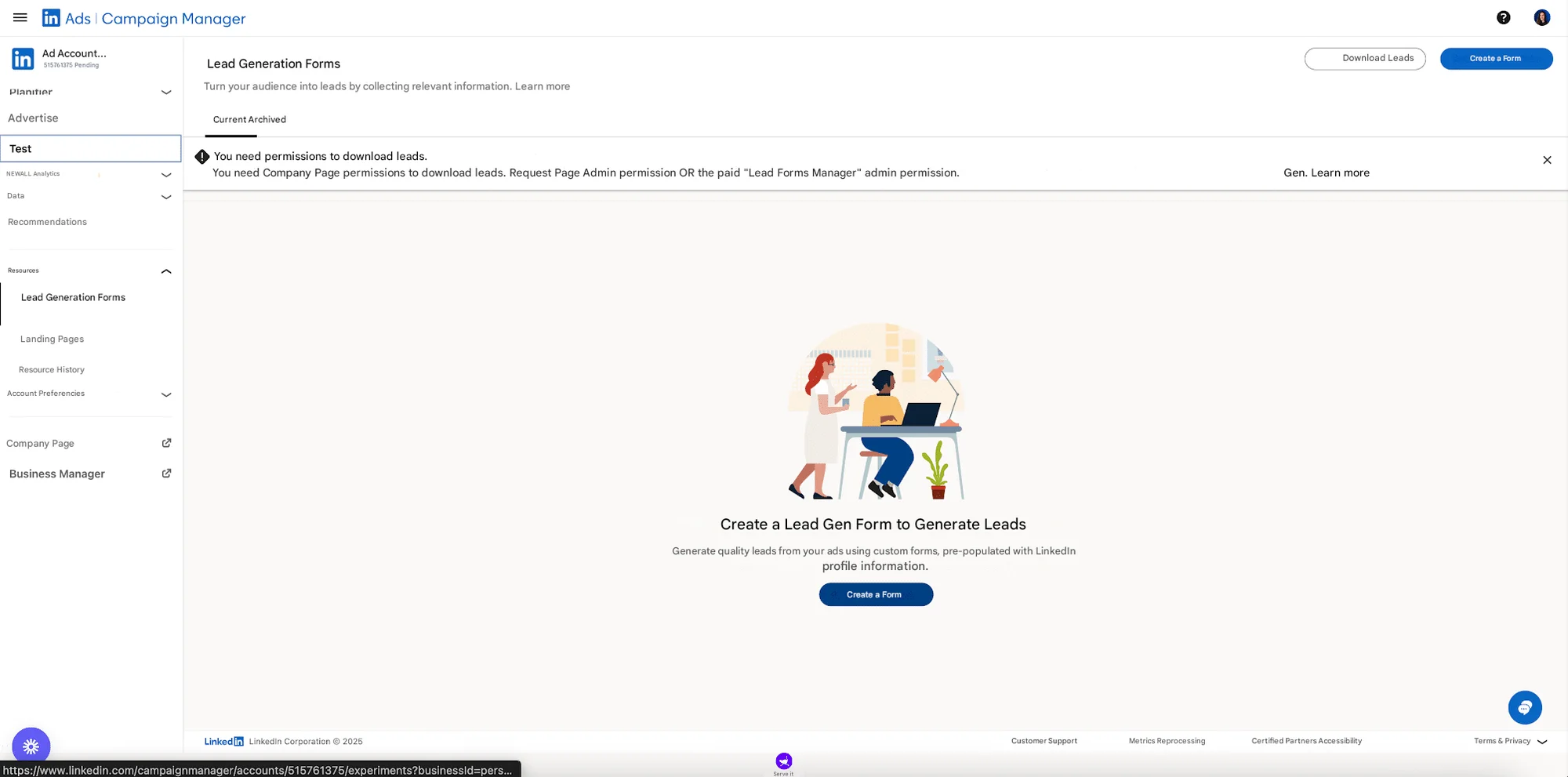
Fill in the form: Form details, prospect details, privacy policy, thank you message...
Specify your placements (LinkedIn feed, InMail...) and your budget.
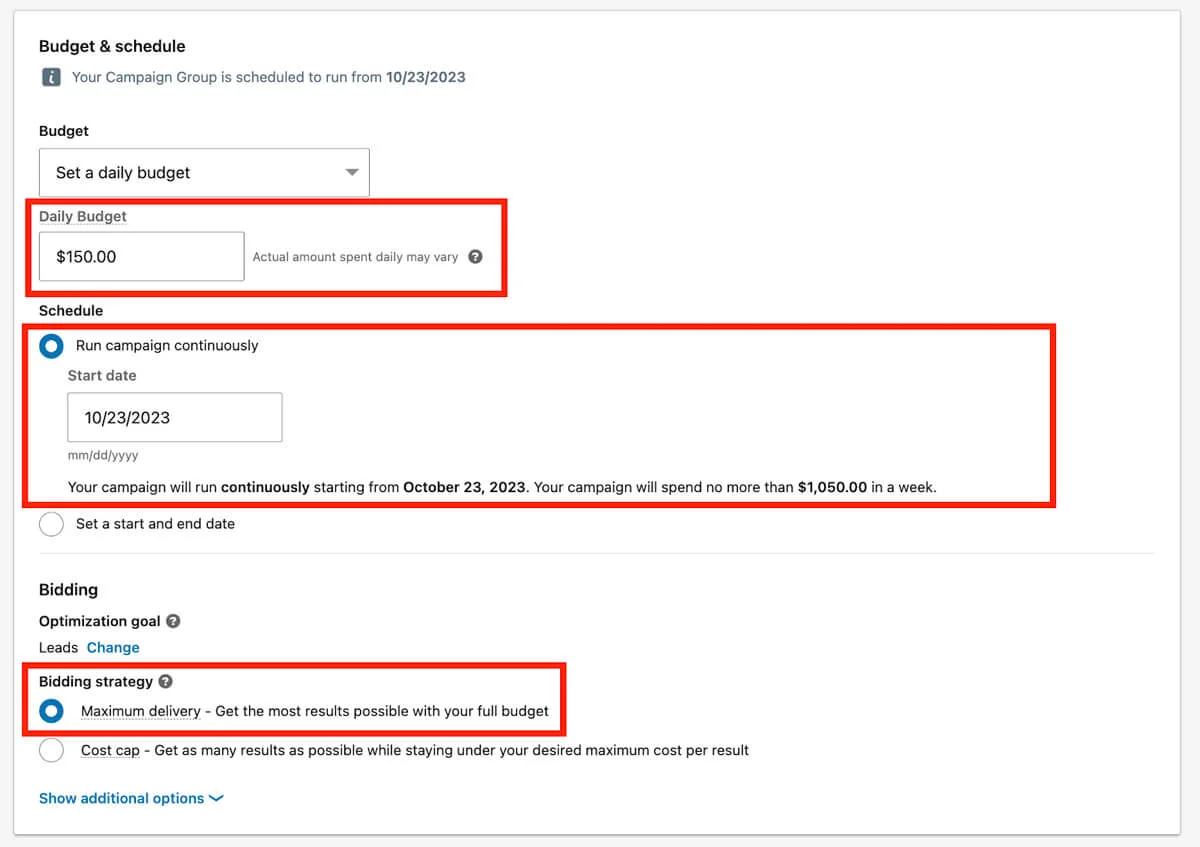
💡 Tip: start with a test budget to validate your audiences (for example, €30-50 / day).
Step 3: Finalize and launch the form.
And that's it; you've created your first LinkedIn Lead Gen form 🎉.
Linkedin lead gen form best practices
When it comes to digital prospecting, the secret is not to “shoot everywhere” but to create a fluid and efficient path. You have a real co-pilot for your campaigns: he automates your mailings but keeps you in control of the relationship between your LinkedIn Lead Gen forms. Here are a few best practices to adopt. 👇
Limit the number of fields: The less information you request, the more likely your prospects are to follow through, resulting in minimal friction ✅.
A clear call-to-action: Please focus on one objective per campaign, such as download, demo, or call, to ensure the message remains clear.
A/B Testing: Test your catchphrases, visuals, and CTAs. The winners will feed your future campaigns.
To take things further, it’s crucial not to settle for a “default” form. A few simple optimizations can make all the difference:
Add clear perceived value: Why should someone fill out your form? Try hooks like “Get access to the exclusive study” or “Book your free audit” 🐀.
Use benefit-driven CTAs: Instead of a plain “Submit”, test options like “Get my guide” or “Schedule my demo” 👀.
And remember: good marketers don’t rely on gut feeling — they rely on data. Here are the key KPIs you should track to measure the effectiveness of your Lead Gen Forms 👇🏻
CPL (Cost per Lead) 💸: How much does each lead generated through your forms cost you?
Conversion rate 👀: % of users who click your ad and complete the form.
Completion rate 📝: How many start the form and actually finish it.
Lead quality ☎️: Metrics like booked meetings or opportunities created.
Overall campaign ROI 💰: How much revenue is generated for every dollar spent.
How can Lead Gen Forms be integrated into a B2B strategy?
If you're involved in B2B prospecting, you know that lead quality counts as much as quantity. A well thought-out form, integrated into a global strategy, can transform your LinkedIn campaigns into a veritable machine for generating qualified leads. But beware: a Lead Gen Form on its own, with no connection to your tools and no nurturing behind it, risks producing nothing but “leads lost in the wild”. 🥲
1. Connect your CRM: your leads have to live somewhere.
A form generates data... but it has to be put to good use. Imagine: every new prospect who fills in your Lead Gen Form should land directly in your CRM.
👉 But how?
Zapier is your best ally: it bridges the gap between LinkedIn and your tools in just a few clicks. Example: Lead Gen Form → Zapier → Waalaxy.
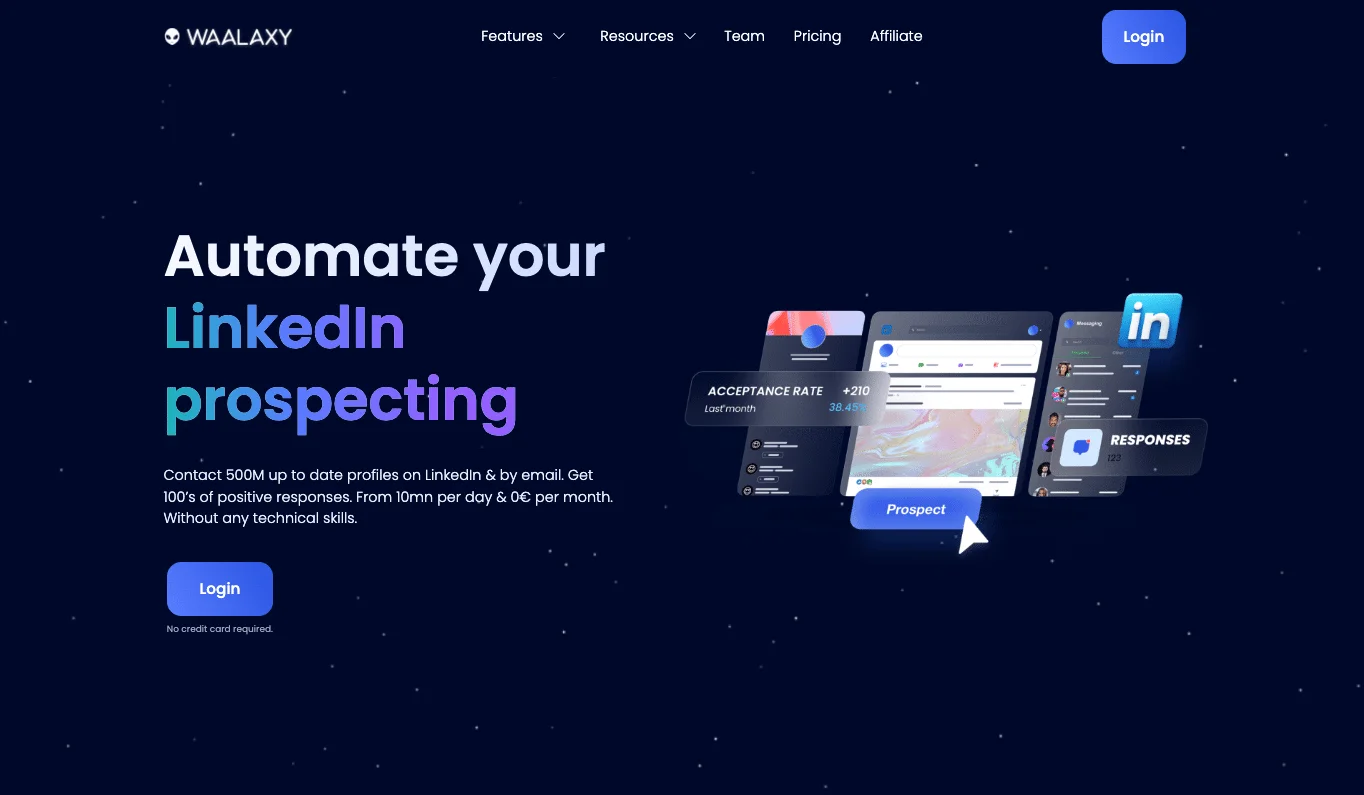
The result: you centralize all your prospect files without manual handling. Fewer errors, less time wasted, and above all... clear follow-up from day 1.
2. Automation with Waalaxy: scaling without losing the human touch
Once your leads are stored, the real game begins: how do you turn a simple contact into an engaged prospect? That’s where Waalaxy steps in ✨. It goes far beyond basic automation — it becomes your true prospecting co-pilot.
With Waalaxy, you can 👇🏻
Sync your data with your CRM: native integrations (HubSpot, Pipedrive, Salesforce) or via Zapier 🔗. Result: your leads flow automatically, no more manual copy-paste.
Easily import leads: upload a CSV from your CRM or trigger auto-imports based on lead behavior (clicks, replies, no response, etc.).
Enrich your data: add key info (industry, company size, role) to better target and prioritize your outreach 🎯.
Launch personalized sequences: connection → tailored message → soft follow-up. Each step is customizable to keep the human touch 🤝.
Build multi-channel workflows: LinkedIn + = higher chances of grabbing attention.
Score leads with tags: track who opens, replies, or clicks. Focus your efforts on the hottest prospects 🔥.
Access clear reporting: monitor campaign performance (acceptance rates, replies, meetings booked) right from your dashboard 📊.
Stay safe with quotas & LinkedIn limits: everything is designed to keep you compliant and avoid bans 🛡️.

You create a fluid, non-intrusive tunnel. Automation saves you time, but personalization keeps the human approach 💬.
3. Relay with nurturing: cultivate your leads
Not all your leads are ready to buy right away (and that's normal!). That's why lead nurturing is essential:
Emailing: Create sequences of useful content (studies, customer testimonials, case studies) 📨
Retargeting: Set up targeted advertising campaigns to stay on their radar (LinkedIn Ads, Meta Ads).😉
Social Selling: Make regular interactions on LinkedIn (comments, likes, messages). 👀
👉 The idea is to remain present without being oppressive. The lead needs to perceive you as a reliable, expert partner, not a pushy salesman.
Shall we have a recap on LinkedIn Lead Generation forms?
LinkedIn Lead Gen Forms aren't just a gimmick but a strategic asset for all your B2B lead generation campaigns. By reducing friction to a single click, they instantly improve your conversion rates 📈 and enable you to collect better-qualified leads 🎯, while reducing your customer acquisition cost 💸.
But their true potential is revealed when integrated into a comprehensive strategy, especially if you use LinkedIn Lead Gen Forms as part of your LinkedIn marketing automation workflow:
🔗 Connection to your CRM to centralize data,
🤖 Automation with a tool like Waalaxy to engage your prospects without wasting time,
🌱 Intelligent nurturing via emails, retargeting and social selling to stay present in their journey.
👉 Result: your LinkedIn campaigns stop being mere advertisements and become a true value-generation tunnel, turning your leads into concrete business opportunities.
Frequently asked questions
Very good question 😏! The difference may seem subtle at first, but it changes absolutely everything in terms of performance.
👉 The classic contact form (often linked to an external landing page) works like this:
The user clicks on your "sponsored content"...
He's redirected to your site or landing page.
He waits for the page to load (often more slowly on mobile).
They must manually fill in all their details (first and last name, email address, job title, company, etc.).
They validate.
At each stage, you lose people. It's called the “funnel leak”. One click, then another... then the user gets bored 😬.
👉 LinkedIn's Lead Gen Form, on the other hand, does away with these unnecessary steps:
The form opens directly in LinkedIn (no redirection 🚀).
It's already pre-filled with LinkedIn profile info (name, position, company, pro email).
All the user has to do is click on “Send” ✅.
Result: an average 5× higher conversion rate (≈13% vs. 2-3% for a classic landing page). ✨
This is a super common question and the short answer is: yes, the tool itself is free… but using it isn’t totally “free” 😉. Let’s break it down.
👉 The forms themselves cost nothing.
When you create a Lead Gen Form inside Campaign Manager, LinkedIn doesn’t charge you for building it. You can customize the fields, add your copy, set up your privacy policy link, and even reuse the same form across multiple campaigns — all for $0. 😌 If you want to dig into the exact requirements (field limits, design options, data storage), check out the LinkedIn Lead Gen form specs for all the technical details.👀
👉 But… you’ll pay for the ads.
Lead Gen Forms only work inside paid LinkedIn Ads campaigns. That means if you want people to actually see and submit your form, you’ll need to run ads with the “Lead Generation” objective. Your costs will depend on LinkedIn’s auction system (CPC, CPM, or CPL), your targeting, competition in your industry, and your bidding strategy.😎
So while creating the form is technically free, getting leads through it requires an ad budget 💸.
Here too, the answer is clear 🔎: Lead Gen Forms shine particularly brightly on mobile 📱. Why?
Over 60% of LinkedIn traffic today comes from a smartphone.
Traditional landing pages are often heavy and take a long time to load on mobile ⏳.
With a Lead Gen Form:👇🏻
No redirection, the form opens in the LinkedIn app.
Pre-filled info = one click and it's sent ⚡.
Fluid customer experience, designed with the mobile user in mind.
That said, on desktop 💻 they remain highly effective too: the simplicity of the experience reduces cognitive load and encourages immediate action.
👉 So yes, they work in both cases, but the competitive advantage is even stronger on mobile. If you're targeting decision-makers on the move, in transit, or between meetings, Lead Gen Form is clearly your best ally.
LinkedIn Lead Gen Forms are powerful, but they're not your only allies. Depending on your needs, other platforms offer interesting solutions.👇
Tool | Strengths | Limits |
|---|---|---|
Meta Ads (Facebook/Instagram) | Highly effective for B2C, huge reach, behavioral | Less relevant for B2B, variable lead quality |
Google Ads Lead Form Extensions | Capture leads directly from a Google ad, enormous visibility | Less fluid experience, often desktop, CPL sometimes high |
Typeform | Great UX, interactive and engaging forms | Not native to social platforms, requires more steps |
JotForm | Flexible, customizable, good value for money | Less optimized for social or native advertising |
Google Forms | Free, easy to use, collaborative (linked to Google Drive) | Not suitable for native advertising, little customization and no advanced CRM integration |
By now, you know all about LinkedIn Lead Generation forms. 🚀