
Clicking "Connect" profile after profile eats hours of your week. LinkedIn auto connect fixes that in three moves. You target a list or an interest signal, like the people who visit your profile or comment on your posts. You pick a campaign that includes an invitation. Then the tool sends your requests at a steady pace, under LinkedIn's limits. In this guide, you get the step-by-step Waalaxy tutorial, the limits that keep your account safe, the data-backed answer to "note or no note" and how to chain a follow-up. 👽
What is LinkedIn auto connect?
LinkedIn auto connect means a LinkedIn connection request sent by a tool on your behalf. You decide who gets it and at what pace. The tool handles the rest, day after day. You'll also see it called LinkedIn auto invite or automatic LinkedIn invitations. The idea stays the same: swap hundreds of manual clicks for a targeted list that works through itself.
In practice, LinkedIn auto connect gives you four things:
Time back, which you spend talking to prospects instead of clicking.
Steady sending, even in weeks when you don't have a spare minute.
Precise targeting, because you invite a list you picked, not just anyone.
A smooth handoff to messages as soon as the invitation is accepted.
Why automate LinkedIn connections?
Inviting people by hand works while you contact ten of them. Past that, you forget profiles, you send everything on Monday and nothing the rest of the week, and you lose track of who accepted. With LinkedIn auto connect, sending becomes steady, targeted and tracked with zero effort on your side. 🙌
Waalaxy runs in the Cloud, so your campaigns keep going even when your computer is off. It works with a free LinkedIn account, a Premium account or Sales Navigator. And you don't need to be an expert: 75% of Waalaxy customers had never done automated prospecting before using it.
Manual, extension, cloud tool or AI agent: which method should you pick?
There are four ways to send your invitations. What really sets them apart is one question: who picks the target and who writes the messages? If you want a wider comparison of LinkedIn bots, use this table as your starting point.
Method | Who targets and writes? | Sending pace | Best for |
|---|---|---|---|
Manual sending | You, one profile at a time. | Irregular, depending on your time. | A few targeted invitations per week. |
Browser extension | You, the extension clicks for you. | Only while your browser is open. | Small volumes, occasional use. |
Cloud tool (Waalaxy) | You pick the list and the template. | Steady, spread over your days and hours. | Anyone who prospects every week. |
Prospecting agent (Waalaxy AI) | The agent suggests targets and writes, you approve or let it run. | Steady, within your working hours. | People who never learned how to prospect. |
The rest of this guide focuses on the cloud tool, with Waalaxy. The agent gets its own section further down.

Your prospecting agent at half price, for life
€100€50/month, annual plan
Nov 27 12am to Nov 28 noon CET
Discover Waalaxy AI →14-day free trial
How to set up LinkedIn auto connect with Waalaxy
It comes down to two moves. You choose your prospects, then you launch a Waalaxy campaign that includes an invitation step, with or without a note. To find those prospects, Waalaxy gives you four sources, and three of them rely on Auto-import: your campaign fills itself as soon as a new profile matches the criterion.
Source | Interest signal | Add a note? |
|---|---|---|
List imported from LinkedIn or Sales Navigator | Low: they don't know you yet. | No on a broad target, yes on a niche. |
People who visit your profile | Medium: they came to see who you are. | No, or a very short note. |
People who comment on your post | Strong: they reacted to your content. | Yes, one line that mentions the post. |
People who invited you | Very strong: they made the first move. | No invitation to send, the tool accepts theirs. |
The stronger the signal, the more likely your request gets accepted. Here's the step-by-step for each source. 👇
1. Invite a prospect list imported from LinkedIn or Sales Navigator
Your acceptance rate depends first on how relevant your target is. Inviting off-target profiles drags your results down and hurts your credibility. So build a clean prospecting database before you launch anything, for example from a LinkedIn Sales Navigator search or a regular LinkedIn search.
Then follow these steps:
Install the Waalaxy Chrome extension and connect your LinkedIn account.
Import your prospects into a list from LinkedIn or Sales Navigator.
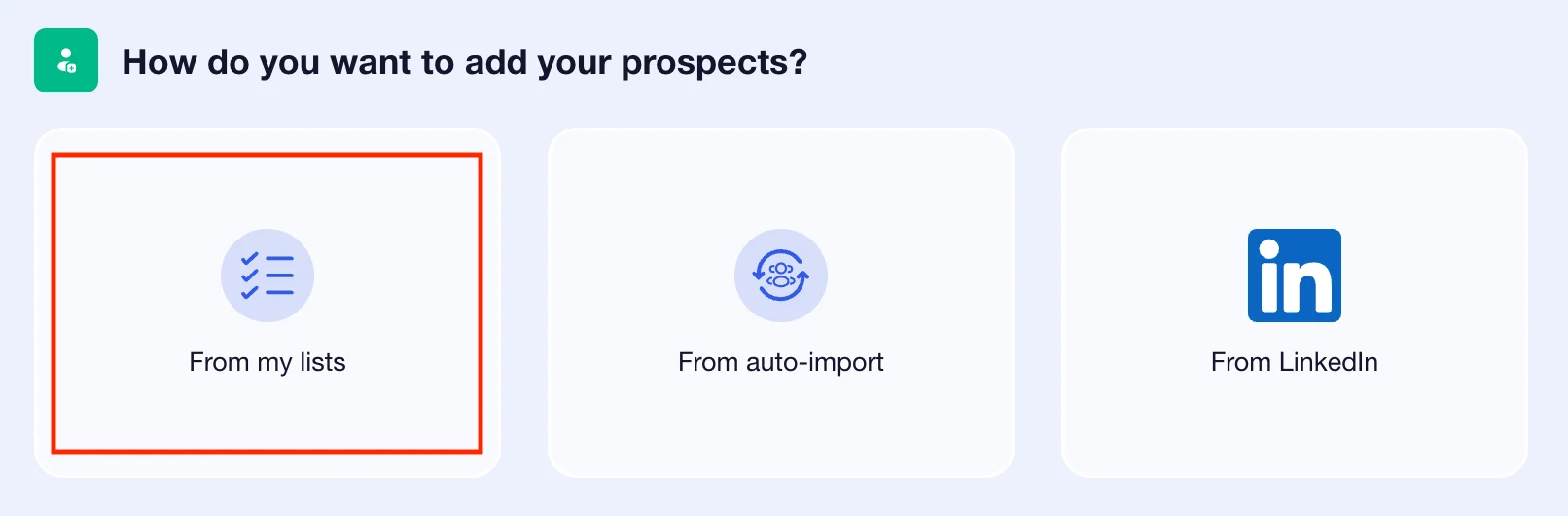
Go to the Campaigns tab, then click "Start a campaign".
Pick a template that includes an invitation, for example "Invitation" alone or "Invitation + 2 Messages".
Add prospects from your list.
Write your invitation note, or leave it blank, then launch the campaign.
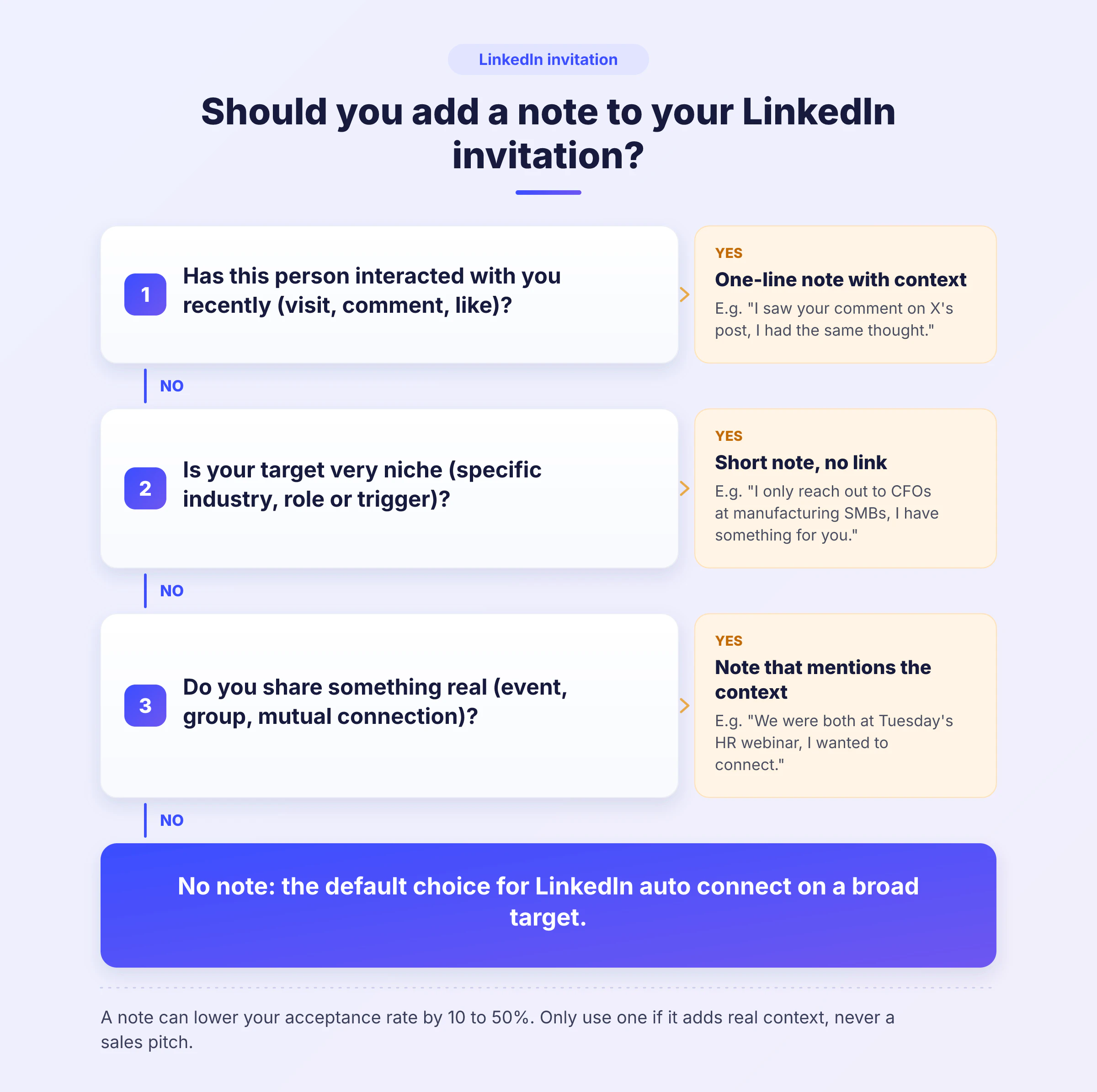
Once your prospects are added, Waalaxy asks whether you want to include a note. That's the step people hesitate over most. 🤔
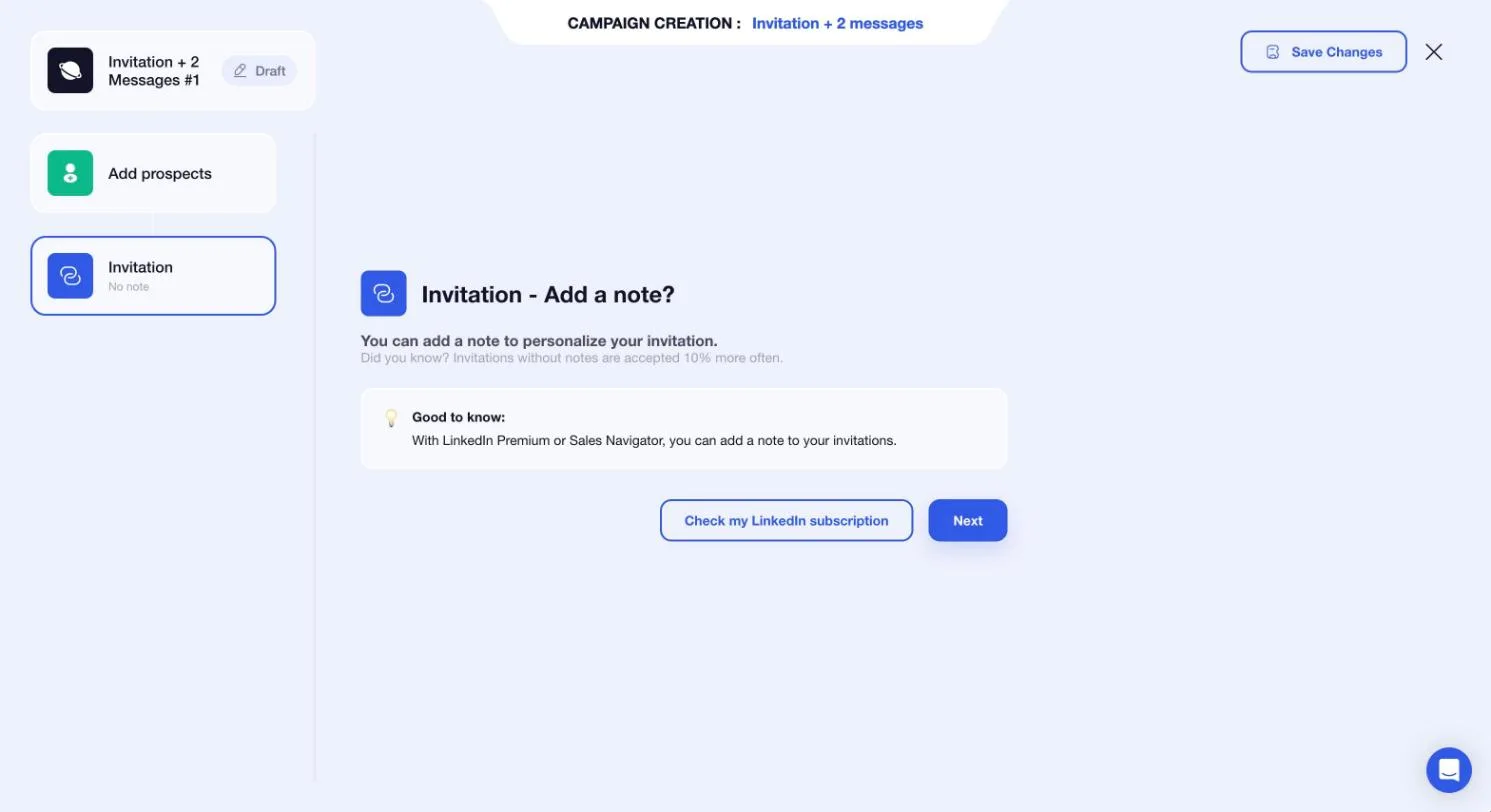
Choose based on your target, then confirm. The campaign then moves into the queue and the invitations go out over the following days.
Keep one simple rule in mind about the note. The numbers behind it come further down.
Your first campaign is ready in a few minutes, and then it runs without you.
2. Automatically invite people who visit your profile
When someone visits your profile, they've already shown a first sign of interest. Maybe they're looking for a service like yours, or they want to know who you are. So they're more likely to accept your request. An optimized LinkedIn profile does the rest of the work when they click "Accept".
To send a LinkedIn auto connect request to every visitor, follow these steps:
Go to the Campaigns tab and click "Start a campaign".
Pick a template that includes an invitation.
Under "Add prospects", select the list that will store your visitors.
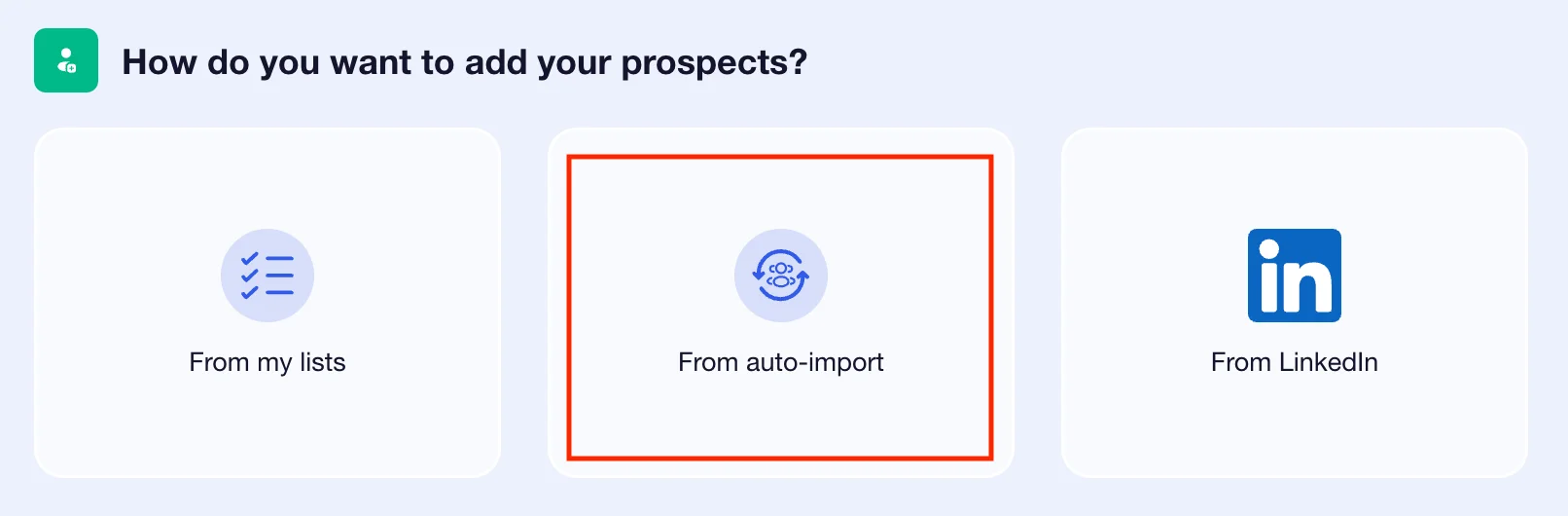
Click "From auto-import".
Choose "Visited my profile", write a note or skip it, then launch the campaign.
The next screen lists the available Auto-import criteria. Select the profile visit.
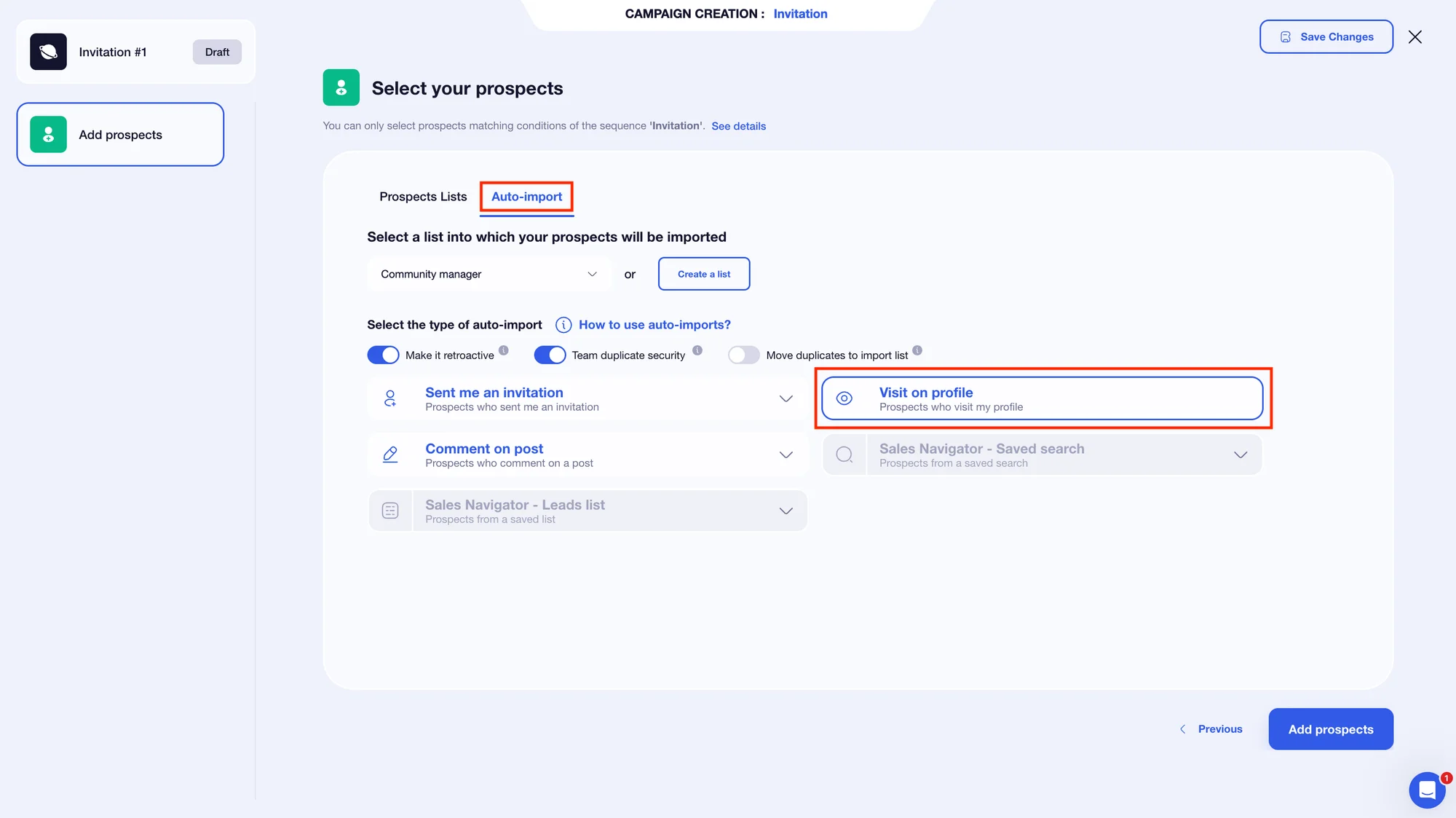
You can also pull in past visitors, not only future ones.
3. Invite the people who comment on your posts
Someone who comments on your content has already interacted with you. They know your expertise and your tone. It's one of the strongest intent signals you can capture. Every LinkedIn post that performs well turns into a source of warm prospects.
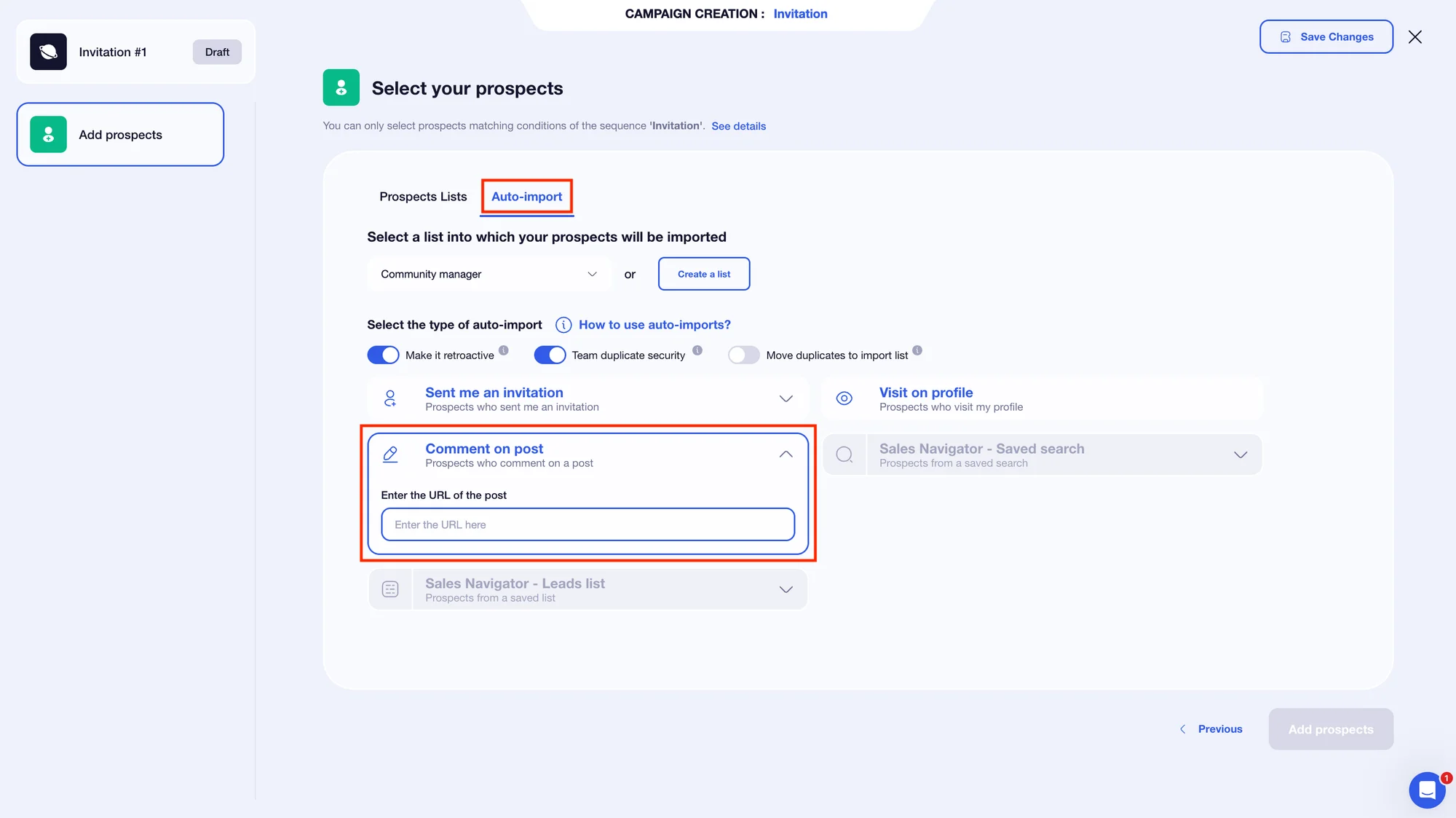
The flow is the same as for visitors. In Auto-import, select "Commented on a post", paste your post's URL, and Waalaxy collects everyone who commented. They then get your LinkedIn auto connect request. A note that mentions the post works well here, since you share the context. 💬
4. Automatically reply to people who invite you
Last case, the opposite of the other three. Here, other people invite you. Choose the "Sent me an invitation" Auto-import and tick "Automatically accept the invitation". Waalaxy then accepts the requests you receive and adds those people to your campaign, so you can send them a welcome message, for example.
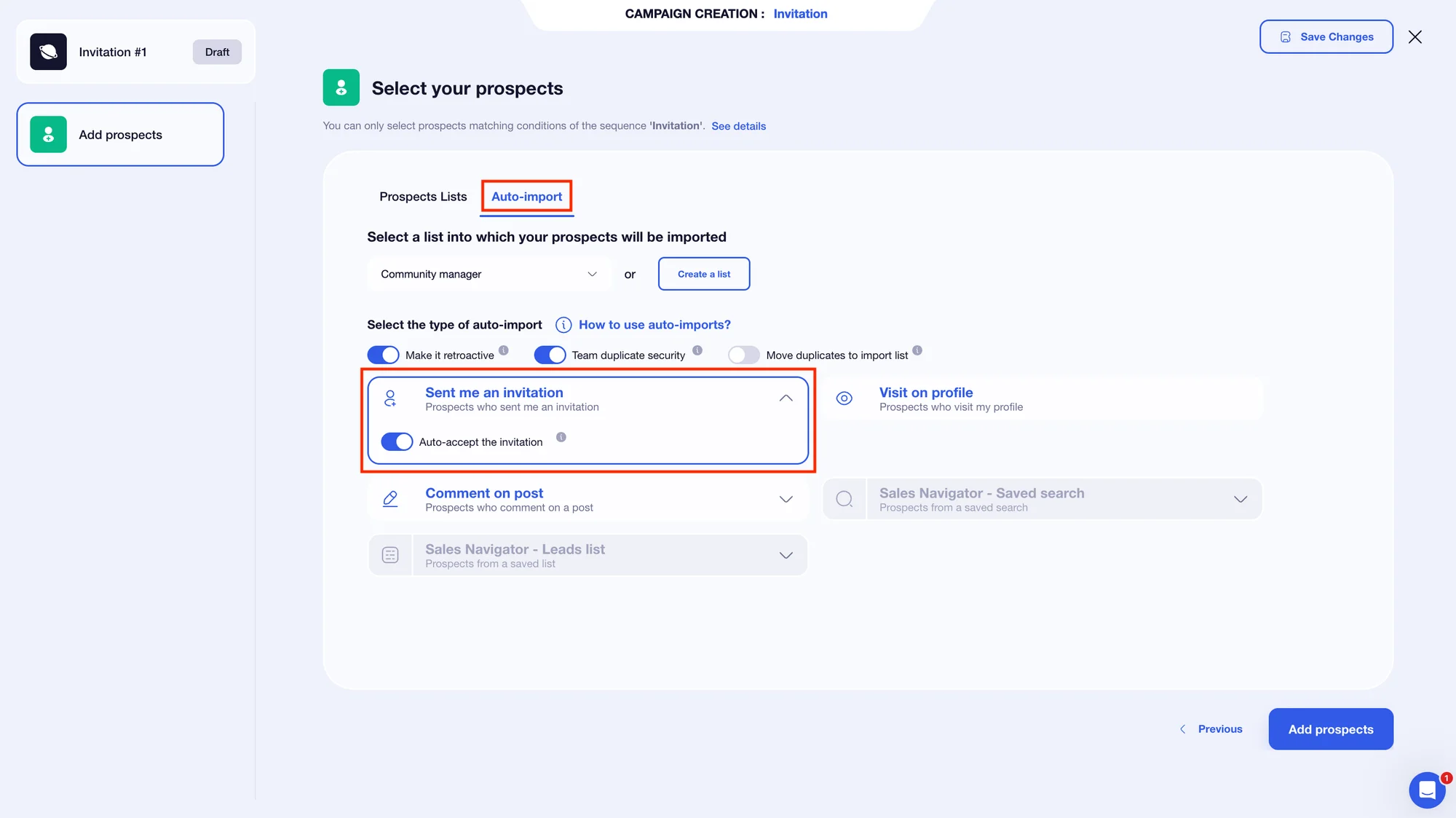
Don't accept everyone blindly. Before you launch this Auto-import, sort manually through your pending invitations and decline the ones outside your target. To go further, see how to accept all LinkedIn invitations without hurting the quality of your network.
Schedule your sending days and hours
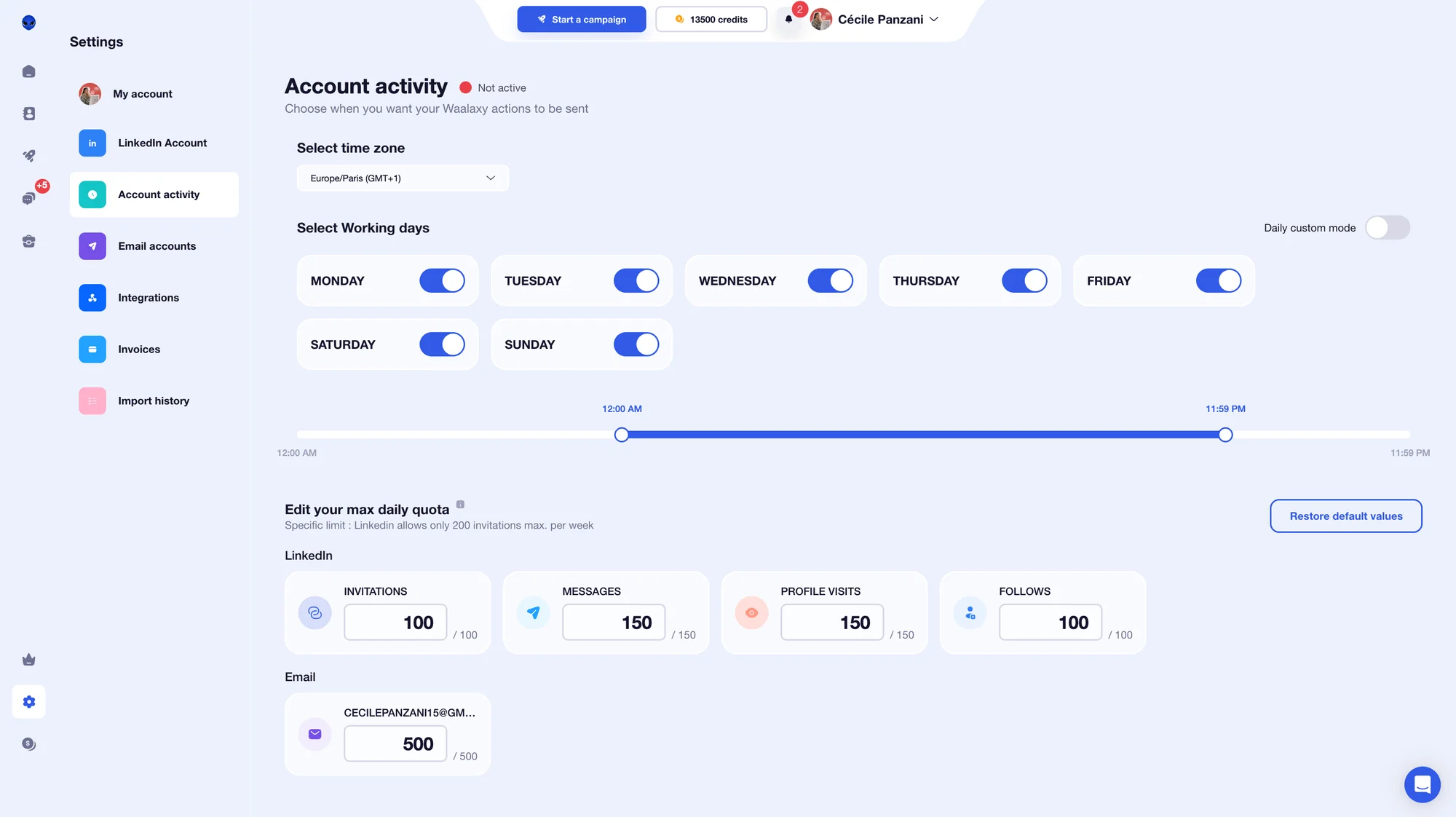
Your invitations go out when you decide. Go to Settings > Account activity, pick your sending days and time slots, then your time zone if you prospect internationally. 🌍 This setting helps you:
Send your invitations when your target is online.
Respect the time zone of prospects based abroad.
Spread out sending instead of firing everything at once, which looks more natural.
Chain your invitation with messages and a follow-up
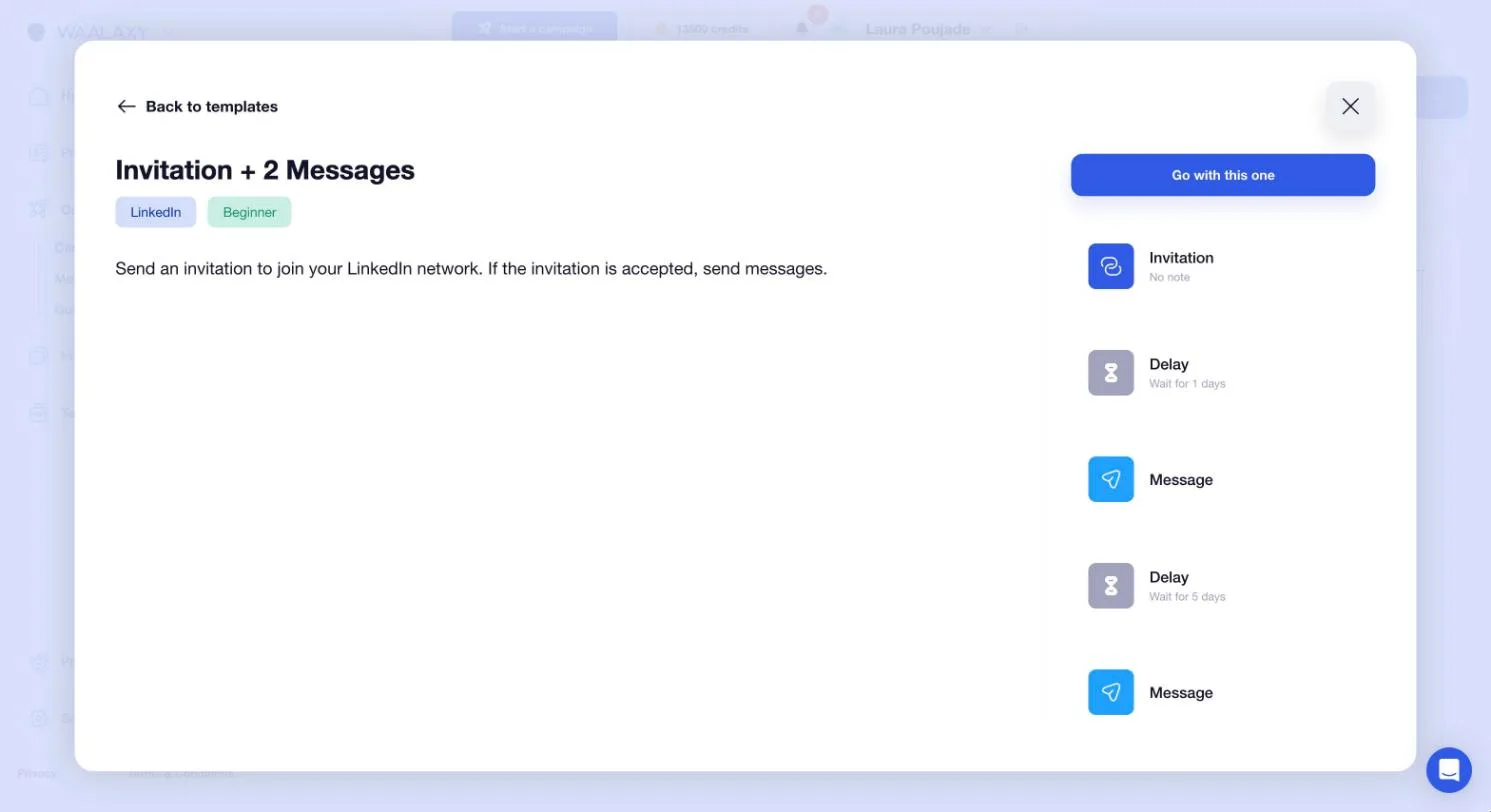
An accepted LinkedIn auto connect request is only the start. What books meetings is what comes next. With the "Invitation + 2 Messages" template, Waalaxy sends your invitation, then a first message as soon as it's accepted, then a follow-up if the person doesn't reply. You can also add an email step for people who don't accept, which is called multichannel prospecting. To set up your automated LinkedIn follow-ups properly, space each message a few days apart.
Depending on how the prospect reacts, two scenarios open up.
If the invitation is accepted: your first message
Your first message should be short and value-driven. No sales pitch in the first line. Your automated LinkedIn messages work better when they follow a few simple rules:
Stay under 500 characters.
Talk about your prospect's problem before you talk about your offer.
Ask one easy question that invites a reply.
Change the angle in your follow-up instead of asking "did you see my message?".
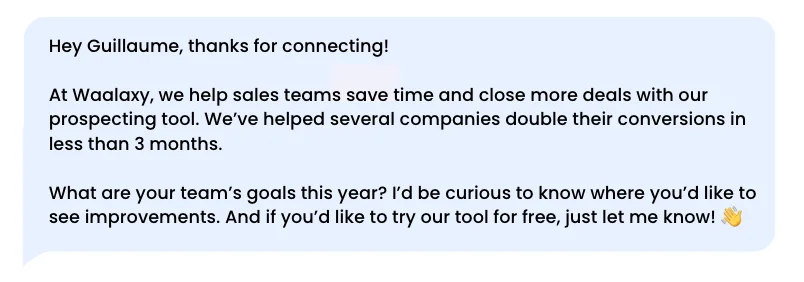
Stuck for words? Waami, the AI message generator built into Waalaxy, gives you a first draft to rework. Here's a follow-up example that changes the angle:
If the invitation gets no answer: follow up by email or withdraw it
LinkedIn doesn't let you follow up on a pending invitation. Until it's accepted, you can't message the person, except through InMail. So you have two options. 😅
The first is to withdraw the invitation and send a new request later. Do it sparingly, so you don't come across as pushy. The second is to switch channels. Waalaxy's Email Finder looks for the prospect's work email, then an email step takes over in the same campaign. For B2B email in the UK, the ICO sets out the rules for business-to-business marketing: the message should relate to the person's job, say who you are and offer an easy way to opt out. Rules differ by country, so check the ones that apply to your market.
Switching to email also lets you reach the people who rarely log in to LinkedIn.
LinkedIn auto connect: the rules that keep your account safe
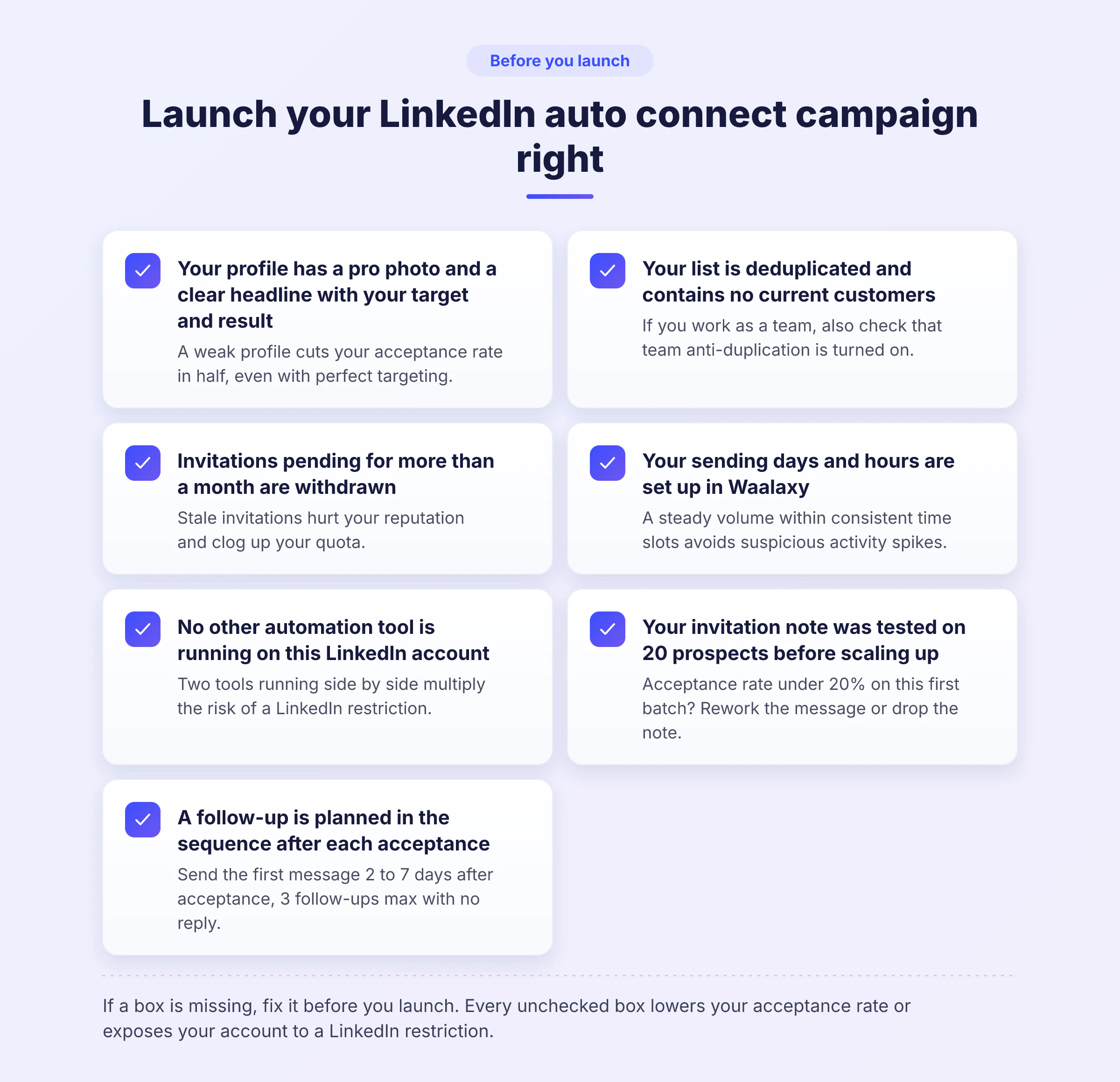
Automating doesn't mean sending without limits. Three topics decide whether your account stays healthy and your invitations get accepted: volume, the note and the classic mistakes.
LinkedIn limits: how many automatic invitations should you send?
LinkedIn doesn't publish an official number. In practice, the weekly LinkedIn invitation limit sits around 200 invitations per week, depending on your account and its history. It applies to your account, whatever tool you use. For safe LinkedIn auto connect, follow these rules:
Ramp up gradually if your account has never prospected, instead of aiming for the max in week one.
Spread sending over your working days rather than sending everything on Monday.
Watch your acceptance rate: if it drops, rework your target or your note.
Remember that shared limits add up across tools on the same LinkedIn account.
If you think day by day, check the recommended number of LinkedIn connections per day for your account type. 📅
Clean up your pending invitations
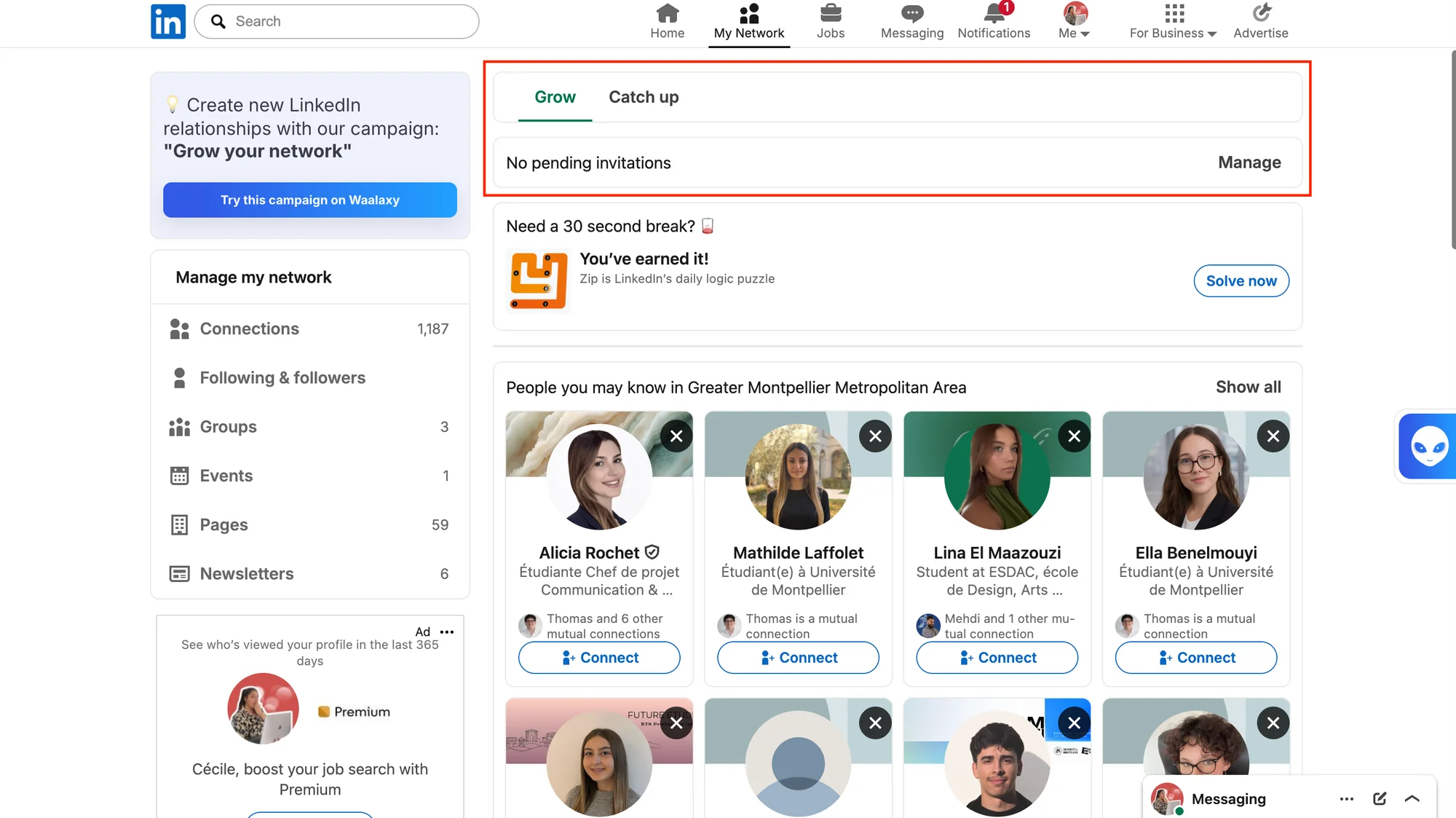
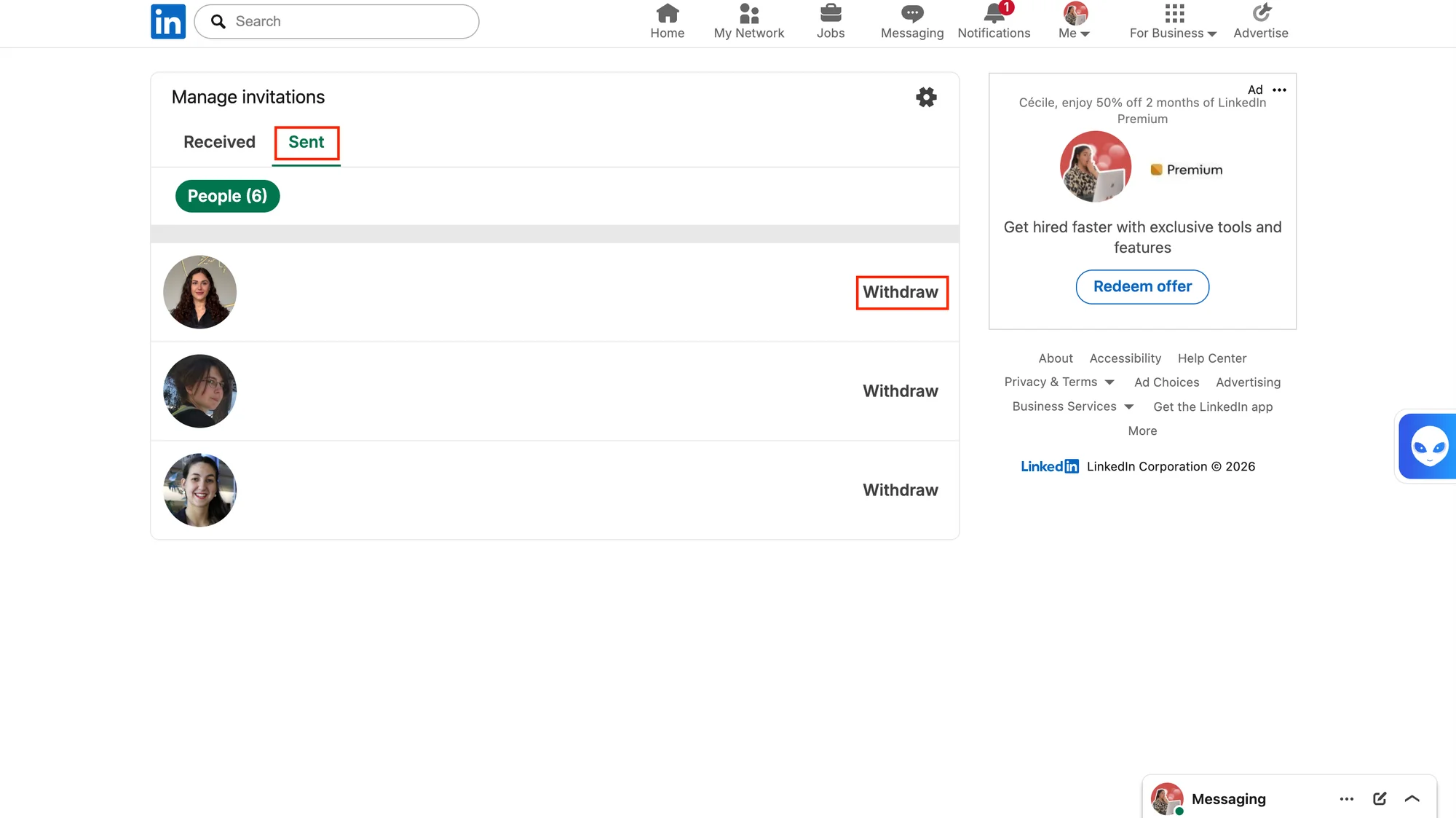
Hundreds of LinkedIn auto connect requests left pending send a bad signal to LinkedIn. To withdraw a LinkedIn invitation, go to "My Network", then "Manage" next to invitations, and open the "Sent" tab.
Next to each profile, click "Withdraw". It's instant and the person gets no notification. 🤫 In Waalaxy, each campaign's dashboard also shows pending, accepted and sent invitations.
Do this cleanup once a month, starting with the oldest invitations.
Invitation note or not: what do the numbers say?
Waalaxy compared the results of 2,000 invitations by type of note. The outcome often surprises people:
Type of note | Acceptance rate |
|---|---|
Blank note | 38% |
Non-personalized note | 36% |
Personalized note | 33% |
Full note, no link | 32% |
Full note, with link | 26% |
Without a note, your request feels more natural and lands better on a broad target. A link makes acceptance drop, so keep it for later. On a niche target or a warm prospect, a short note is still a good idea. For inspiration, browse these LinkedIn invitation message examples or these LinkedIn connect message templates.
Prefer a note? Draft a first version with this free generator, then cut it down as much as you can.

LinkedIn prospecting message generator
Describe what you sell and to whom: the tool writes your first message, focused on your target’s problem.
Always reread the generated note. One line of context is enough, with no sales argument.
Mistakes to avoid with LinkedIn auto connect
Even with a good tool, some mistakes wreck your results or trigger LinkedIn warnings. Here are the six most common ones:
Sending too many invitations at once, instead of sticking to the limits above.
Poor targeting, inviting profiles that have nothing to do with your offer.
Using the same message for very different targets.
Turning your invitation into a sales pitch, which drives people away from the first line.
Leaving hundreds of invitations pending without ever withdrawing them.
Running two tools on the same account, when their limits add up.
Fix these six points and LinkedIn auto connect becomes a safe habit that works for you every week. 💪
Invite your connections to follow your LinkedIn page
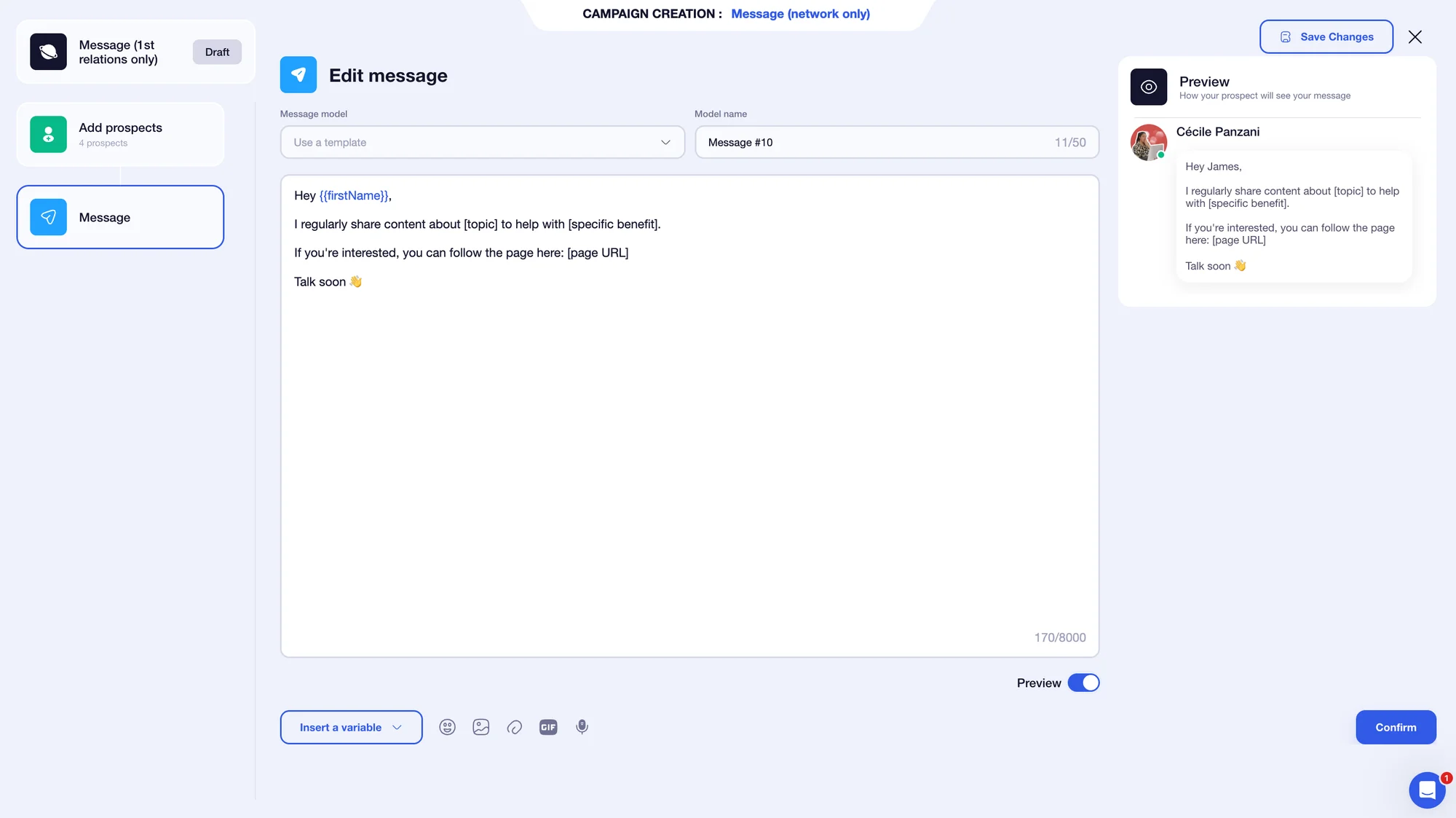
Your network can also grow your LinkedIn company page. On LinkedIn, inviting people to follow a page happens from the page itself, in the admin tools menu, with a limited number of invitation credits each month. It isn't LinkedIn auto connect in the strict sense, but you can complement it with Waalaxy by messaging your connections with a link to your page.
Here's how to do it in four steps:
Import your connections into a Waalaxy list, through Auto-import or an existing list.
Create a campaign with a message template.
Write a short message that explains what the page posts, with your page URL.
Launch the campaign.
Your connections already know you. They're a qualified audience that gives your content reach from day one. 📢
What if an agent handled your invitations for you?
Waalaxy carries out your strategy, because you're the one who picks the target and writes the messages. If you've never learned how to prospect, that step often blocks you before the first invitation even goes out. That's where Waalaxy AI comes in. It's a separate product from Waalaxy, an AI agent for LinkedIn prospecting that does the work end to end. 🤖
You give it your website URL. The agent suggests 2 to 4 targets, finds prospects and filters out the ones that don't fit. For each prospect, it sends an invitation without a note, then three messages written from their profile. It runs the conversation and hands over to you when it's time to close. You choose its level of autonomy: Assisted, where you approve every message, Semi-autonomous, where you only approve its replies, or Autonomous, where it sends and replies on its own. In every case, it works within your working hours.
LinkedIn limits are still those of your account. They're shared between Waalaxy and Waalaxy AI, so pause your Waalaxy campaigns on that account while the agent runs. Waalaxy AI costs $100 per LinkedIn account per month, with a 14-day free trial.
LinkedIn auto connect: key takeaways
Well-tuned LinkedIn auto connect gives you hours back every week. Target the right profiles first, starting with those who show an interest signal. Pick a campaign with an invitation, note or no note depending on your target. Let the tool send at a steady pace, under roughly 200 invitations a week, and clean up your pending requests.
The real difference happens after acceptance, with a useful first message and a follow-up that changes the angle. Launch a first campaign on a small list, watch your acceptance rate, then adjust. ✨
FAQ: LinkedIn auto connect
LinkedIn doesn't officially allow third-party tools that automate activity on the platform, as its help page on prohibited software and extensions explains. In reality, it's mostly abnormal behavior that triggers restrictions: too many invitations, sent in one burst, with a low acceptance rate. A tool that spreads out sending over your hours and respects the limits cuts that risk sharply. Zero risk doesn't exist, which is why you should ramp up gradually.
Count on about 200 invitations per week, depending on your account and its history. LinkedIn doesn't share an official number and this cap can change. A few markers to stay on the safe side:
Start below the cap if your account has never prospected.
Spread your sending over working days.
Regularly withdraw invitations that have been pending for a long time.
If you hit the cap, your Waalaxy campaign simply picks up again the following week.
Not necessarily. Across 2,000 invitations analyzed by Waalaxy, a blank note gets a 38% acceptance rate, against 33% for a personalized note and 26% for a note with a link. On a broad audience, send without a note. On a niche target or a prospect who has already interacted with you, a one-line note works well. Always leave the link out of the note.
Go to "My Network", click "Manage" next to invitations, then open the "Sent" tab. Next to the profile, click "Withdraw". The person gets no notification. It works the same way for a LinkedIn auto connect request sent by Waalaxy. Wait a few weeks before sending a new request to the same person, because LinkedIn blocks resending for a while.
LinkedIn may offer to invite contacts imported from your address book or your mailbox. To prevent that, turn off contact syncing in your account settings:
Open your Settings, then the data privacy section and the contact syncing options.
Turn off syncing for your address book and your calendar.
In your communication preferences, turn off invitations to pages, events and newsletters if you don't want them.
On the Waalaxy side, no invitation goes out unless you launched a campaign.
The sender isn't notified. The invitation disappears from your list and the person stays outside your network. On your side, if your own LinkedIn invitations are often ignored, take it as a serious signal. Review your target, your note or your profile before you increase volume.