
Do you want to add a LinkedIn emoji, but aren’t sure how or where to use them? 🤔
I have a little secret that should save you a ton of time inserting emojis anywhere on the web.
That's right, get all the emojis in the push of a button on all your keyboards!
Super handy for your social media strategy! 😱
LinkedIn Emojis Copy-Paste List
You can copy and paste these emojis for LinkedIn, but also :
Instagram.
Facebook.
Your documents.
Your messages from an instant messenger.
Your blog posts.
Digital marketing and emails.
Let's find out together (emojis images free LinkedIn)! 🕵️
LinkedIn Emojis To Boost Your Posts
⚡️ 🔥 💥 🚀 📍📞 ✅ 📣 📢 ✔️ ➡️ ⤵️ ❗️ ❓ 💯 ♻️
LinkedIn Emojis : Hands & Facial Parts
👏 👋 👌 👐 🤞👂 👍🏻 👈 ☝️ 💪 ✍️ 👃 👎 👉 ✌️ 🙏 👊 👆 ✋ 🖖 ✊ 🙌 👇 🖐 🤘 👀 👁 🗣 👤 👥
LinkedIn Emojis : Facial expression
😊 🙂 😃 😄 😁 😆 😂 🤣 😅 😗 😙 😘 🥰 😍 🤗 🤩 😛 😜 😝 😋 🙃 🤭 😉 😐 🤨 🤔 😕 😶 🙄 😳 🥺 😮 😦 😧 😯 😲 😨 😱 😰 😭 😟 😞 😌 😢 😣 😖 😫 😩 😓 😪 🙁 😒 😤 😡 😠 🤬 🤢 🤮 😈 👿 😇 😎 😴 😷 🤧 🤒 🤕 🧐 🤠 🤓 👶 🤑 🤐 🤥 🤯 😬 🤪 😵 🥳 🥱 🥴 🥵 🥶👽👾 🤖 🧒 👦 👧 🧑 👨 👩 🧓 👴 👵
LinkedIn Emojis : For Office
⌚️ 📱 📲 💻 ⌨ 💽 💾 💿 📀 📼 📷 📹 🎥 📞 ☎️ 📟 📠 📺 📻 ⏰ ⏳ ⌛️ 📡 🔋 🔌 💡 🔦 💸 💵 💴 💶 💷 💰 💳 💎 🔧 🔨🔩🔪 ⚔ 🚬 ⚰ ⚱ 🔮 💈 🔭 🔬 💊 💉 🔖 🚽 🚿 🛁 🔑 🚪🗿🎈 🎏 🎀 🎁 🎊 🎉 🎎 🎐 🎌 🏮 ✉️ 📩 📨 📧 💌 📮 📪 📫 📬 📭 📦 📯 📥 📤 📜 📃 📑 📊 📈 📉 📄 📅 📆 📇 📋 📁 📂 📰 📓 📕 📗 📘 📙 📔 📒 📚 📖 🔗 📎 ✂️ 📐 📏 📌 📍 🚩 🔐 🔒 🔓 🔏 ✒️ 📝 ✏️ 🔍 🔎 💬 💭🗣
LinkedIn Emojis : Heart emoji to share your emotions
🌈 💘 💝 💖 💗 💓 💞 💕 💟 ❣️ 💔 ❤️ 🧡 💛 💚 💙 💜 🖤
LinkedIn Emojis : People & accessories
👦 👧 👨 👩 👱 👴 👵 👲 👳 👮 👷 💂 🎅 👼 👸 👰 🚶 🏃 💃 👯 👫 👬 👭 🙇 💁 🙅 🙆 🙋 🙎 🙍 💇 💆 💑 👩❤️👩 👨❤️👨 💏 👩❤️💋👩 👨❤️💋👨 👪 👨👩👧 👨👩👧👦 👨👩👦👦 👨👩👧👧 👩👩👦 👩👩👧 👩👩👧👦 👩👩👦👦 👩👩👧👧 👨👨👦 👨👨👧 👨👨👧👦 👨👨👦👦 👨👨👧👧 👚 👕 👖 👔 👗 👙 👘 💄 💋 👣 👠 👡 👢 👞 👟 👒 🎩 🎓 👑 🎒 👝 👛 👜 💼 👓 💍 🌂
👦🏼 👧🏼 👨🏼 👩🏼 👴🏼 👵🏼 👶🏼 👱🏼 👮🏼 👲🏼 👳🏼 👷🏼 👸🏼 💂🏼 🎅🏼 👼🏼 💆🏼 💇🏼 👰🏼 🙍🏼 🙎🏼 🙅🏼 🙆🏼 💁🏼 🙋🏼 🙇🏼 🙌🏼 🙏🏼 🚶🏼 🏃🏼 💃🏼 💪🏼 👈🏼 👉🏼 ☝️🏼 👆🏼👇🏼 ✌️🏼 🖖🏼 ✊🏼 ✋🏼 👊🏼 👌🏼 👍🏼 👎🏼 👋🏼 👏🏼 👐🏼 💅🏼 👂🏼 👃🏼 🚣🏼 🛀🏼 🏄🏼 🏇🏼 🏊🏼 🚴🏼 🚵🏼
👦🏽 👧🏽 👨🏽 👩🏽 👴🏽 👵🏽 👶🏽 👱🏽 👮🏽 👲🏽 👳🏽 👷🏽 👸🏽 💂🏽 🎅🏽 👼🏽 💆🏽 💇🏽 👰🏽 🙍🏽 🙎🏽 🙅🏽 🙆🏽 💁🏽 🙋🏽 🙇🏽 🙌🏽 🙏🏽 🚶🏽 🏃🏽 💃🏽 💪🏽 👈🏽 👉🏽 ☝️🏽 👆🏽 👇🏽 ✌️🏽 🖖🏽 ✊🏽 ✋🏽 👊🏽 👌🏽 👍🏽 👎🏽 👋🏽 👏🏽 👐🏽 💅🏽 👂🏽 👃🏽 🚣🏽 🛀🏽 🏄🏽 🏇🏽 🏊🏽 🚴🏽 🚵🏽
👦🏾 👧🏾 👨🏾 👩🏾 👴🏾 👵🏾 👶🏾 👱🏾 👮🏾 👲🏾 👳🏾 👷🏾 👸🏾 💂🏾 🎅🏾 👼🏾 💆🏾 💇🏾 👰🏾 🙍🏾 🙎🏾 🙅🏾 🙆🏾 💁🏾 🙋🏾 🙇🏾 🙌🏾 🙏🏾 🚶🏾 🏃🏾 💃🏾 💪🏾 👈🏾 👉🏾 ☝️🏾 👆🏾👇🏾 ✌️🏾 🖖🏾 ✊🏾 ✋🏾 👊🏾 👌🏾 👍🏾 👎🏾 👋🏾 👏🏾 👐🏾 💅🏾 👂🏾 👃🏾 🚣🏾 🛀🏾 🏄🏾 🏇🏾 🏊🏾 🚴🏾 🚵🏾
👦🏿 👧🏿 👨🏿 👩🏿 👴🏿 👵🏿 👶🏿 👱🏿 👮🏿 👲🏿 👳🏿 👷🏿 👸🏿 💂🏿 🎅🏿 👼🏿 💆🏿 💇🏿 👰🏿 🙍🏿 🙎🏿 🙅🏿 🙆🏿 💁🏿 🙋🏿 🙇🏿 🙌🏿 🙏🏿 🚶🏿 🏃🏿 💃🏿 💪🏿 👈🏿 👉🏿 ☝️🏿👆🏿👇🏿✌️🏿🖖🏿 ✊🏿 ✋🏿 👊🏿 👌🏿 👍🏿 👎🏿 👋🏿 👏🏿 👐🏿 💅🏿 👂🏿 👃🏿 🚣🏿 🛀🏿 🏄🏿 🏇🏿 🏊🏿 🚴🏿 🚵🏿
LinkedIn Emojis : Activities, Sports & Leisure
⚽️ 🏀 🏈 ⚾️ 🎾 🏉 🎱 ⛳️ 🎿 🏂 🎣 🚣 🏊 🏄 🛀 🚴 🚵 🏇 🏆 🎽 🎫 🎭 🎨 🎪 🎤 🎧 🎼 🎹 🎷 🎺 🎸 🎻 🎬 🎮 👾 🎯 🎲 🎰 🎳
LinkedIn Emojis : Location & Transport
🚗 🚕 🚙 🚌 🚎 🚓 🚑 🚒 🚐 🚚 🚛 🚜 🚲 🚨 🚔 🚍 🚘 🚖 🚡 🚠 🚟 🚃 🚋 🚝 🚄 🚅 🚈 🚞 🚂 🚆 🚇 🚊 🚉 🚁 ✈️ ⛵️ 🚤 🚀 💺 ⚓️ 🚧 ⛽️ 🚏 🚦 🚥 🏁 🚢 🎡 🎢 🎠 🌁 🗼 🏭 ⛲️ 🎑 🗻 🌋 🗾 ⛺️ 🌅 🌄 🌇 🌆 🌃 🌉 🌌 🌠 🎇 🎆 🌈 🏰 🏯 🗽 🏠 🏡 🏢 🏬 🏣 🏤 🏥 🏦 🏨 🏪 🏫 🏩 💒 ⛪️
LinkedIn Emojis : Food on social network
🍏 🍎 🍐 🍊 🍋 🍌 🍉 🍇 🍓 🍈 🍒 🍑 🍍 🍅 🍆 🌽 🍠 🍯 🍞 🍗 🍖 🍤 🍳 🍔 🍟 🍕 🍝 🍜 🍲 🍥 🍣 🍱 🍛 🍙 🍚 🍘 🍢 🍡 🍧 🍨 🍦 🍰 🎂 🍮 🍬 🍭 🍫 🍩 🍪 🍺 🍻 🍷 🍸 🍹 🍶 🍵 ☕️ 🍼 🍴
LinkedIn Emojis : Animals, Fauna & Flora
🐶 🐱 🐭 🐹 🐰 🐻 🐼 🐨 🐯 🐮 🐷 🐽 🐸 🐙 🐵 🙈 🙉 🙊 🐒 🐔 🐧 🐦 🐤 🐣 🐥 🐺 🐗 🐴 🐝 🐛 🐌 🐞 🐜 🐍 🐢 🐠 🐟 🐡 🐬 🐳 🐋 🐊 🐆 🐅 🐃 🐂 🐄 🐪 🐫 🐘 🐐 🐏 🐑 🐎 🐖 🐀 🐁 🐓 🐕 🐩 🐈 🐇 🐾 🐉 🐲 🌵 🎄 🌲 🌳 🌴 🌱 🌿 ☘ 🍀 🎍 🎋 🍃 🍂 🍁 🌾 🌺 🌻 🌹 🌷 🌼 🌸 💐 🍄 🌰 🎃 🐚
LinkedIn Emojis : Weather & Globe
🌎 🌍 🌏🌠 🌌 🪐🌐🌕 🌖 🌗 🌘 🌑 🌒 🌓 🌔 🌚 🌝 🌛 🌜 🌞 🌙 ⭐️ 🌟 💫 ✨ ☀️ ⛅️ ☁️ ⛈️ 🌤️ 🌥️ 🌦️ 🌧️ 🌨️ 🌩️ 🌪️⚡️ 🔥 ☄️💥 ❄️ ⛄️ 💨 ☔️ 💧 💦 🌊🌫️ 🌬️ 🌀 🌈
LinkedIn Emojis : Symbols of numbers and time
🆘 ⛔️ 📛 🚫 ❌ ⭕️ 💢 ♨️ 🚷 🚯 🚳 🚱 🔞 📵 ❗️ ❕ ❓ ❔ ‼️ ⁉️ 💯
🔅 🔆 🔱 ⚜ 〽️ ⚠️ 🚸 🔰 ♻️ 🈯️ 💹 ❇️ ✳️ ❎ ✅
💠 🌀 ➿ 🌐 Ⓜ️ 🏧 🈂️ 🛂 🛃 🛄 🛅 ♿️ 🚭 🚾 🅿️ 🚰 🚹 🚺 🚼 🚻 🚮 🎦 📶 🈁 🆖 🆗 🆙 🆒 🆕 🆓 0️⃣ 1️⃣ 2️⃣ 3️⃣ 4️⃣ 5️⃣ 6️⃣ 7️⃣ 8️⃣ 9️⃣🔟 🔢 🔤 🔡 🔠 🔣
🎵 🎶 〰️ ➰ ✔️ 🔃 ➕ ➖ ➗ ✖️ 💲 💱 ©️ ®️ ™️ 🔚 🔙 🔛 🔝 🔜 ☑️ 🔘 ⚪️ ⚫️ 🔴 🔵 🔸 🔹 🔶 🔷 🔺 ▪️ ▫️ ⬛️ ⬜️ 🔻 ◼️ ◻️ ◾️ ◽️ 🔲 🔳 🔈 🔉 🔊 🔇 📣 📢 🔔 🔕 🃏 🀄️ ♠️ ♣️ ♥️ ♦️ 🎴
🔯 ⛎ ♈️ ♉️ ♊️ ♋️ ♌️ ♍️ ♎️ ♏️ ♐️ ♑️ ♒️ ♓️ 🆔 🈳 🈹 📴 📳 🈶 🈚️ 🈸 🈺 🈷️ ✴️ 🆚 🉑 💮 🉐 ㊙️ ㊗️ 🈴 🈵 🈲 🅰️ 🅱️ 🆎 🆑 🅾️ 🆘
LinkedIn Emojis : Arrows & Bullets
▶️ ⏩ ⏪ ⏸️ ⏹️ ⏺️ ⏏️🔀 🔁 🔂 ◀️ 🔼 🔽 ⏫ ⏬ ➡️ ⬅️ ⬆️ ⬇️ ↗️ ↘️ ↙️ ↖️ ↕️ ↔️ 🔚 🔙 🔛 🔝 🔜 ↪️ ↩️ ⤴️ ⤵️ ℹ️ 👈 👉 👆 🖕 👇 📌 📍 📎 🔶 🔷 🔸 🔹 🔺 🔻 💠
🔴 🟠 🟡 🟢 🔵 🟣 ⚫ ⚪ 🟥 🟧 🟨 🟩 🟦 🟪 ⬛ ⬜ 🔳 🔲 ◼️ ◻️ ◾ ◽
0️⃣ 1️⃣ 2️⃣ 3️⃣ 4️⃣ 5️⃣ 6️⃣ 7️⃣ 8️⃣ 9️⃣ 🔟 🔢 ➕ ➖ ➗ ✖️
🅰️ 🆎 🅱️ 🆒 🆓 ℹ️ 🆔 Ⓜ️ 🆕 🆖 🅾️ 🆗 🅿️ 🆘 🆙 🆚 🔠 🔤
LinkedIn Emojis :Clock and Timetables
🕛 🕧 🕐 🕜 🕑 🕝 🕒 🕞 🕓 🕟 🕔 🕠 🕕 🕡 🕖 🕢 🕗 🕣 🕘 🕤 🕙 🕥 🕚 🕦 ⌚ ⏰ ⏱️ ⏲️ 🕰️
LinkedIn Emojis : Country Flags
Africa : 🇩🇿🇦🇴🇧🇯🇧🇫🇧🇮🇨🇻🇨🇲🇨🇬🇨🇩🇰🇲🇨🇮🇩🇯🇪🇬🇬🇦🇬🇲🇬🇭🇬🇳🇬🇼🇱🇸🇱🇷🇱🇾🇲🇬🇲🇼🇲🇱🇲🇷🇲🇦🇲🇿🇳🇦🇳🇪🇳🇬🇷🇼🇸🇹🇸🇳🇸🇨🇸🇱🇸🇴🇿🇦🇸🇸🇱🇰🇸🇩🇸🇿🇹🇿🇹🇬🇹🇳🇺🇬🇿🇲🇿🇼
Asia : 🇦🇫🇦🇲🇦🇿🇧🇭🇧🇩🇧🇹🇧🇳🇰🇭🇨🇳🇭🇰🇮🇳🇮🇩🇮🇷🇮🇶🇮🇱🇯🇵🇯🇴🇰🇿🇰🇼🇰🇬🇱🇦🇱🇧🇲🇴🇲🇾🇲🇻🇲🇳🇲🇲🇳🇵🇰🇵🇴🇲🇵🇰🇵🇭🇶🇦🇸🇦🇸🇬🇸🇾🇹🇯🇹🇭🇹🇱🇹🇷🇹🇲🇻🇳🇾🇪🇦🇪🇰🇷🇱🇰
Europe : 🇦🇱🇦🇩🇦🇹🇧🇾🇧🇪🇧🇦🇧🇬🇭🇷🇨🇾🇨🇿🇩🇰🇪🇪🇫🇮🇫🇷🇬🇪🇩🇪🇬🇮🇬🇷🇭🇺🇮🇸🇮🇪🇮🇹🇱🇮🇱🇹🇱🇺🇲🇰🇲🇹🇲🇩🇲🇪🇳🇱🇳🇴🇵🇱🇵🇹🇷🇴🇷🇺🇸🇲🇷🇸🇸🇰🇸🇮🇪🇸🇸🇪🇨🇭🇺🇦🇬🇧
America: 🇦🇸🇦🇮🇦🇬🇦🇷🇦🇼🇧🇸🇧🇧🇧🇿🇧🇲🇧🇴🇧🇷🇻🇬🇨🇦🇰🇾🇨🇱🇨🇴🇨🇰🇨🇷🇨🇺🇨🇼🇩🇲🇩🇴🇪🇨🇸🇻🇬🇫🇬🇵🇬🇹🇬🇾🇭🇹🇭🇳🇯🇲🇲🇶🇲🇸🇲🇽🇳🇨🇳🇿🇳🇮🇵🇦🇵🇾🇵🇪🇵🇷🇷🇪🇰🇳🇱🇨🇻🇨🇸🇽🇸🇷🇹🇹🇹🇨🇺🇸🇻🇮🇺🇾🇻🇪
Oceania : 🇦🇺🇫🇯🇬🇺🇰🇮🇲🇵🇳🇺🇵🇼🇵🇬🇸🇧🇼🇸🇹🇴🇹🇻🇻🇺
LinkedIn Emoji Keyboard Shortcut
I guess you're here for this super simple keyboard hack that's going to make your life easier. Don't worry, I'm not going to keep you waiting. 😉
Emoji keyboard shortcuts on Windows
Locate the Windows key on your keyboard (either it's a text “Win” or a sign that looks something like this, “❖”) :
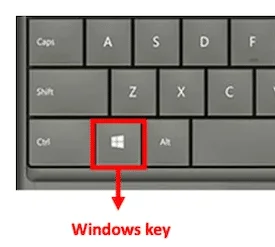
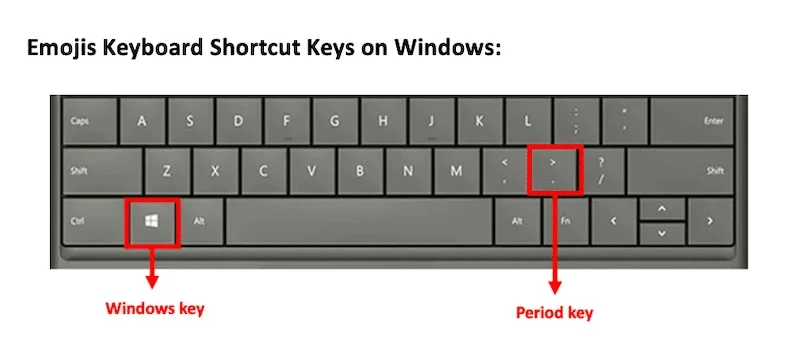
Then locate the semicolon key on the keyboard.
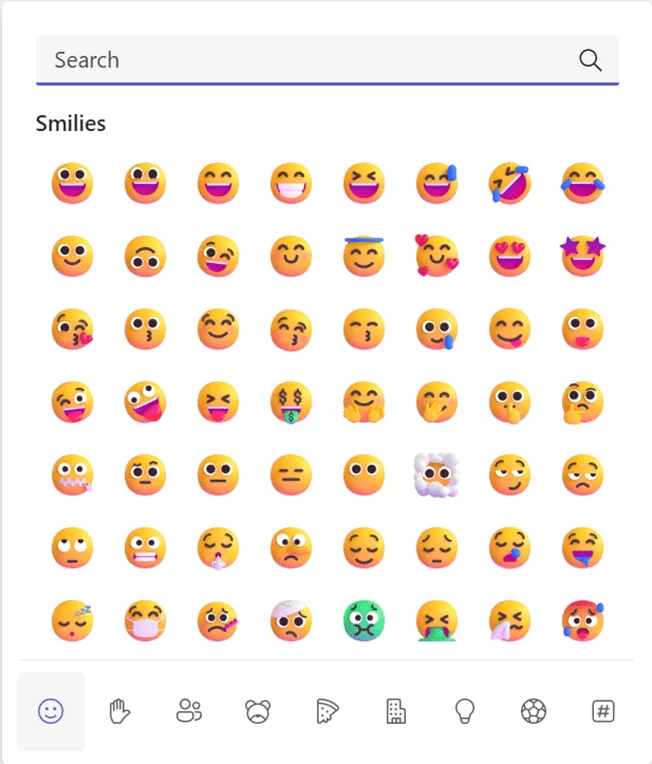
Press the “Win ❖ + ;” keys on your keyboard (Windows key + semicolon key) simultaneously to open the emoji keyboard. 😀
Select the emoji you are interested in with your mouse cursor or with the directional keys on your keyboard, then click on it. 😎
You can then click on the cross on the top-right hand corner to close the little window. To bring the window back up, just repeat the initial steps (Win + ;) at any point.
Emojis keyboard shortcut on Mac
Have you opted for a mac?
Macs have special keywords so the steps are a little different. Mac also makes it possible to get a drop-down list of LinkedIn emojis with one click.
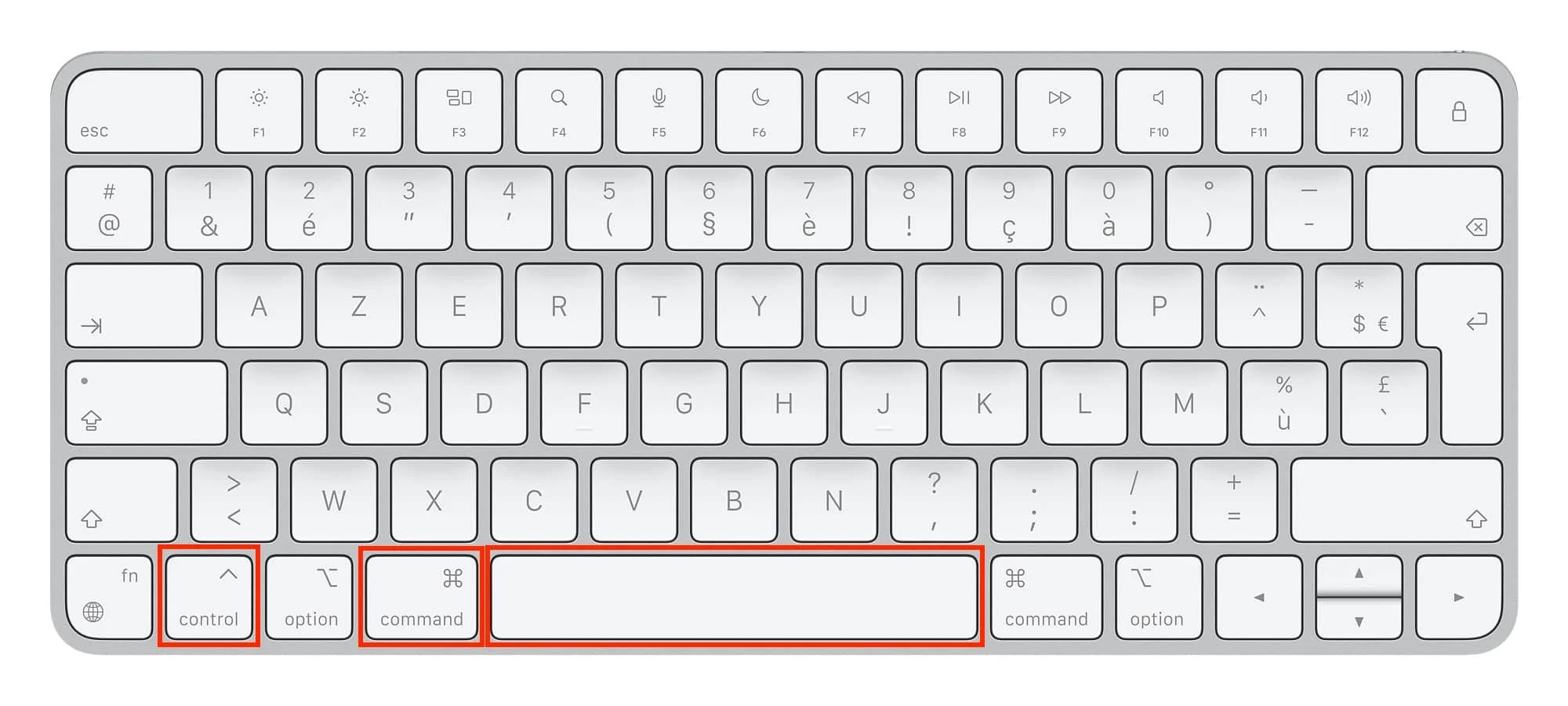
To insert an emoji in a message, a LinkedIn post, an email, etc., just follow this simple keyboard shortcut: CTRL + CMD + SPACE.
Place the cursor where you want to insert the emoji in a text window.
On your keyboard, press (Command + Control + Spacebar) simultaneously.
There’s another MacBook keyboards shortcut available (built-in) : just press "Fn" or "🌐".
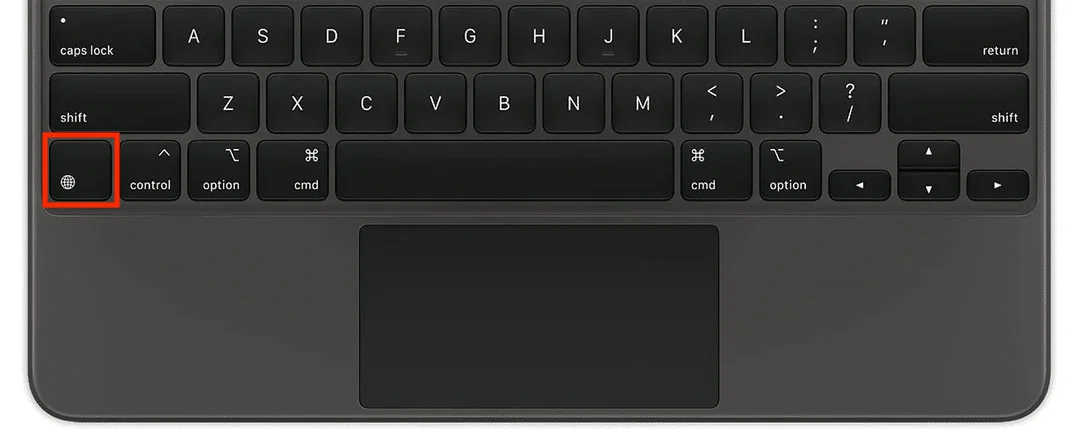
There you go. No more copying and pasting LinkedIn emoticons from a Google search.
You're all set to make your sentences pop with cute little yellow heads 🤗, colourful object-emojis 🛴, and a range of random emojis that will boost the impact of your LinkedIn posts 🚀 and catch your readers' eye. 👀
Emoji Keyboard Extension
You’re not comfortable with keyboard shortcuts for your LinkedIn emojis? No problem because you can also install the Emoji Keyboard Google Chrome Extension.
Emoji Keyboard is a free extension that lets you input emojis and icons for LinkedIn on the web browser of your computer
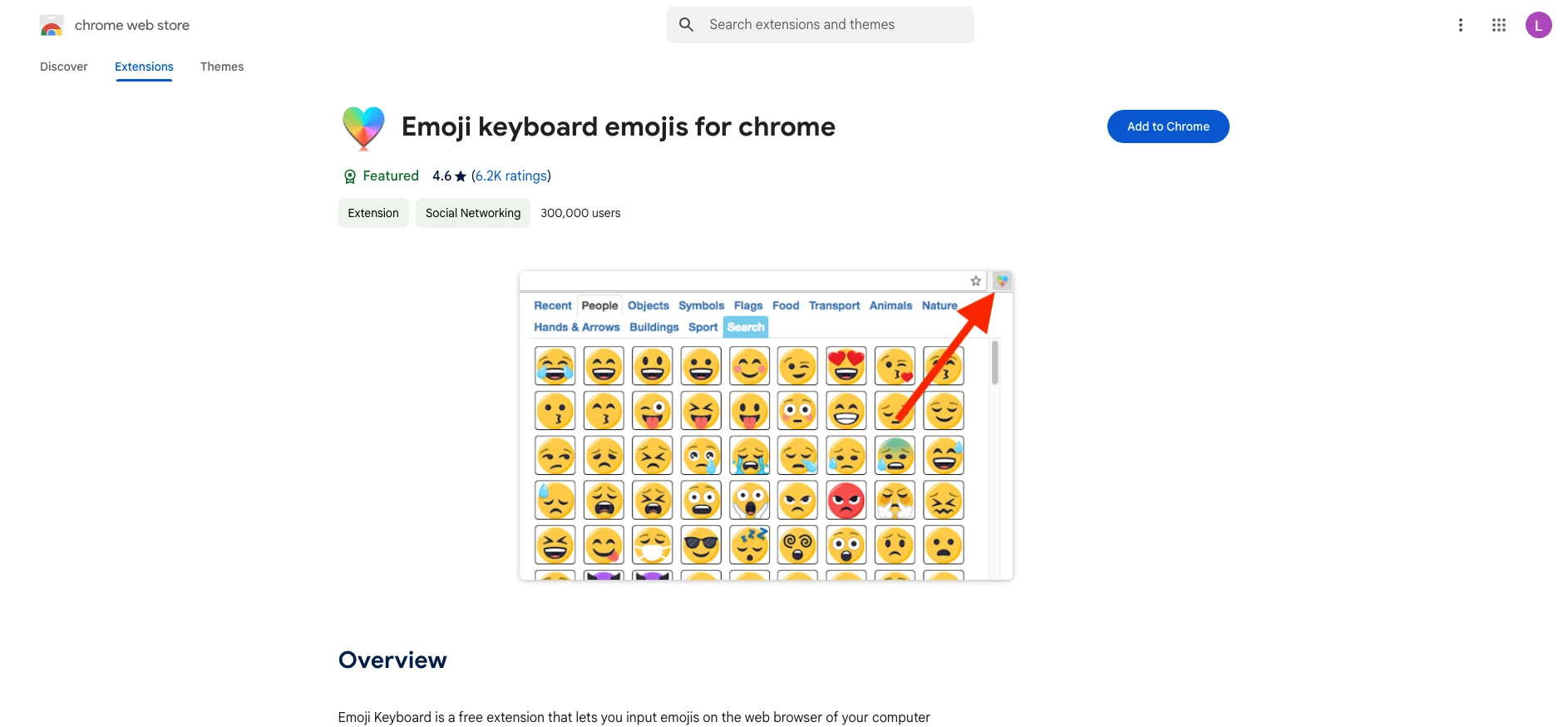
All you need to do is install it and pin it to your browser's toolbar. Then, just click to the extension icon to invoke an emoji keyboard you need it.
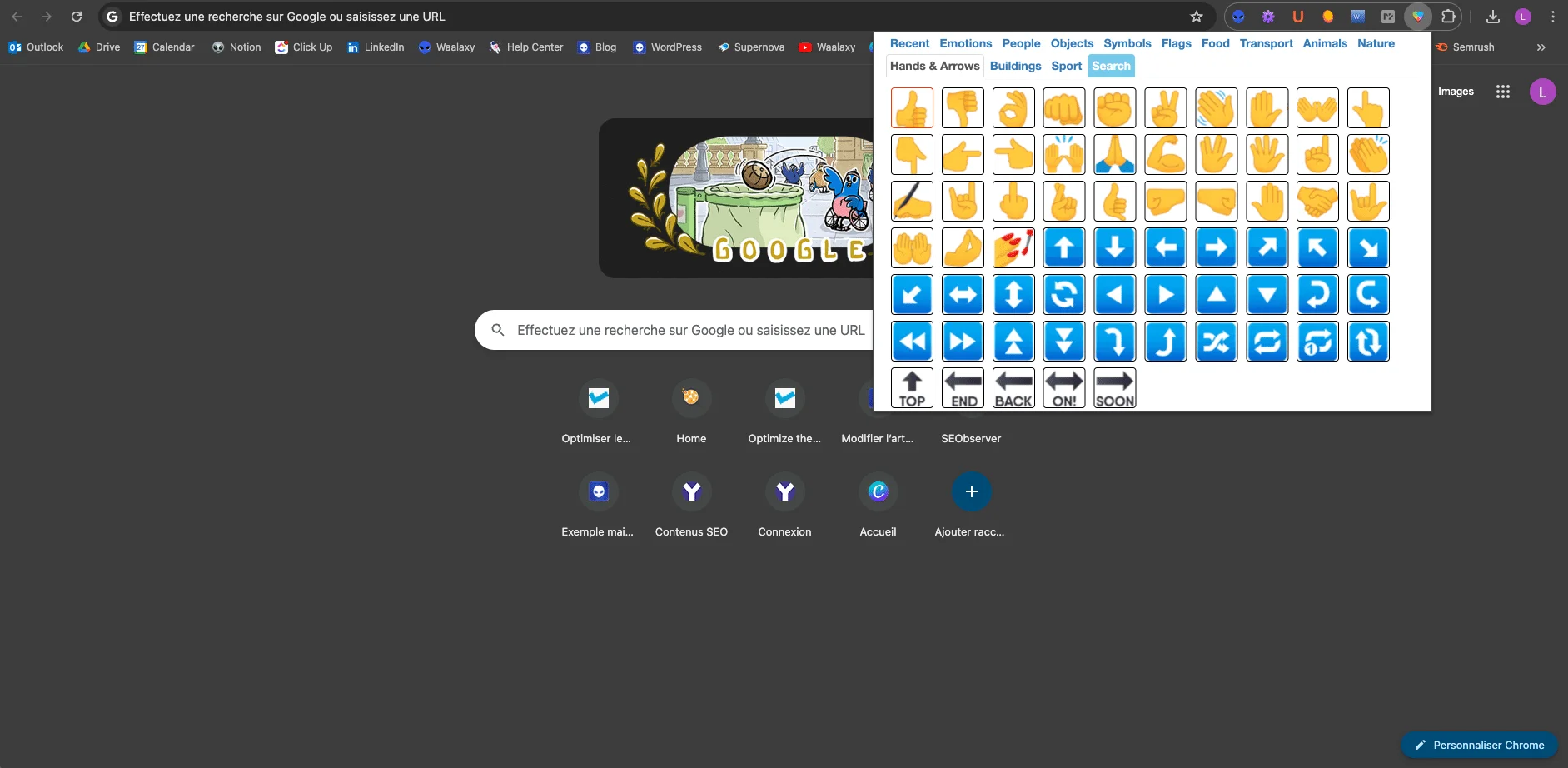
Emoji Keyboard for Special Characters
If you're looking for special characters, you can copy and paste them from here:
Symbols Category | LinkedIn Symbol Copy and Paste |
|---|---|
Circled | ⓐⓑⓒⓓⓔⓕⓖⓗⓘⓙⓚⓛⓜⓝⓞⓟⓠⓡⓢⓣⓤⓥⓦⓧⓨⓩéèàëêùⒶⒷⒸⒹⒺⒻⒼⒽⒾⒿⓀⓁⓂⓃⓄⓅⓆⓇⓈⓉⓊⓋⓌⓍⓎⓏ&é »‘(⊖è_çà)⊜ |
Circled (neg) | 🅐🅑🅒🅓🅔🅕🅖🅗🅘🅙🅚🅛🅜🅝🅞🅟🅠🅡🅢🅣🅤🅥🅦🅧🅨🅩éèàëêù🅐🅑🅒🅓🅔🅕🅖🅗🅘🅙🅚🅛🅜🅝🅞🅟🅠🅡🅢🅣🅤🅥🅦🅧🅨🅩&é »‘(-è_çà)= |
Fullwidth | abcdefghijklmnopqrstuvwxyzéèàëêùABCDEFGHIJKLMNOPQRSTUVWXYZ&é »'(-è_çà)= |
Math bold | 𝐚𝐛𝐜𝐝𝐞𝐟𝐠𝐡𝐢𝐣𝐤𝐥𝐦𝐧𝐨𝐩𝐪𝐫𝐬𝐭𝐮𝐯𝐰𝐱𝐲𝐳éèàëêù𝐀𝐁𝐂𝐃𝐄𝐅𝐆𝐇𝐈𝐉𝐊𝐋𝐌𝐍𝐎𝐏𝐐𝐑𝐒𝐓𝐔𝐕𝐖𝐗𝐘𝐙&é »‘(-è_çà)= |
Math bold Fraktur | 𝖆𝖇𝖈𝖉𝖊𝖋𝖌𝖍𝖎𝖏𝖐𝖑𝖒𝖓𝖔𝖕𝖖𝖗𝖘𝖙𝖚𝖛𝖜𝖝𝖞𝖟éèàëêù𝕬𝕭𝕮𝕯𝕰𝕱𝕲𝕳𝕴𝕵𝕶𝕷𝕸𝕹𝕺𝕻𝕼𝕽𝕾𝕿𝖀𝖁𝖂𝖃𝖄𝖅&é »‘(-è_çà)= |
Math bold italic | 𝒂𝒃𝒄𝒅𝒆𝒇𝒈𝒉𝒊𝒋𝒌𝒍𝒎𝒏𝒐𝒑𝒒𝒓𝒔𝒕𝒖𝒗𝒘𝒙𝒚𝒛éèàëêù𝑨𝑩𝑪𝑫𝑬𝑭𝑮𝑯𝑰𝑱𝑲𝑳𝑴𝑵𝑶𝑷𝑸𝑹𝑺𝑻𝑼𝑽𝑾𝑿𝒀𝒁&é »‘(-è_çà)= |
Math bold script | 𝓪𝓫𝓬𝓭𝓮𝓯𝓰𝓱𝓲𝓳𝓴𝓵𝓶𝓷𝓸𝓹𝓺𝓻𝓼𝓽𝓾𝓿𝔀𝔁𝔂𝔃éèàëêù𝓐𝓑𝓒𝓓𝓔𝓕𝓖𝓗𝓘𝓙𝓚𝓛𝓜𝓝𝓞𝓟𝓠𝓡𝓢𝓣𝓤𝓥𝓦𝓧𝓨𝓩&é »‘(-è_çà)= |
Math double-struck | 𝕒𝕓𝕔𝕕𝕖𝕗𝕘𝕙𝕚𝕛𝕜𝕝𝕞𝕟𝕠𝕡𝕢𝕣𝕤𝕥𝕦𝕧𝕨𝕩𝕪𝕫éèàëêù𝔸𝔹ℂ𝔻𝔼𝔽𝔾ℍ𝕀𝕁𝕂𝕃𝕄ℕ𝕆ℙℚℝ𝕊𝕋𝕌𝕍𝕎𝕏𝕐ℤ&é »‘(-è_çà)= |
Math monospace | 𝚊𝚋𝚌𝚍𝚎𝚏𝚐𝚑𝚒𝚓𝚔𝚕𝚖𝚗𝚘𝚙𝚚𝚛𝚜𝚝𝚞𝚟𝚠𝚡𝚢𝚣éèàëêù𝙰𝙱𝙲𝙳𝙴𝙵𝙶𝙷𝙸𝙹𝙺𝙻𝙼𝙽𝙾𝙿𝚀𝚁𝚂𝚃𝚄𝚅𝚆𝚇𝚈𝚉&é »‘(-è_çà)= |
Math sans | 𝖺𝖻𝖼𝖽𝖾𝖿𝗀𝗁𝗂𝗃𝗄𝗅𝗆𝗇𝗈𝗉𝗊𝗋𝗌𝗍𝗎𝗏𝗐𝗑𝗒𝗓éèàëêù𝖠𝖡𝖢𝖣𝖤𝖥𝖦𝖧𝖨𝖩𝖪𝖫𝖬𝖭𝖮𝖯𝖰𝖱𝖲𝖳𝖴𝖵𝖶𝖷𝖸𝖹&é »‘(-è_çà)= |
Math sans bold | 𝗮𝗯𝗰𝗱𝗲𝗳𝗴𝗵𝗶𝗷𝗸𝗹𝗺𝗻𝗼𝗽𝗾𝗿𝘀𝘁𝘂𝘃𝘄𝘅𝘆𝘇éèàëêù𝗔𝗕𝗖𝗗𝗘𝗙𝗚𝗛𝗜𝗝𝗞𝗟𝗠𝗡𝗢𝗣𝗤𝗥𝗦𝗧𝗨𝗩𝗪𝗫𝗬𝗭&é »‘(-è_çà)= |
Math sans bold italic | 𝙖𝙗𝙘𝙙𝙚𝙛𝙜𝙝𝙞𝙟𝙠𝙡𝙢𝙣𝙤𝙥𝙦𝙧𝙨𝙩𝙪𝙫𝙬𝙭𝙮𝙯éèàëêù𝘼𝘽𝘾𝘿𝙀𝙁𝙂𝙃𝙄𝙅𝙆𝙇𝙈𝙉𝙊𝙋𝙌𝙍𝙎𝙏𝙐𝙑𝙒𝙓𝙔𝙕&é »‘(-è_çà)= |
Math sans italic | 𝘢𝘣𝘤𝘥𝘦𝘧𝘨𝘩𝘪𝘫𝘬𝘭𝘮𝘯𝘰𝘱𝘲𝘳𝘴𝘵𝘶𝘷𝘸𝘹𝘺𝘻éèàëêù𝘈𝘉𝘊𝘋𝘌𝘍𝘎𝘏𝘐𝘑𝘒𝘓𝘔𝘕𝘖𝘗𝘘𝘙𝘚𝘛𝘜𝘝𝘞𝘟𝘠𝘡&é »‘(-è_çà)= |
Parenthesized | ⒜⒝⒞⒟⒠⒡⒢⒣⒤⒥⒦⒧⒨⒩⒪⒫⒬⒭⒮⒯⒰⒱⒲⒳⒴⒵éèàëêù⒜⒝⒞⒟⒠⒡⒢⒣⒤⒥⒦⒧⒨⒩⒪⒫⒬⒭⒮⒯⒰⒱⒲⒳⒴⒵&é »‘(-è_çà)= |
Regional Indicator | 🇦🇧🇨🇩🇪🇫🇬🇭🇮🇯🇰🇱🇲🇳🇴🇵🇶🇷🇸🇹🇺🇻🇼🇽🇾🇿éèàëêù🇦🇧🇨🇩🇪🇫🇬🇭🇮🇯🇰🇱🇲🇳🇴🇵🇶🇷🇸🇹🇺🇻🇼🇽🇾🇿&é »‘(-è_çà)= |
Squared | 🄰🄱🄲🄳🄴🄵🄶🄷🄸🄹🄺🄻🄼🄽🄾🄿🅀🅁🅂🅃🅄🅅🅆🅇🅈🅉éèàëêù🄰🄱🄲🄳🄴🄵🄶🄷🄸🄹🄺🄻🄼🄽🄾🄿🅀🅁🅂🅃🅄🅅🅆🅇🅈🅉&é »‘(⊟è_çà)= |
Squared (neg) | 🅰🅱🅲🅳🅴🅵🅶🅷🅸🅹🅺🅻🅼🅽🅾🅿🆀🆁🆂🆃🆄🆅🆆🆇🆈🆉éèàëêù🅰🅱🅲🅳🅴🅵🅶🅷🅸🅹🅺🅻🅼🅽🅾🅿🆀🆁🆂🆃🆄🆅🆆🆇🆈🆉&é »‘(-è_çà)= |
Tag | éèàëêùé »èçà |
A-cute pseudoalphabet | ábćdéfǵhíjḱĺḿńőṕqŕśtúvẃxӳźéèàëêùÁBĆDÉFǴHíJḰĹḾŃŐṔQŔśTŰVẂXӲŹ&é »‘(-è_çà)= |
CJK+Thai pseudoalphabet | ム乃cd乇キgんノフズレᄊ刀oアq尺丂イu√wメリ乙éèàëêùム乃cd乇キgんノフズレᄊ刀oアq尺丂イu√wメリ乙&é »‘(-è_çà)= |
Curvy 1 pseudoalphabet | ค๒ƈɗﻉिﻭɦٱﻝᛕɭ๓กѻρ۹ɼรՇપ۷ฝซץչéèàëêùค๒ƈɗﻉिﻭɦٱﻝᛕɭ๓กѻρ۹ɼรՇપ۷ฝซץչ&é »‘(-è_çà)= |
Curvy 2 pseudoalphabet | αв¢∂єƒﻭнιנкℓмησρ۹яѕтυνωχуչéèàëêùαв¢∂єƒﻭнιנкℓмησρ۹яѕтυνωχуչ&é »‘(-è_çà)= |
Curvy 3 pseudoalphabet | ค๒ς๔єŦﻮђเןкɭ๓ภ๏קợгรՇยשฬאץչéèàëêùค๒ς๔єŦﻮђเןкɭ๓ภ๏קợгรՇยשฬאץչ&é »‘(-è_çà)= |
Faux Cyrillic pseudoalphabet | аъсↁэfБЂіјкlмиорqѓѕтцvшхЎzéèàëêùДБҀↁЄFБНІЈЌLМИФРQЯЅГЦVЩЖЧZ&é »‘(-è_çà)= |
Faux Ethiopic pseudoalphabet | ልጌርዕቿቻኗዘጎጋጕረጠክዐየዒዪነፕሁሀሠሸሃጊéèàëêùልጌርዕቿቻኗዘጎጋጕረጠክዐየዒዪነፕሁሀሠሸሃጊ&é »‘(-è_çà)= |
Math Fraktur pseudoalphabet | 𝔞𝔟𝔠𝔡𝔢𝔣𝔤𝔥𝔦𝔧𝔨𝔩𝔪𝔫𝔬𝔭𝔮𝔯𝔰𝔱𝔲𝔳𝔴𝔵𝔶𝔷éèàëêù𝔄𝔅ℭ𝔇𝔈𝔉𝔊ℌℑ𝔍𝔎𝔏𝔐𝔑𝔒𝔓𝔔ℜ𝔖𝔗𝔘𝔙𝔚𝔛𝔜ℨ&é »‘(-è_çà)= |
Rock Dots pseudoalphabet | äḅċḋëḟġḧïjḳḷṁṅöṗqṛṡẗüṿẅẍÿżéèàëêùÄḄĊḊЁḞĠḦЇJḲḶṀṄÖṖQṚṠṪÜṾẄẌŸŻ&é »‘(⸚è_çà)= |
Small Caps pseudoalphabet | ᴀʙᴄᴅᴇꜰɢʜɪᴊᴋʟᴍɴᴏᴩqʀꜱᴛᴜᴠᴡxyᴢéèàëêùᴀʙᴄᴅᴇꜰɢʜɪᴊᴋʟᴍɴᴏᴩQʀꜱᴛᴜᴠᴡxYᴢ&é »‘(-è_çà)= |
Stroked pseudoalphabet | ȺƀȼđɇfǥħɨɉꝁłmnøᵽꝗɍsŧᵾvwxɏƶéèàëêùȺɃȻĐɆFǤĦƗɈꝀŁMNØⱣꝖɌSŦᵾVWXɎƵ&é »‘(-è_çà)= |
Subscript pseudoalphabet | ₐbcdₑfgₕᵢⱼₖₗₘₙₒₚqᵣₛₜᵤᵥwₓyzéèàëêùₐBCDₑFGₕᵢⱼₖₗₘₙₒₚQᵣₛₜᵤᵥWₓYZ&é »‘(-è_çà)= |
Superscript pseudoalphabet | ᵃᵇᶜᵈᵉᶠᵍʰⁱʲᵏˡᵐⁿᵒᵖqʳˢᵗᵘᵛʷˣʸᶻéèàëêùᴬᴮᶜᴰᴱᶠᴳᴴᴵᴶᴷᴸᴹᴺᴼᴾQᴿˢᵀᵁⱽᵂˣʸᶻ&é »‘(-è_çà)= |
Inverted pseudoalphabet | ɐqɔpǝɟƃɥıɾʞןɯuodbɹsʇnʌʍxʎzéèàëêùɐqɔpǝɟƃɥıɾʞןɯuodbɹsʇn𐌡ʍxʎz⅋é »,(-è_çà)= |
Inverted pseudoalphabet (backwards) | =)�ç�_��-(, »��⅋zʎxʍ𐌡nʇsɹbdouɯןʞɾıɥƃɟǝpɔqɐ�êëàèé�zʎxʍʌnʇsɹbdouɯןʞɾıɥƃɟǝpɔqɐ |
Reversed pseudoalphabet | AdↄbɘꟻgHijklmᴎoqpᴙꙅTUvwxYzéèàëêùAdↃbƎꟻGHIJK⅃MᴎOꟼpᴙꙄTUVWXYZ&é »‘(-è_çà)= |
Reversed pseudoalphabet (backwards) | =)�ç�_��-(‘ »��&ZYXWVUTꙄᴙpꟼOᴎM⅃KJIHGꟻƎbↃdA�êëàèé�zYxwvUTꙅᴙpqoᴎmlkjiHgꟻɘbↄdA |
LinkedIn symbols list : bullets, square separators and rectangles
➤∎ ■ ◘ □ ▢ ◉ ◎ ● ⊗ ⊖ ⊝ ⊕ ⬬ ⬭ ⬮ ⬯○ ● ▪ - ‣ ♦ ♠ ◌ ◕ ○ ❍
👉 not forgetting the classic bullet point: ●
❏ ❐ ❑ ❒ ▀ ▁ ▂ ▃ ▄ ▅ ▆ ▇ ▉ ▊ ▋ ". ▌ ▍ ▎ ▏▐ ░ ▒ ▓ ▔ ▕ ╍ ╏ ■ □ ▢ ▣ ▤ ▥ ▦ ▧ ▨ ▩. ▬ ▭ ▮ ▯ ☰ ☲ ☱ ☴ ☵ ☶ ☳ ☷ ◪ ◩
▲ ▼ ◄ ► ◣ ◢ ◥ ▼ ◤ ◥ ▴ ▾ ◂ ▸ △ ▽ ◁ ▷ ⊿ ▻ ◅ ▵ ▹ ◃ ▿⟁ ⧋
👉 “ ” for highlighted quotes
Star and asterisk symbols
⋆ ✢ ✣ ✤ ✥ ❋ ✦ ✧ ✩ ╰☆╮ ✫ ✬ ✭ ✮ ✯ ✰ ★ ✱ ✲ ❂ ✵ ✶ ✷ ✸ ✹ ✺ ✻ ✼ ❅ ❆ ❈ ❉ ❊
LinkedIn tick symbols
✓ ✔ ☑ ✓ √ ✗ ✘ ✕ ☓ ╳
LinkedIn cross symbols
✗ ✘☒ ❌
Kaomojis to Use on LinkedIn to Stand Out
On LinkedIn, kaomojis add a touch of emotion and personality while keeping a professional tone. ✨ They humanize posts, boost engagement, and make messages more memorable—without going overboard. ( •̀ ω •́ )✧
Category (without cute kaomojis) | Kaomoji | Meaning / Usage of |
|---|---|---|
💡 Introduce an idea / insight | ( •̀ ω •́ )✧ | brilliant idea |
(ᵔ◡ᵔ)ノ✿ | positive suggestion | |
(๑˃ᴗ˂)ﻭ | enthusiastic statement | |
(。•̀ᴗ-)✧ | “Here’s what I learned” | |
(⁎˃ᆺ˂) | little personal revelation | |
🎯 Goal / result / achievement | (๑•̀ㅂ•́)و✧ | victory, goal achieved, well done emoji |
(*≧▽≦) | genuine enthusiasm | |
\(^O^)/ | joyful announcement | |
\( ̄▽ ̄)/ | announcement + pride | |
( ͡° ͜ʖ ͡°)✧ | accomplishment + humor | |
🤝 Human, team, professional relations | (´。• ᵕ •。`) 🤍 | gratitude |
(つ≧▽≦)つ | team spirit, inclusion | |
(๑˘︶˘๑)♡ | kindness | |
(〃^▽^〃) | good mood in a team | |
( ᐛ )و | complicity | |
✍️ Ask a question / encourage interaction | (•ө•)♡ ? | gentle question |
(・・ ) ? | sincere request for opinion | |
( •̀ .̫ •́ )✧ | “What do you think?” | |
(¬‿¬ ) | playful wink | |
( ・◇・)? | surprise question | |
🌱 Learning / reflection | (。•́︿•̀。) | moment of doubt / vulnerability |
(╥﹏╥) | difficult learning | |
( ˘︹˘ ) | reflection | |
(´• ω •`) | self-reflection | |
(`・ω・´)ゞ | decision-making | |
🚀 Wrap up with impact | (ง •̀_•́)ง | call to action |
(๑•̀ㅂ•́)و✨ | “Let’s go!” | |
(ノ◕ヮ◕)ノ*:・゚✧ | shared motivation | |
(。♥‿♥。) | passion / favorite | |
(๑˃ᴗ˂)ﻭ | “I’m counting on you!” |
Now it's time for us to take a look at how to well use emojis for LinkedIn and the mistakes you should avoid making. I'll give you a clue- staying subtle is the name of the game!
How To Add Emojis on LinkedIn?
Before to give you some tips and use cases (in your posts, your intro, your messages), there's what you have to know about LinkedIn emojis :
Choose the right emoticon, the ones that represent your sector of activity.
Copy-paste them at the end of your sentences to make your content stand out. 🚀
Use emoji for LinkedIn sparingly – Don't copy-paste symbols 🐢 everywhere 🎈 for no 💐 reason 💰.
Finally, follow the examples in this article as a benchmark for having great, personalized and attractive posts, spicing up your intro and optimizing your LinkedIn profile.
5 Tips to Use Emojis For LinkedIn
Emojis correspond to a universal language. No matter what language you're speaking, smiling eyes brings a positive message. And a crying face, a sad or negative message. 😭
So the use of emojis for LinkedIn can help you to convey the emotions in your messages/posts, therefore allowing you to get your point across more easily.
LinkedIn is a human social media platform, people who read your texts want to feel what you are trying to convey.
Don't copy-paste a confused smiley face at the end of an affirmative sentence_ it's weird for the reader. 🤨
Copy-paste a "winky" smiley face emoji when you give advice. 😉
Copy-paste a sad face when you highlight a problem. 😥
Avoid smiley faces with their tongue out. These may have a completely different connotation amongst different groups of people. 😛
Sprinkle your posts with positive vibes, with at least one happy smiley. 😁 – Except, of course, when the topic is serious.
If you want to learn more about how to create a successful post on LinkedIn and develop a social media marketing strategy, follow this LinkedIn content case study.
LinkedIn Emojis in your post
If you're wondering how to add emojis to linkedin posts, the answer is here!
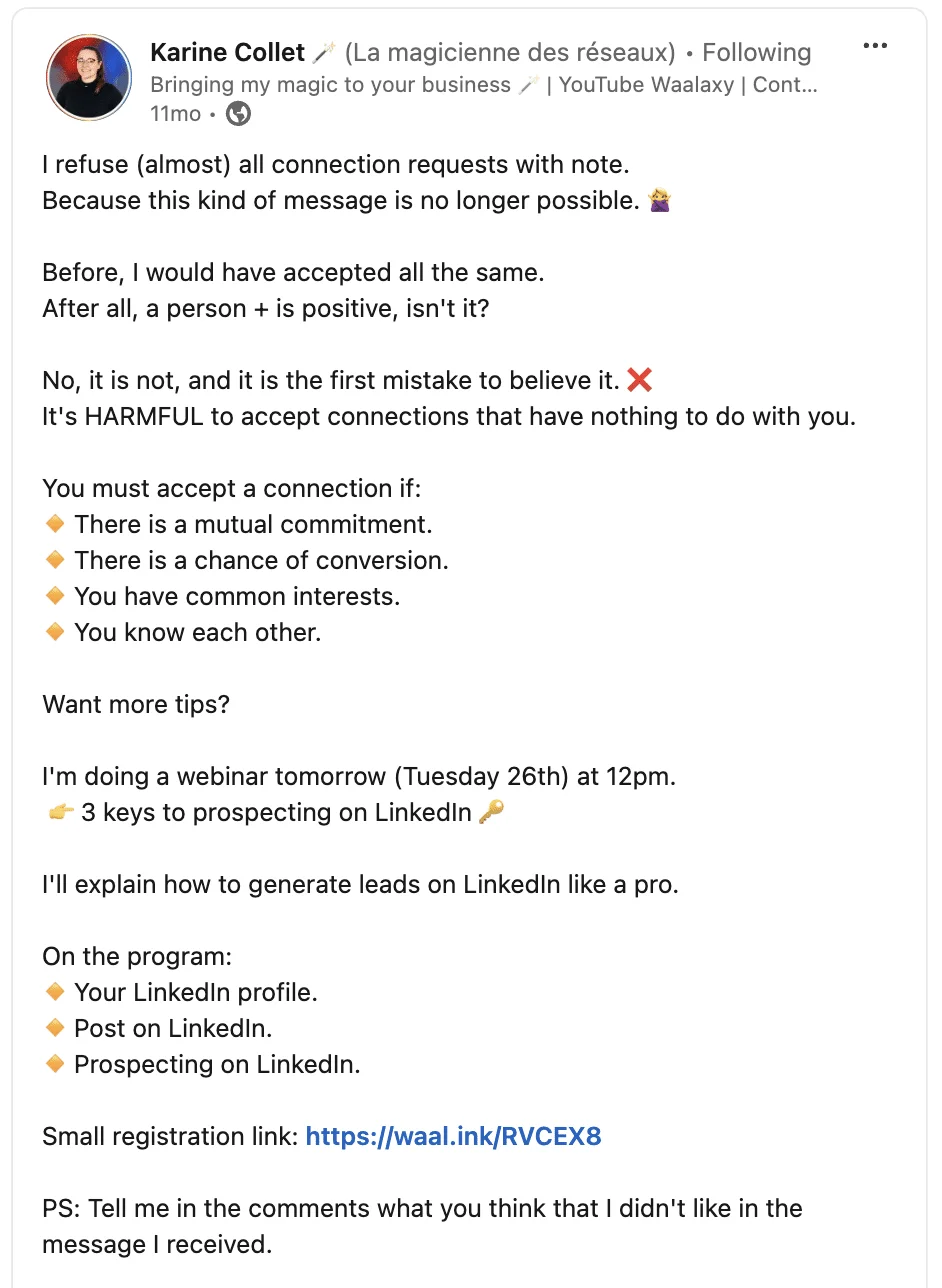
Emojis are there to make your sentences pop, and to make your posts more appealing. 😁 Here's a screenshot of a post, to highlight my point:
Karine shows us the perfect LinkedIn post with emojis example – not too much, not too little.
Your emojis should be chosen according to your sentence and emphasize the emotion you want to communicate on the .
LinkedIn Emojis in your intro
What about emojis in your LinkedIn profile introduction? Again, I'd say yes.
✅ LinkedIn is a social network containing millions of users and profiles.
Be innovative. Get your creative juices flowing and build an engaging storytelling. One of the ways to do that is with the use of copy-paste emojis for LinkedIn 🧡.
This is the case with Vincent, who masters the art of emojis like no other. 🎨
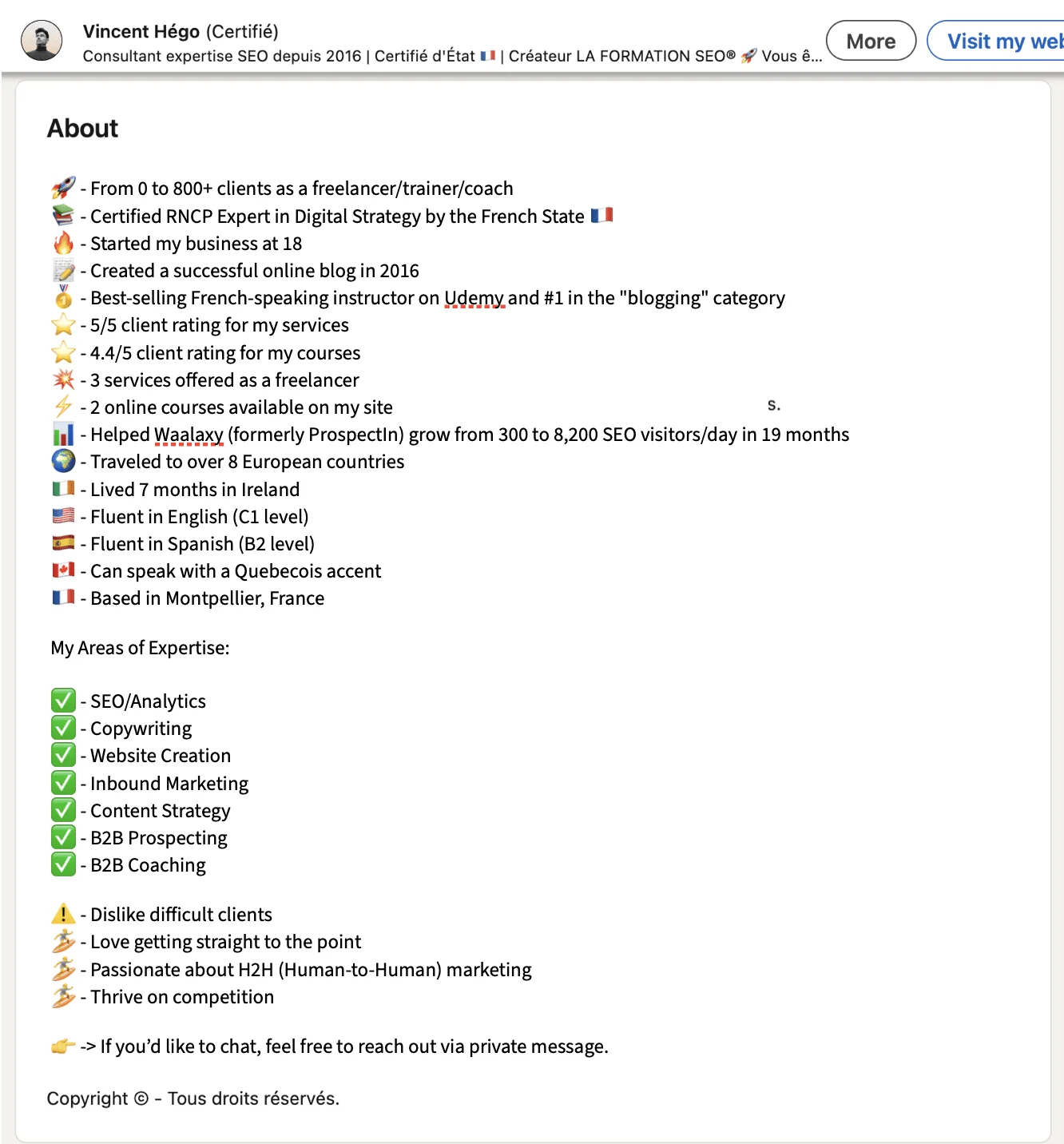
If you are not familiar with the use of emojis for LinkedIn and want to take it easy, here is another example that might suit you with Amandine's intro.
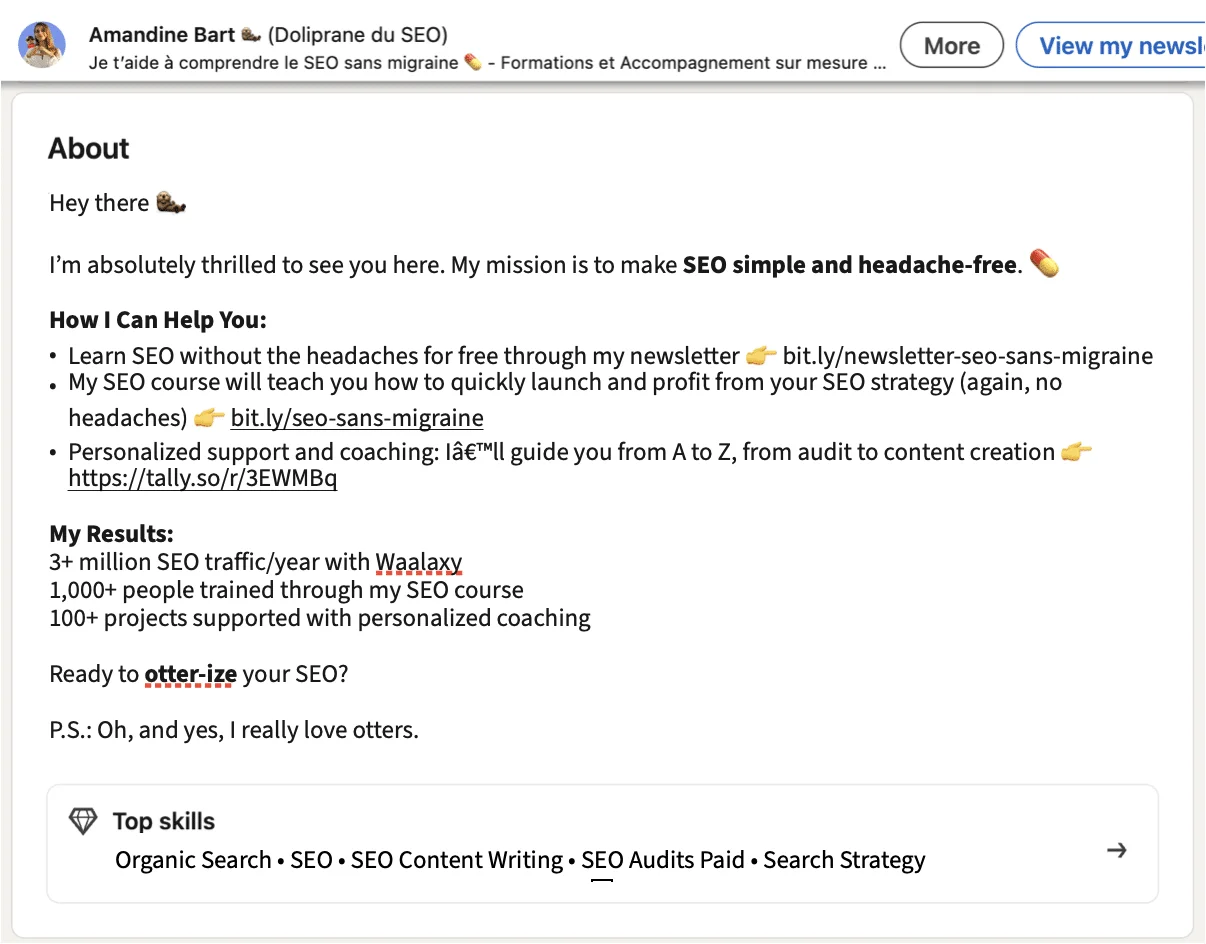
We have to admit that in our team, emojis are a tradition.
When reading Amandine's profile info, we can deduce that:
The heart emoji is for passion. 🧡
The laughing face is for good vibes. 😂
Star emojis are representative of an “infinity of possibilities” and the magic that Amandine talks about in her posts. ⭐🌟
The Alien emoji because it represents the tool: Waalaxy. 👽
There you go, it's up to you to choose the layout that suits you and formatting LinkedIn post.
LinkedIn emojis in your private messages
Some special characters and smiley are associated with a specific sector.
Using social media “codes” for your social content and your message is super important!
For example:
Recruiting 🔍🕵️♀️
Marketing 🎯🚀
Digital training 📱💻👨🏫
Business emoji. 🤑🤝
Share with emoji Link. 🔗
Others are universal, like a smiling face in your catchphrase – great for starting the conversation on a good note.
Here's a sample of , just to give you an idea:
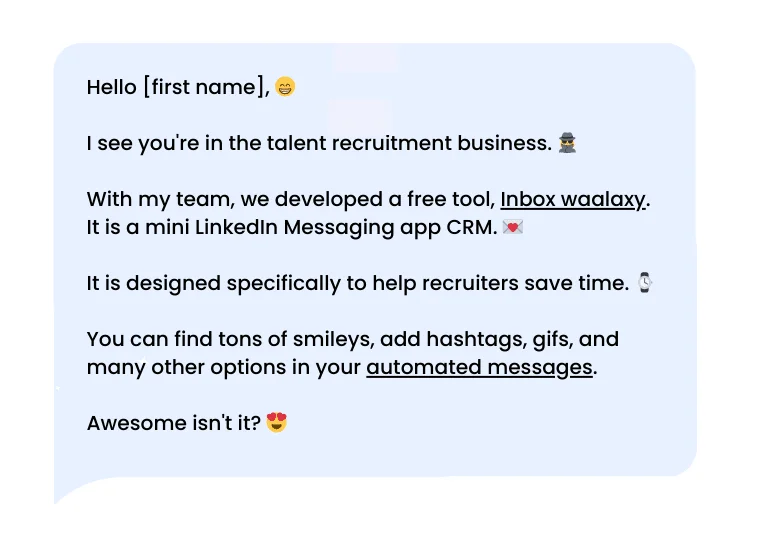
If you want more examples of original invitation notes, see: (5 examples). 👈
LinkedIn Emojis for Post Reactions
LinkedIn has its own set of emojis that allow users to react to posts in their news feed. But, how to use LinkedIn reactions? 😏
👍 Thumbs Up: Used for the "Like" reaction.
👏 Clapping Hands: For "Bravo" or applause, to celebrate something.
✋ LinkedIn Heart in Hand emoji : To show "Support."
😆 Laughing Smiley: For "Funny".
❤️ Red Heart emoji: To express "Love."
💡 Lightbulb: For something "Insightful."
🤔 Thinking Face: To indicate something is "Interesting" or curious.
👉🏼 To use reactions on LinkedIn, click on the "Like" LinkedIn icon under a post and hold it down to see the different reaction options. Then, select the one that best expresses your response or emotion.
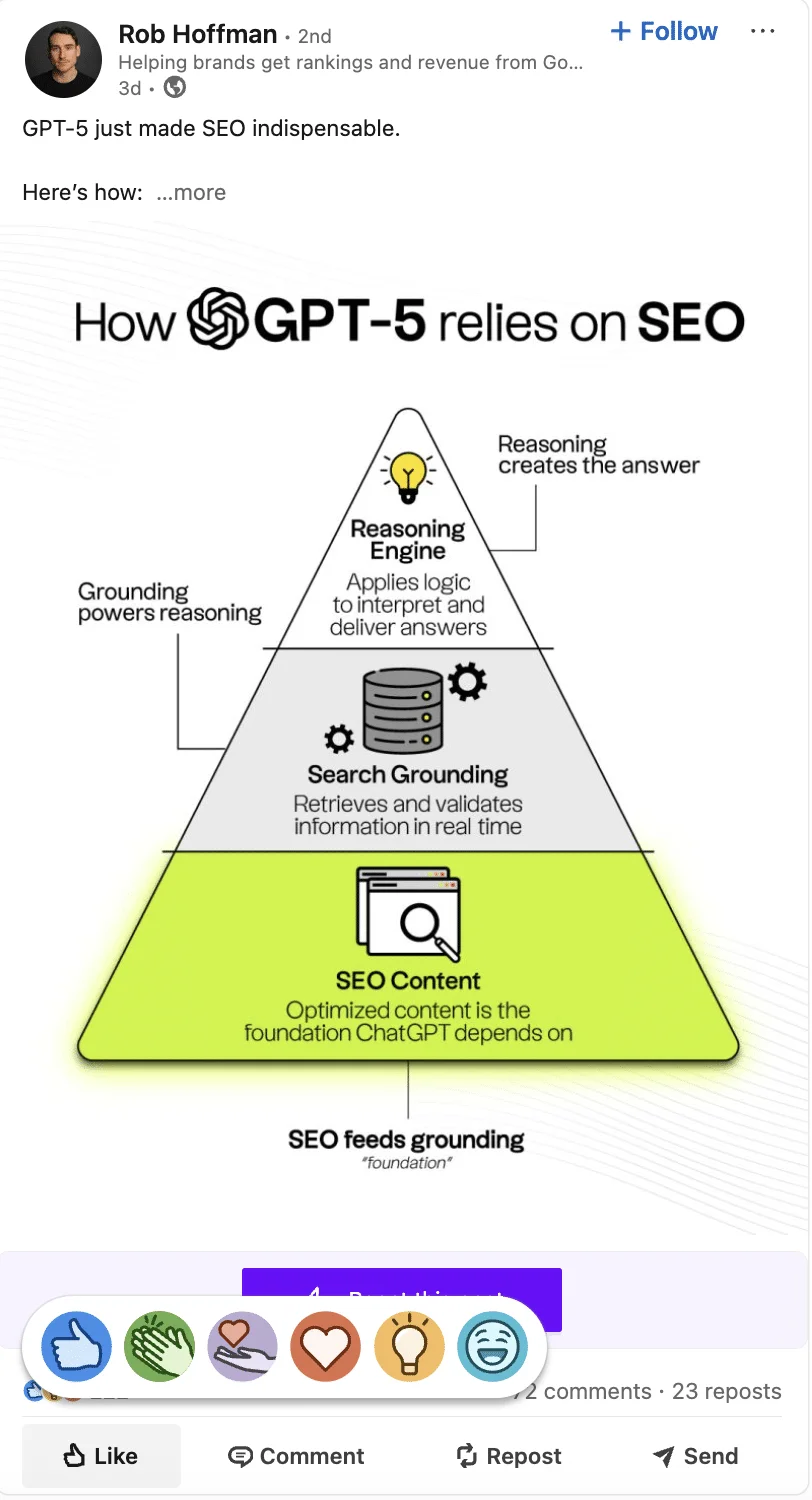
If you're curious and want to learn more about the new reactions on LinkedIn, be sure to check out this dedicated article! 🥰
Also, if you like what you see in your feed, let LinkedIn's algorithm know by liking and commenting on the posts to keep seeing similar content. 😍
Conclusion - LinkedIn Emoji For Resume
There you go, you now know LinkedIn Emojis can help convey your tone, make your messages stand out, and even build a more relatable online reputation and presence (so useful for your social media strategy).
But also, how to: 👇
Find the best LinkedIn emoji with our free best emojis for LinkedIn list,
Add LinkedIn emoji using keyboard shortcuts on any device, whether you're using Windows, Mac, or even a Google Chrome Extension.
Use emojis for LinkedIn effectively across different areas —whether in your introductory sections, posts, or private messages (with some of our best examples).
With these tools and tips, you can enhance your LinkedIn interactions and attract your audience by adding a personal touch, making your communication more engaging and expressive.
But did you think that was all? 🫢 Of course not!
We’ve got a few more valuable insights, tips and few more questions to share with you. 😇
Frequently Asked Questions (FAQ)
Can I use LinkedIn Emoji in Waalaxy?
This article is here to help you learn a little more about the emoji, and that you will use emojis images free LinkedIn.
But, if you are using LinkedIn to grow your network or find clients, Waalaxy is a free tool to help you achieve your goal. 🎁
And yes, you can use copy-paste emojis for LinkedIn prospecting messages with Waalaxy. ✅
What are the best professional emojis to use?
The best professional emojis to use in business communication plans include:
Thumbs Up 👍 - Universal sign of approval or agreement.
Handshake 🤝 - Represents partnership, collaboration, or agreement.
Light Bulb 💡 - Symbolizes ideas, innovation, or brainstorming.
Clapping Hands 👏 - Shows recognition, appreciation, or celebration.
Briefcase 💼 - Represents business, work, or professionalism.
Chart Increasing 📈 - Used to depict growth, progress, or success.
Check Mark ✅ - Indicates completion, confirmation, or approval.
These emojis are widely accepted in professional settings and help convey your message clearly while maintaining a professional tone.
What Are the Most Used Emojis on Social Media?
Rank / Emoji | LinkedIn Emoji Meaning / Usage Context |
|---|---|
❤️ (red heart) | Universal symbol of support, affection, and approval. Widely used in positive or personal posts. |
😂 (face with tears of joy) | Expresses humor, amusement, something very funny. |
😍 / 😊 (smiling faces / hearts) | Joy, pleasure, admiration. Often used to soften the tone and increase engagement. |
🔥 (fire) | To highlight what’s “hot,” impressive, or trending. |
🤔 (thinking face) | To introduce reflection, a question, or a debate. |
✨ (sparkles) | To emphasize, beautify, or make content visually appealing. |
To learn more, you can use the emoji tracker tool, which lists and counts emojis in real time across social media.
It also lets you easily copy and paste the most commonly used emojis in posts, comments, or reactions on LinkedIn.
Can I use LinkedIn emoji for personal purposes or projects?
Yes, you can use LinkedIn emojis for personal purposes or projects. 🚨 However, it's important to remember what's next :
1️⃣ LinkedIn is a professional platform, so its emojis are generally designed to maintain a professional tone. If you're using them outside of LinkedIn, ensure they match the context of your personal project or communication.
2️⃣ Using LinkedIn emojis for personal purposes, such as in your logo or , is generally not advisable without permission from LinkedIn. ⚠️ LinkedIn's emojis are part of their proprietary assets, and using them for commercial purposes, could potentially violate their intellectual property rights.
Now you know all about the LinkedIn emoji, stay tuned for more ways to optimize your LinkedIn experience! See you soon! 👽